
Draining water from your LG portable air conditioner is essential to prevent leaks, odors, and unit damage. This guide walks you through the process simply and clearly, covering automatic and manual drainage methods, troubleshooting, and maintenance tips.
Key Takeaways
- Understand how LG portable ACs produce water: Condensation forms during cooling and collects in an internal tank that needs periodic draining.
- Know when to drain: Most models auto-drain, but high humidity or extended use may require manual intervention.
- Use the right tools: Have a bucket, towel, and hose (if applicable) ready before starting.
- Follow safety first: Always unplug the unit before draining to avoid electrical hazards.
- Maintain regularly: Clean the drain tank and check for clogs monthly to ensure smooth operation.
- Troubleshoot common issues: If water leaks or the unit won’t turn on, check the drain tank and drainage mode.
- Choose the best drainage method: Decide between continuous drainage (hose) or manual bucket removal based on your setup and usage.
How to Drain Water Out of LG Portable Air Conditioner
If you own an LG portable air conditioner, you’ve probably noticed water collecting inside the unit—especially on hot, humid days. While this is completely normal, it’s important to know how to drain water out of your LG portable air conditioner properly. Ignoring it can lead to leaks, unpleasant odors, reduced cooling efficiency, or even damage to your floors and the unit itself.
In this comprehensive guide, you’ll learn everything you need to know about draining water from your LG portable AC. We’ll cover how these units collect water, when and why you need to drain them, step-by-step instructions for both automatic and manual drainage, troubleshooting common problems, and tips for ongoing maintenance. Whether you’re a first-time user or just need a refresher, this guide will help you keep your portable AC running smoothly all season long.
Why Does My LG Portable Air Conditioner Collect Water?
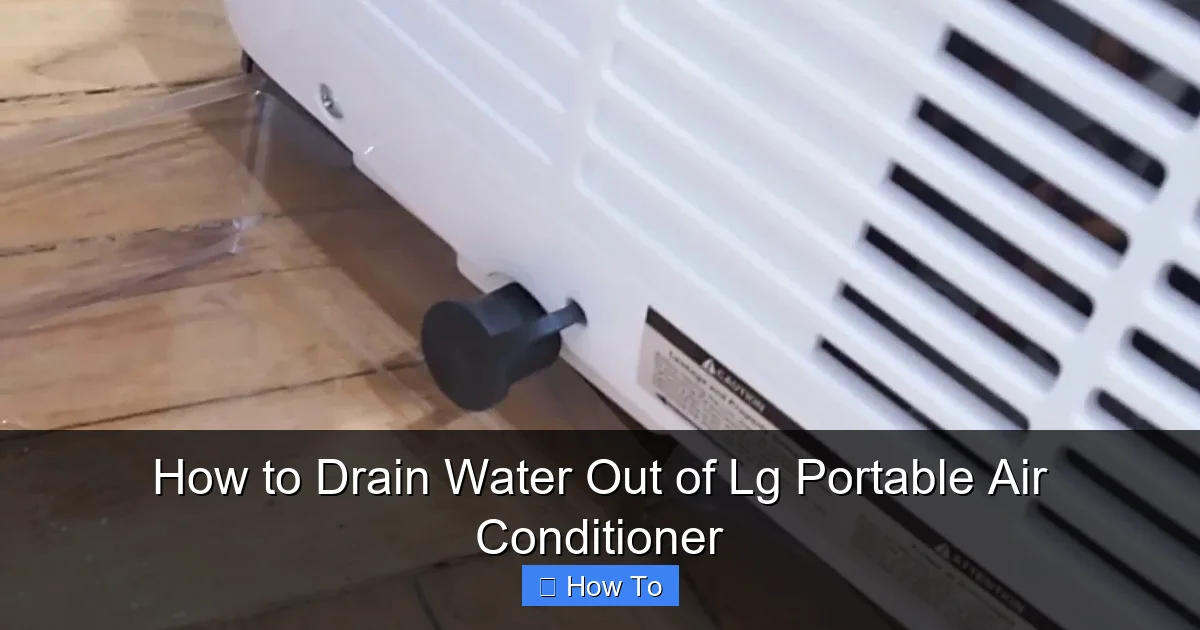
Visual guide about How to Drain Water Out of Lg Portable Air Conditioner
Image source: i.ytimg.com
Before we dive into the how-to, let’s understand the “why.” LG portable air conditioners work by pulling warm, moist air from your room, cooling it over evaporator coils, and then blowing the cooled air back into the space. During this process, moisture in the air condenses on the cold coils—just like water droplets form on the outside of a cold drink on a hot day.
This condensation drips down into a built-in collection tank or reservoir inside the unit. Most LG portable ACs are designed with an auto-drain feature that periodically removes this water automatically, especially during dehumidification mode. However, in high-humidity environments or during extended use, the tank can fill up faster than the system can evaporate or pump it out.
When the tank reaches its capacity, the unit may shut off as a safety measure to prevent overflow. That’s why it’s crucial to monitor and drain the water when needed—even if your model claims to be “self-draining.”
When Should You Drain Your LG Portable Air Conditioner?
Not all LG portable air conditioners require manual draining all the time. Many newer models come with advanced auto-drain systems that handle water removal without user intervention. But there are certain situations when you should check and drain the water manually:
- High humidity days: On muggy summer days, your AC works harder to remove moisture, filling the tank faster.
- Extended use: Running the unit continuously for several hours increases condensation buildup.
- Unit shuts off unexpectedly: If your AC turns off and won’t restart, a full water tank could be the culprit.
- You hear sloshing sounds: This indicates water is moving inside the unit—time to drain.
- Visible water leakage: If you see water pooling around the base, drain immediately.
As a general rule, check the water level every few days during heavy use. Some models have a water level indicator light or alert on the control panel. If yours does, pay attention to it!
Tools and Supplies You’ll Need
Before starting the draining process, gather these items to make the job quick and mess-free:
- A large bucket or container (at least 2–3 liters)
- A clean towel or absorbent cloth
- A hose (optional, for continuous drainage setups)
- Gloves (optional, for hygiene)
- A flat, stable surface to place the unit during draining
Having everything ready beforehand prevents spills and stress.
Step-by-Step Guide: How to Drain Water Manually
Most LG portable air conditioners allow for manual draining when the internal tank gets full. Here’s how to do it safely and effectively.
Step 1: Turn Off and Unplug the Unit
Safety first! Always turn off your LG portable air conditioner using the remote or control panel. Then, unplug it from the wall outlet. This prevents any risk of electric shock while handling water near electrical components.
Let the unit sit for 10–15 minutes to cool down if it’s been running. Hot components can cause burns, and warm water may expand slightly, making drainage trickier.
Step 2: Locate the Drain Plug or Drain Cap
The location of the drain plug varies slightly depending on your LG model, but it’s typically found at the back or bottom rear of the unit. Look for a small rubber or plastic cap labeled “Drain” or “Water Drain.” Some models have a pull-out drain hose instead of a cap.
Refer to your user manual if you’re unsure. Common models like the LG LP1419IVSM or LP0821WSR have a drain cap on the lower back panel.
Step 3: Place a Bucket Under the Drain
Position your bucket directly under the drain opening. Make sure it’s large enough to catch all the water—some units can hold over a liter. Place a towel underneath to catch any drips or spills.
If your model has a drain hose, gently pull it out and direct the end into the bucket. Secure it so it doesn’t slip out during drainage.
Step 4: Remove the Drain Cap and Drain the Water
Carefully twist or pull off the drain cap. Water will begin to flow out immediately. Let it drain completely—this may take 1–3 minutes depending on how full the tank is.
Pro Tip: Tilt the unit slightly backward (if safe and stable) to help water flow out more easily. Never tilt it forward, as this could damage internal components.
Step 5: Replace the Drain Cap Securely
Once all the water has drained, wipe the drain area with a clean cloth to remove any residue. Reattach the drain cap firmly to prevent leaks during future use. If using a hose, push it back into place until it clicks or fits snugly.
Step 6: Wipe Down and Reconnect
Use a dry towel to wipe the exterior of the unit, especially around the base. This prevents water from seeping into the floor or carpet.
Plug the unit back in and turn it on. Check that it’s working normally and that no water is leaking.
How to Set Up Continuous Drainage (Using a Hose)
If you plan to run your LG portable air conditioner for long periods—like during a heatwave—consider setting up a continuous drainage system. This method uses a hose to automatically drain water outside or into a floor drain, eliminating the need for frequent manual checks.
Step 1: Check If Your Model Supports Continuous Drain
Not all LG portable ACs support continuous drainage. Models like the LG LP1419IVSM and LP1218GXR include a built-in drain hose or adapter. Check your user manual or look for a hose port on the back of the unit.
If your model doesn’t have one, you may need to purchase a compatible drain hose kit (available online or at appliance stores).
Step 2: Attach the Drain Hose
Remove the drain cap and insert the hose into the drain opening. Make sure it fits tightly to prevent leaks. Some models require you to screw in an adapter first.
Step 3: Route the Hose to a Drain
Run the hose to a nearby floor drain, sink, or outdoor area. Use clips or tape to secure it along the wall or baseboard to avoid tripping hazards.
Ensure the hose has a downward slope so gravity helps the water flow out. Avoid kinks or bends that could block the flow.
Step 4: Test the System
Turn on the unit and let it run for 15–20 minutes. Check that water is flowing steadily through the hose and not backing up. If it stops, check for clogs or improper positioning.
Note: Continuous drainage works best in dehumidification or cooling mode. In some models, the pump only activates when the tank reaches a certain level.
Automatic Drainage: How It Works
Many LG portable air conditioners feature an auto-drain function that pumps water out automatically using an internal pump. This is especially useful in high-humidity conditions.
When the water level sensor detects a full tank, the pump activates and pushes water through a small tube, often exiting near the exhaust hose. The water then evaporates or drips outside.
To ensure auto-drain works properly:
- Keep the exhaust hose properly vented to the outside.
- Don’t block the area around the exhaust port.
- Clean the pump and sensor regularly (see maintenance section).
If your unit isn’t auto-draining, it could be due to a clogged pump, faulty sensor, or incorrect mode setting.
Troubleshooting Common Drainage Issues
Even with proper care, you might run into problems. Here’s how to fix the most common issues.
Water Leaking from the Unit
If water is pooling around your AC, check the following:
- Loose drain cap: Tighten it securely.
- Cracked tank: Inspect the internal tank for cracks (may require professional repair).
- Clogged drain hose: Remove and flush with warm water.
- Improper leveling: Make sure the unit is on a flat, level surface. Tilting can cause uneven drainage.
Unit Won’t Turn On After Draining
Some LG models have a safety switch that prevents operation when the water tank is removed or not properly seated. After draining:
- Ensure the drain cap is fully reattached.
- Check that the tank is properly locked in place (if removable).
- Wait 5–10 minutes before restarting—some units need time to reset.
Drain Pump Not Working
If your unit has an auto-drain pump but water isn’t being removed:
- Check for power—ensure the unit is plugged in and turned on.
- Listen for a humming sound—if silent, the pump may be faulty.
- Clean the pump inlet (usually behind a panel) with a soft brush.
- Contact LG support if the pump still doesn’t work—it may need replacement.
Foul Odors Coming from the Unit
Stagnant water in the tank can breed mold and mildew, causing bad smells. To fix:
- Drain the water completely.
- Clean the tank with a mixture of water and white vinegar (1:1 ratio).
- Let it air dry before reassembling.
- Run the unit in fan mode for 30 minutes to dry internal components.
Maintenance Tips to Prevent Drainage Problems
Regular maintenance keeps your LG portable air conditioner running efficiently and reduces the risk of drainage issues.
Clean the Drain Tank Monthly
Even if you don’t see water, residue can build up. Every month:
- Drain any remaining water.
- Wipe the tank with a cloth and mild cleaner.
- Rinse with clean water and dry thoroughly.
Check and Clean the Air Filter
A dirty filter restricts airflow, causing the coils to freeze and then thaw—leading to excess water. Clean the filter every 2–4 weeks:
- Remove the filter (usually behind a front panel).
- Rinse under warm water.
- Let it air dry completely before reinserting.
Inspect the Drain Hose and Pump
Every few months, check the drain hose for cracks or clogs. Flush it with water to clear debris. If your model has a pump, listen for unusual noises and ensure it activates when the tank is full.
Keep the Unit Level
Always place your portable AC on a flat, stable surface. Uneven flooring can prevent proper drainage and cause leaks.
Use in the Right Environment
Avoid placing your unit in extremely humid areas like basements without ventilation. High humidity increases condensation and drainage frequency.
When to Call a Professional
While most drainage issues can be handled at home, some problems require expert help:
- The drain pump is broken and needs replacement.
- There’s a crack in the internal water tank.
- The unit continues to leak after all troubleshooting steps.
- You notice electrical issues or burning smells.
Contact LG customer support or a certified technician if you’re unsure. Attempting complex repairs yourself could void your warranty.
Conclusion
Draining water from your LG portable air conditioner is a simple but essential task that ensures your unit runs efficiently and lasts longer. Whether you’re using manual drainage, a continuous hose, or relying on auto-drain features, staying proactive prevents leaks, odors, and unexpected shutdowns.
By following the steps in this guide—turning off the unit, locating the drain, using the right tools, and maintaining the system regularly—you’ll keep your portable AC in top shape all summer long. Remember to check the water level often, clean the tank and filter, and address issues early.
With a little care, your LG portable air conditioner will keep you cool and comfortable without the hassle of water problems. Stay cool, stay dry, and enjoy the breeze!

