
This guide provides clear, up-to-date instructions for setting up, using, and maintaining your LG portable air conditioner in 2026. Learn how to maximize cooling efficiency, reduce energy use, and troubleshoot common issues with ease.
Key Takeaways
Proper installation ensures optimal performance: Correct window kit setup and level placement prevent leaks and improve airflow.
Use the right mode for your needs: Choose Cool, Fan, Dry, or Sleep mode based on weather and comfort preferences.
Regular filter cleaning is essential: Clean the air filter every two weeks to maintain air quality and unit efficiency.
Smart features enhance convenience: Connect via the LG ThinQ app for remote control, scheduling, and energy monitoring.
Proper storage extends lifespan: Drain water, clean components, and store in a dry place during off-seasons.
Troubleshoot common issues quickly: Address error codes, poor cooling, or noise with simple fixes before calling support.
Energy-saving tips reduce costs: Use timers, close doors, and maintain room insulation to lower electricity bills.
Introduction: Get the Most from Your LG Portable Air Conditioner in 2026
Welcome to your complete guide for using an LG portable air conditioner in 2026. Whether you're setting up your unit for the first time or looking to improve its performance, this guide walks you through every step—from unboxing to daily operation and seasonal maintenance. LG’s 2026 portable AC models come with upgraded smart features, improved energy efficiency, and quieter operation, making them ideal for bedrooms, home offices, and small living spaces. For more on this, see our guide on portable air conditioner vs hvac.
In this guide, you’ll learn how to install your unit correctly, operate all its features, maintain it for long-term use, and troubleshoot common problems. By following these instructions, you’ll enjoy cooler, cleaner air while saving on energy costs. Let’s get started!
Before you plug in, verify that your outlet matches the unit’s voltage rating (115 V or 230 V) and that the circuit can handle the rated amperage. This quick check prevents nuisance trips and protects the compressor.
Step 1: Unboxing and Initial Setup
Before you begin, make sure you have all the parts included in the box. Most 2026 LG portable air conditioners come with the unit, a window installation kit, an exhaust hose, a hose adapter, a remote control, and a user manual. Some models also include a washable air filter and a drain hose for continuous drainage.
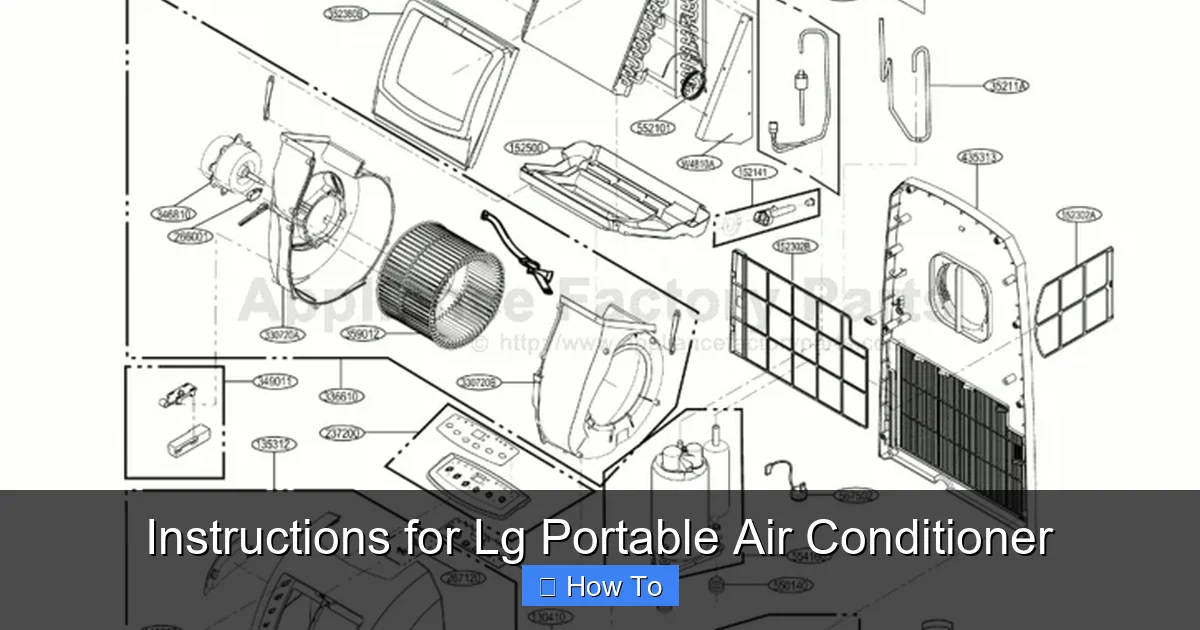
Figure: LG portable AC window kit components laid out for assembly.
Visual guide about Instructions for Lg Portable Air Conditioner
Image source: cdn.appliancefactoryparts.com
Check the Components
Inspect the unit for any visible damage during shipping.
Verify the window kit includes a sliding window bracket, adjustable panels, and weather stripping.
Ensure the exhaust hose is flexible and free of kinks.
Choose the Right Location
Place your LG portable AC on a flat, level surface near a window and an electrical outlet. Avoid placing it on carpets or uneven floors, as this can affect drainage and stability. Keep the unit at least 20 inches away from walls or furniture to allow proper airflow.
Tip: If you plan to move the unit between rooms, consider a model with built‑in casters and a lightweight chassis for easier handling.
Step 2: Installing the Window Kit
Proper installation of the window kit is crucial to prevent hot air from re-entering your room and to ensure efficient cooling.
Measure Your Window
Most LG portable ACs are designed for vertical-sliding or horizontal-sliding windows. Measure the width or height of your window opening to confirm the adjustable panels will fit snugly.
Assemble the Window Bracket
Slide the adjustable panels into the main bracket to match your window size.
Secure them with the provided screws or locking knobs.
Attach the weather stripping around the edges to seal gaps and reduce noise.
Install the Exhaust Hose
Connect one end of the exhaust hose to the back of the AC unit and the other to the window bracket. Make sure the hose is straight and not bent or crushed, as this can restrict airflow and reduce cooling power. Use the hose adapter if needed to secure a tight fit.
Add a strip of foam tape along the bracket’s interior edge for an extra airtight seal, especially on older windows with uneven frames.
Step 3: Powering On and Basic Operation
Once installed, plug the unit into a dedicated 115V or 230V outlet (depending on your model). Avoid using extension cords, as they can overheat and cause power issues.
Using the Control Panel
Press the Power button to turn on the unit. The LED display will show the current room temperature. Use the Mode button to switch between:
Cool: Lowers room temperature using refrigerant.
Fan: Circulates air without cooling—great for mild days.
Dry: Reduces humidity in damp conditions (ideal for rainy seasons).
Sleep: Gradually adjusts temperature for comfortable nighttime use.
Adjusting Temperature and Fan Speed
Use the Temp +/- buttons to set your desired temperature (typically between 60°F and 86°F). Choose from low, medium, or high fan speeds using the Fan Speed button. Higher speeds cool faster but may be noisier.
Use the built‑in timer to schedule automatic shut‑off after you fall asleep or leave the house, which can shave 10‑15 % off your cooling bill.
Step 4: Using Smart Features with LG ThinQ App
In 2026, most LG portable air conditioners are compatible with the LG ThinQ app , available for iOS and Android. This app lets you control your AC remotely, monitor energy use, and receive maintenance alerts.
Connecting to Wi-Fi
Download and open the LG ThinQ app.
Tap “Add Product” and follow the on-screen instructions.
Press and hold the Wi-Fi button on the AC unit until the light blinks.
Select your home network and enter the password.
Remote Control and Scheduling
Once connected, you can:
Turn the AC on or off from your phone.
Set daily or weekly schedules (e.g., cool the room 30 minutes before you arrive home).
Receive filter cleaning reminders and error notifications.
Monitor energy consumption to track savings.
Voice control works through Google Assistant and Alexa once the ThinQ skill is linked, letting you adjust temperature hands‑free.
Step 5: Maintenance and Cleaning
Regular maintenance keeps your LG portable AC running efficiently and extends its lifespan. Follow these steps every few weeks during heavy use.
Cleaning the Air Filter
The air filter captures dust, pollen, and pet dander. A dirty filter reduces airflow and cooling performance.
Turn off and unplug the unit.
Open the front panel and remove the filter.
Rinse it under lukewarm water or use a soft brush to remove debris.
Let it air dry completely before reinserting.
Tip: Clean the filter every two weeks during summer. If you have pets or allergies, clean it weekly.
Draining Water
LG portable ACs collect moisture during cooling. Most 2026 models have an auto-evaporation system, but in high-humidity areas, you may need to manually drain water.
Check the water level indicator on the unit.
If full, place a container under the drain plug at the back.
Remove the plug and let water drain completely.
Reattach the plug securely.
Note: Some models include a continuous drain hose option—attach it to a floor drain or bucket for hassle-free operation.
Cleaning the Exterior and Hose
Wipe the outside of the unit with a damp cloth and mild detergent. Avoid harsh chemicals. Inspect the exhaust hose monthly for dust buildup and clean it with a vacuum attachment if needed.
Once a season, gently brush the evaporator and condenser coils (accessible behind the front grille) to remove fine dust that the filter misses; this restores heat‑exchange efficiency.
Step 6: Seasonal Storage Tips
When the cooling season ends, proper storage prevents mold, dust buildup, and mechanical issues.
Pre-Storage Checklist
Turn off and unplug the unit.
Drain all water from the tank and hose.
Clean the filter and let it dry.
Wipe down the interior and exterior.
Coil the exhaust hose neatly and store it separately.
Storing the Unit
Store the AC in a cool, dry place like a closet or basement. Cover it with a breathable cloth to protect from dust. Avoid plastic bags, which can trap moisture.
Place the remote control in a sealed zip‑lock bag with the unit so it stays together and the batteries don’t corrode.
Comparing LG Portable AC Models (2026 Lineup)
| Model | BTU (ASHRAE) | Coverage (sq ft) | Noise (dB) | Smart Features | Continuous Drain |
|---|---|---|---|---|---|
| LP1419IVSM | 14,000 | 500 | 44 | ThinQ, Voice, Energy‑Monitor | Yes |
| LP1019IVSM | 10,000 | 350 | 42 | ThinQ, Voice | No |
| LP0819IVSM | 8,000 | 250 | 40 | ThinQ | No |
Choose a model that matches your room size; oversizing wastes energy and undersizing struggles on hot days.
Troubleshooting Common Issues
Even the best units can have occasional problems. Here’s how to fix the most common issues with your LG portable AC.
Unit Won’t Turn On
Check if it’s plugged in and the outlet is working.
Ensure the water tank isn’t full (some models won’t start if full).
Reset the circuit breaker or try a different outlet.
Poor Cooling Performance
Clean or replace the air filter.
Make sure the exhaust hose isn’t kinked or blocked.
Close windows, doors, and curtains to keep cool air in.
Set the temperature lower and run the fan on high.
Water Leaking from the Unit
Check if the drain plug is loose or missing.
Ensure the unit is level—tilting can cause leaks.
Inspect the exhaust hose for condensation buildup.
Unusual Noises or Vibrations
Make sure the unit is on a stable, level surface.
Check for loose parts or debris inside the fan.
Tighten any screws on the exterior panels.
Error Codes on Display
LG portable ACs show error codes to help diagnose issues. Common ones include:
E1: Water tank full—drain and reset.
E2: Sensor error—turn off for 10 minutes, then restart.
E3: Communication error—check Wi-Fi or reset the unit.
Refer to your user manual for a full list of error codes and solutions.
Energy-Saving Tips for 2026
Save money and reduce your carbon footprint with these smart practices:
Use the Sleep mode at night to gradually raise the temperature.
Set a timer to turn off the AC when you leave home.
Keep blinds or curtains closed during the day to block heat.
Seal gaps around windows and doors to prevent cool air from escaping.
Run ceiling fans to circulate cool air and reduce AC workload.
For deeper savings, review the EPA’s ENERGY STAR guidelines on portable air conditioners (https://www.energystar.gov/products/heating_cooling/air_conditioning_portable) to compare rated efficiency before you buy.
Frequently Asked Questions
How often should I clean the LG portable AC filter?
Clean the filter every two weeks during heavy use; weekly if you have pets or allergies.
Can I run the unit continuously without draining?
Most 2026 models auto‑evaporate condensate, but in very humid climates you’ll need to empty the tank or attach a continuous drain hose.
Does the LG ThinQ app work without Wi‑Fi?
No — the app requires a stable home Wi‑Fi connection for remote control and notifications.
What size portable AC do I need for a 400 sq ft room?
A 12,000–14,000 BTU unit (ASHRAE) is typically sufficient; oversizing reduces efficiency.
Why is my LG portable AC making a rattling noise?
Check that the unit sits level, the exhaust hose isn’t vibrating against the window kit, and no loose screws remain.
How do I reset an error code on the display?
Power off the unit, wait 10 minutes, then restart; if the code persists, consult the manual or contact LG support.
Conclusion: Enjoy Cool, Comfortable Air All Summer Long
Your LG portable air conditioner is a powerful, convenient solution for staying cool in 2026. By following these instructions—proper installation, smart operation, regular maintenance, and timely troubleshooting—you’ll get the most out of your unit while keeping energy costs low. With features like app control, auto-evaporation, and quiet operation, LG’s latest models make comfort easier than ever.
Remember: a well-maintained AC not only cools better but lasts longer. Clean the filter regularly, drain water when needed, and store it properly during off-months. Whether you're working from home, sleeping better, or just beating the heat, your LG portable air conditioner is ready to deliver reliable performance all season long.
Ready to optimize your whole‑home cooling? Explore our guide on choosing the right air conditioner for your home.

