
This guide covers everything you need to know about LG air conditioner instructions , from unboxing and installation to daily use and maintenance. Whether you're using a window unit, split system, or smart inverter model, we’ll help you get the most out of your cooling system safely and efficiently.
Key Takeaways
Proper installation ensures efficiency: Correct setup prevents energy waste and extends your AC’s lifespan.
Use the remote or LG ThinQ app for control: Modern LG units support Wi-Fi and voice commands via Google Assistant or Alexa.
Clean filters monthly: Dirty filters reduce airflow and increase energy consumption by up to 15%.
Set temperature between 72–78°F (22–26°C): This range balances comfort and energy savings.
Schedule regular maintenance: Annual professional servicing prevents major breakdowns.
Use energy-saving modes: Features like Sleep Mode and AI Cool help reduce electricity bills.
Troubleshoot common issues quickly: Most problems like poor cooling or error codes can be resolved at home.
Introduction: Getting Started with Your LG Air Conditioner
Welcome to your complete guide on instructions for LG air conditioner models in 2026. Whether you’ve just unboxed a sleek new LG Dual Inverter window unit or installed a high-efficiency split system, this guide will walk you through setup, operation, maintenance, and troubleshooting. LG air conditioners are known for their quiet operation, energy efficiency, and smart features—especially with the integration of the LG ThinQ app. By following these steps, you’ll keep your home cool, your energy bills low, and your AC running smoothly for years.
Step 1: Unboxing and Initial Setup
LG air conditioner components and accessories layout
Before turning on your LG air conditioner, it’s important to handle it properly during unboxing and setup.
Unbox Carefully
Remove the unit from its packaging gently. Avoid using sharp tools that could damage the casing or internal components. Check for included accessories like the remote control, mounting brackets, window seal kit, and user manual.
Inspect for Damage
Look for dents, scratches, or loose parts. If you notice any damage, contact LG customer support or your retailer immediately. Most 2026 LG models come with a 10-year compressor warranty, so don’t hesitate to report issues.
Choose the Right Location
For window units, pick a spot that supports the weight and allows proper ventilation. Avoid direct sunlight and heat sources. For split systems, ensure the indoor unit is mounted high on a wall and the outdoor unit has at least 12 inches of clearance on all sides.
Register your warranty on LG’s website within 90 days to activate the full compressor coverage and receive firmware update notifications. This also helps LG notify you of any safety bulletins.
Step 2: Installing Your LG Air Conditioner
Proper installation is key to performance and safety. If you're not comfortable doing it yourself, hire a certified technician—especially for split or ducted systems.
Window Unit Installation
Open the window and place the AC in the frame.
Extend the side panels to fill the gaps.
Secure the unit with screws or brackets.
Seal any openings with weather stripping to prevent air leaks.
Split System Installation
Mount the indoor unit on the wall using the provided bracket.
Drill a small hole for the refrigerant line, drain hose, and electrical wiring.
Connect the lines to the outdoor unit and secure it on a stable surface.
Vacuum the lines to remove air and moisture before charging the system.
Pro Tip: Use a level to ensure the indoor unit is perfectly horizontal. A tilted unit can cause drainage issues and reduce efficiency.
For detailed split‑system guidance, see our split system setup steps, indoor unit mounting tips, and outdoor unit placement guidelines. A proper vacuum pull below 500 microns is critical — skip it and you risk compressor failure within months.
Step 3: Powering On and Basic Operation
Once installed, it’s time to power up your LG air conditioner.
Plug In and Turn On
Plug the unit into a dedicated outlet. Avoid using extension cords, as they can overheat. Press the power button on the unit or remote.
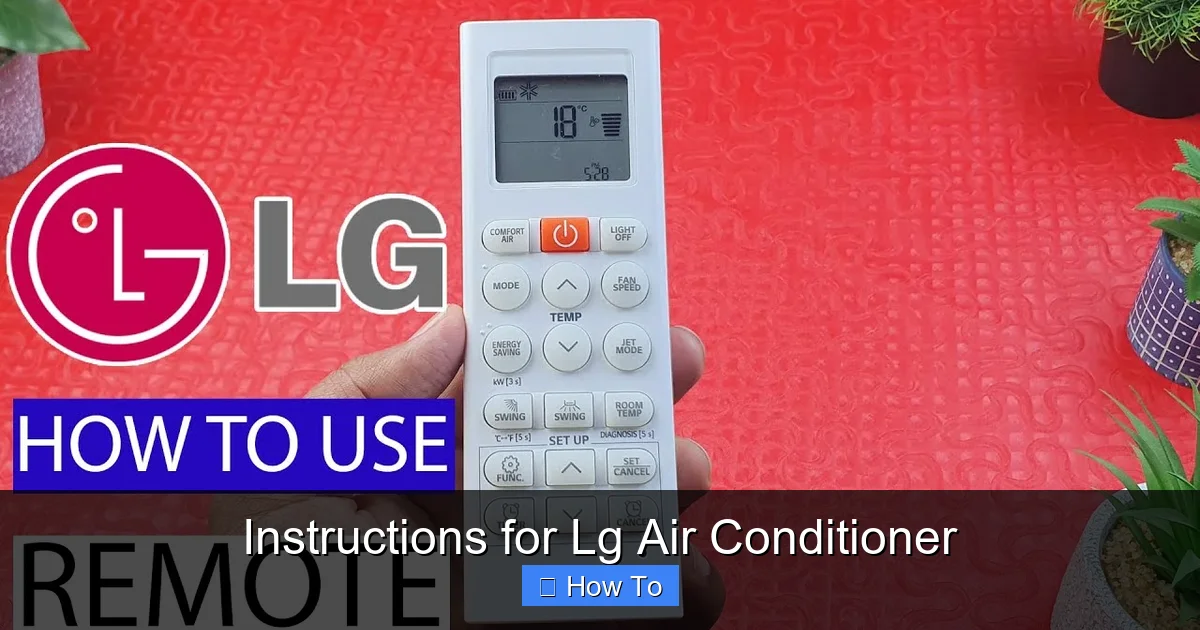
Using the Remote Control
The remote is your main control hub. Use it to:
Set the temperature (recommended: 74°F or 23°C)
Choose cooling, fan, or dehumidify mode
Adjust fan speed (Low, Medium, High, Auto)
Set a timer for automatic shut-off
Understanding Display Icons
Modern LG units have LED displays showing:
Snowflake: Cooling mode active
Fan: Fan-only mode
Drop: Dehumidifying
Wi-Fi: Connected to LG ThinQ app
First‑time remote pairing: hold the “Mode” and “Fan” buttons together for three seconds until the remote beeps — this syncs it to the indoor unit’s IR receiver.
Step 4: Using Smart Features and the LG ThinQ App
In 2026, most LG air conditioners come with Wi-Fi connectivity and smart home integration.
Download the LG ThinQ App
Available on iOS and Android, the app lets you control your AC from anywhere. Create an account and follow the on-screen prompts to add your device.
Connect to Wi-Fi
Press and hold the Wi-Fi button on the unit or remote until the light blinks.
Open the ThinQ app and select “Add Device.”
Follow the setup wizard to connect to your home network.
Voice Control and Automation
Once connected, use voice commands like:
“Hey Google, set the living room AC to 72 degrees.”
“Alexa, turn on the bedroom air conditioner.”
You can also create routines—like turning on the AC when you leave work or lowering the temperature at bedtime.
Energy monitoring in the ThinQ app shows real‑time kWh usage and estimates monthly cost — enable “Energy Report” in settings to get weekly summaries emailed to you. For more on optimizing smart AC schedules, review optimal temperature settings for savings.
Step 5: Daily Use and Energy-Saving Tips
Using your LG air conditioner wisely saves money and reduces wear.
Use Energy-Saving Modes
AI Cool: Automatically adjusts temperature based on room conditions.
Sleep Mode: Gradually increases temperature while you sleep to save energy.
Turbo Cool: Quickly cools the room—use sparingly to avoid high energy use.
Close Doors and Windows
Keep interior doors closed and windows shut while the AC runs. This prevents cool air from escaping and reduces workload.
Use Fans to Circulate Air
Ceiling or floor fans help distribute cool air evenly, allowing you to raise the thermostat by 4°F without sacrificing comfort.
Set a daily schedule in the ThinQ app: start cooling 30 minutes before you arrive home, then switch to Eco mode overnight. The U.S. Department of Energy recommends 78°F when you’re home and higher when away for maximum savings — see Energy Saver guide for details.
Step 6: Cleaning and Maintenance
Regular maintenance keeps your LG air conditioner running efficiently.
Clean the Air Filter Monthly
Turn off the unit and unplug it.
Remove the front panel and take out the filter.
Rinse it under warm water or use a vacuum attachment.
Let it dry completely before reinserting.
Tip: Mark your calendar or set a phone reminder every 30 days.
Wipe Down the Exterior
Use a damp cloth to clean the front panel and vents. Avoid harsh chemicals that could damage the surface.
Check the Drain Line (Split Systems)
Ensure the drain hose isn’t clogged. A blocked line can cause water leaks or error codes.
Schedule Annual Professional Service
A technician will check refrigerant levels, clean coils, inspect electrical connections, and test performance. This is especially important in humid climates.
Clean the outdoor condenser coil once a year: shut off power, remove debris, and gently spray the fins with a garden hose (low pressure). For a seasonal checklist, see seasonal upkeep checklist.
Step 7: Troubleshooting Common Issues
Even the best ACs can have problems. Here’s how to fix common issues.
Unit Won’t Turn On
Check the power outlet—try plugging in another device.
Ensure the remote has working batteries.
Look for a tripped circuit breaker.
Poor Cooling
Clean or replace the air filter.
Make sure vents aren’t blocked by furniture.
Check if the outdoor unit is dirty or obstructed.
Water Leaking Inside
Ensure the unit is level—tilting can cause drainage issues.
Clear the drain line with a pipe cleaner or compressed air.
Error Codes on Display
Refer to your user manual for specific codes. Common ones in 2026 models include:
CH 01: Dirty filter—clean and reset.
CH 02: Drain pan full—check drainage.
CH 05: Refrigerant issue—call a technician.
If the unit displays CH 38 (high pressure) or CH 53 (communication error), power‑cycle the breaker for 60 seconds — if the code persists, schedule service immediately. For condenser‑specific faults, consult our condenser troubleshooting guide.
Frequently Asked Questions
How often should I clean the LG air conditioner filter?
Clean the filter every 30 days during heavy use; in dusty environments or homes with pets, check every two weeks. A clogged filter cuts airflow by up to 15% and raises energy bills.
Can I install a split‑system LG AC myself?
LG recommends professional installation for split systems because refrigerant handling requires EPA‑certified tools and a vacuum pump. DIY installs void the compressor warranty.
Why does my LG AC show “CH 02” after cleaning the filter?
CH 02 indicates a full drain pan. Verify the drain line slopes downward without kinks, then pour a cup of water into the pan to confirm it flows freely.
Does the LG ThinQ app work without internet?
Local control via Wi‑Fi works on the same LAN, but remote access, voice assistants, and energy reports need an active internet connection.
What temperature setting saves the most energy?
Set 78°F (26°C) when home and 82–85°F (28–29°C) when away. Each degree higher saves roughly 3–5% on cooling costs.
When should I call a technician instead of troubleshooting?
Call a pro for refrigerant leaks (CH 05/CH 38), compressor noises, repeated breaker trips, or any error that returns after a power reset.
Conclusion: Enjoy Cool Comfort All Year
Following these instructions for LG air conditioner use ensures your unit performs at its best. From smart controls and energy-saving modes to regular cleaning and troubleshooting, a little care goes a long way. With LG’s advanced technology and your attention to maintenance, you’ll enjoy reliable, quiet, and efficient cooling for many summers to come. Stay cool, save energy, and make the most of your investment.
Want more LG‑specific tips? Browse our blog for deep‑dives on inverter tech, model comparisons, and seasonal prep.

