
How to Use the Lg Portable Air Conditioner Sleep Mode
Discover how to activate and optimize the sleep mode on your LG portable air conditioner for quieter, energy-efficient cooling all night long. This guide walks you through setup, customization, and troubleshooting to help you get the most out of your unit in 2026.
Key Takeaways
Sleep mode gradually adjusts temperature to match your body’s natural sleep cycle, improving comfort and reducing energy use.
Fan speed automatically lowers during sleep mode to minimize noise, helping you fall and stay asleep.
Timer integration allows you to set sleep mode to start and stop at specific times, perfect for bedtime routines.
Remote and app control make adjustments easy —even from bed—using the LG ThinQ app or included remote.
Energy savings can reach up to 20% when using sleep mode correctly compared to running the AC at full power all night.
Regular maintenance ensures optimal performance —clean filters and vents help sleep mode work efficiently.
Not all LG portable AC models have identical sleep mode features —always check your user manual for model-specific instructions.
How to Use the LG Portable Air Conditioner Sleep Mode
Getting a good night’s sleep is essential—and in 2026, smart home technology like the LG portable air conditioner makes it easier than ever to stay cool, quiet, and comfortable all night. One of the most useful features of these units is the sleep mode, designed to adapt cooling output to your body’s changing needs while you rest. Whether you're dealing with summer heatwaves or just prefer a cooler bedroom, sleep mode helps you save energy, reduce noise, and wake up refreshed. For more on this, see our guide on portable air conditioner vs hvac.
In this comprehensive guide, you’ll learn exactly how to use the sleep mode on your LG portable air conditioner. We’ll walk you through setup, customization, remote and app controls, energy-saving tips, and troubleshooting common issues. By the end, you’ll be able to enjoy peaceful, efficient cooling every night—no matter the season.
What Is Sleep Mode and Why Use It?
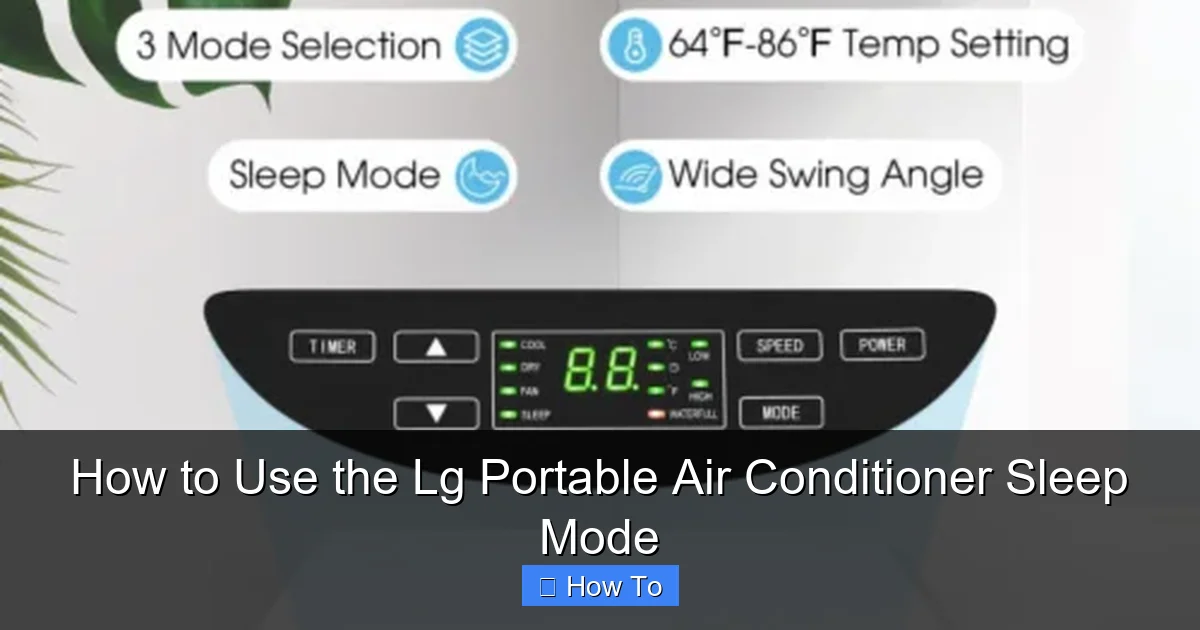
Visual guide showing the sleep mode button on an LG portable air conditioner remote.
Image source: kroger.com
Sleep mode is a smart feature built into many LG portable air conditioners that adjusts the unit’s operation over time to match your natural sleep patterns. Instead of running at full blast all night, the air conditioner gradually reduces cooling intensity and fan speed as you drift off and enter deeper sleep stages. For more on this, see our guide on portable air conditioner maintenance tips.
Here’s how it works: When you activate sleep mode, the unit typically starts at your desired temperature. Over the next few hours, it slowly increases the set temperature by 1–2°F (0.5–1°C) per hour. This mimics how your body naturally cools down during sleep, so you don’t wake up shivering or feeling too warm. At the same time, the fan speed decreases, making the unit quieter—perfect for light sleepers or households with babies and pets.
Using sleep mode offers several benefits:
- Improved sleep quality: A quieter, more consistent environment helps you stay asleep.
- Energy efficiency: By reducing power consumption overnight, you can cut cooling costs by up to 20%.
- Longer unit lifespan: Less strain on the compressor and fan means fewer repairs and longer service life.
- Better comfort: No more waking up to a freezing room or a noisy machine.
In 2026, LG has refined sleep mode with smarter algorithms and integration with smart home systems, making it even easier to use and more effective than ever. For more on this, see our guide on portable air conditioner tips reddit.
Step-by-Step Guide to Activating Sleep Mode
Activating sleep mode on your LG portable air conditioner is simple—but the exact steps may vary slightly depending on your model. Most units from 2024–2026 use similar interfaces, so these instructions should work for the majority of current models.
Using the Remote Control
The most common way to activate sleep mode is through the included remote. Here’s how:
- Turn on your LG portable air conditioner using the power button on the remote or the unit itself.
- Set your desired temperature using the up and down arrows on the remote. For example, set it to 72°F if that’s comfortable for you.
- Press the “Sleep” button —this is usually labeled clearly and may have a moon or bed icon.
- Confirm activation —the display on the unit or remote should show “Sleep” or a similar indicator.
- Let the unit run —sleep mode will now begin adjusting temperature and fan speed automatically.
Tip: Some models allow you to choose between 3–6 hour sleep cycles. If your remote has a “Sleep Timer” option, you can select how long the mode should run before turning off or returning to normal operation.
Using the Control Panel on the Unit
If you don’t have the remote or prefer using the unit directly:
- Press the “Mode” button until you see “Cool” mode activated.
- Adjust the temperature using the temperature control buttons.
- Press the “Sleep” button (often located near the fan or timer buttons).
- Watch for the sleep indicator —a light or icon should appear on the display.
Note: On some older models, sleep mode may be accessed through a combination of buttons (e.g., holding “Fan” and “Timer” for 3 seconds). Check your user manual if you’re unsure.
Using the LG ThinQ App (2026 Models)
For LG portable air conditioners with Wi-Fi connectivity (common in 2026 models), you can control sleep mode remotely using the LG ThinQ app:
- Download and install the LG ThinQ app from the App Store or Google Play.
- Create an account or log in if you already have one.
- Add your air conditioner by following the in-app setup guide (usually involves scanning a QR code on the unit).
- Open the device controls and select your portable AC.
- Tap the “Sleep Mode” toggle to activate it.
- Customize settings —you can adjust the duration, temperature curve, and even schedule sleep mode to turn on automatically at bedtime.
Bonus: The app can send you notifications if the unit needs maintenance or if sleep mode has completed its cycle.
Customizing Sleep Mode for Maximum Comfort
Sleep mode isn’t one-size-fits-all. In 2026, LG has introduced more customization options to help you tailor the experience to your preferences.
Adjusting the Sleep Duration
Most LG portable air conditioners allow you to set how long sleep mode runs. Common options are 3, 5, or 7 hours. Here’s how to change it:
- On the remote: Press the “Sleep” button repeatedly to cycle through durations.
- On the app: Tap “Sleep Settings” and choose your preferred time.
- On the unit: Use the “Timer” button in combination with “Sleep” (refer to your manual).
Tip: If you usually fall asleep within 30 minutes and wake up after 7 hours, set sleep mode for 7 hours so it turns off or returns to normal just as you wake up.
Setting the Temperature Curve
Some advanced models let you customize how quickly the temperature rises during sleep mode. For example:
- Gentle rise: +1°F per hour (ideal for hot climates)
- Moderate rise: +1.5°F per hour (balanced comfort)
- Fast rise: +2°F per hour (for cooler environments)
To adjust:
- Open the LG ThinQ app.
- Go to “Device Settings” > “Sleep Mode Preferences.”
- Select your preferred temperature increase rate.
This feature is especially helpful if you tend to feel cold later in the night or if you share the room with someone who prefers different temperatures.
Combining Sleep Mode with Other Features
You can enhance your sleep experience by pairing sleep mode with other LG AC features:
- Quiet Mode: Reduces fan noise even further. Activate it before turning on sleep mode.
- Auto Swing: Gently moves the airflow to distribute cool air evenly without direct drafts.
- Timer + Sleep Mode: Set the AC to turn on 30 minutes before bedtime, then activate sleep mode automatically.
Example: Use the app to schedule your AC to start cooling at 10:30 PM, then switch to sleep mode at 11:00 PM. This ensures the room is cool when you get into bed, then gradually warms as you sleep.
Energy-Saving Tips for Sleep Mode
One of the biggest advantages of sleep mode is energy efficiency. Here’s how to maximize savings in 2026:
Set the Right Starting Temperature
Starting too low (like 65°F) forces the unit to work harder, even in sleep mode. Experts recommend setting your initial temperature between 72°F and 76°F for optimal comfort and efficiency.
Use a Programmable Schedule
Instead of manually turning sleep mode on every night, use the timer or app to automate it. For example:
- Weekdays: Sleep mode on at 11:00 PM, off at 6:30 AM.
- Weekends: Sleep mode on at 11:30 PM, off at 8:00 AM.
This ensures consistency and prevents you from forgetting to activate it.
Keep Doors and Windows Closed
Even in sleep mode, your AC works harder if hot air leaks in. Close bedroom doors and windows, and use blackout curtains to keep heat out.
Maintain Your Unit Regularly
A dirty filter or blocked vent reduces efficiency. Clean or replace the air filter every 2–4 weeks during heavy use. Also, ensure the exhaust hose is securely connected and not kinked.
Pair with a Smart Thermostat (Optional)
If you have a smart thermostat in your home, use it to pre-cool the house before bedtime. Then, let the portable AC maintain comfort with sleep mode. This reduces the load on both systems.
For additional guidance on reducing household cooling costs, see the U.S. Department of Energy cooling advice and the ENERGY STAR program.
Troubleshooting Common Sleep Mode Issues
Even the best technology can have hiccups. Here’s how to fix common problems with sleep mode on your LG portable air conditioner.
Sleep Mode Won’t Activate
Possible causes and fixes:
- Remote batteries are low: Replace them and try again.
- Unit is in a different mode: Make sure it’s set to “Cool” mode, not “Fan” or “Dry.”
- Feature not available: Some basic models don’t include sleep mode. Check your user manual or model number online.
- Software glitch: Turn the unit off, unplug it for 60 seconds, then plug it back in.
Unit Is Too Loud in Sleep Mode
Sleep mode should reduce noise, but if it’s still loud:
- Check the fan setting: Ensure it’s not stuck on “High.” Use “Quiet” or “Low” mode.
- Inspect the exhaust hose: A loose or damaged hose can cause vibrations. Secure it properly.
- Place the unit on a stable surface: Avoid carpet or uneven floors that can amplify noise.
Temperature Doesn’t Change Over Time
If the AC stays at the same temperature all night:
- Verify sleep mode is on: Look for the indicator light or check the app.
- Check for firmware updates: Open the LG ThinQ app and see if an update is available for your unit.
- Reset the unit: Turn it off, unplug, wait 2 minutes, then restart.
Sleep Mode Turns Off Too Early
If the unit shuts down before you wake up:
- Adjust the timer duration: Increase it to 7 or 8 hours if needed.
- Disable auto-shutoff: Some models turn off after sleep mode ends. Change this in the app or settings menu.
App Won’t Connect to the Unit
For Wi-Fi-enabled models:
- Ensure the unit is in pairing mode: Press and hold the Wi-Fi button until the light blinks.
- Check your home network: The AC needs a 2.4 GHz Wi-Fi signal (not 5 GHz).
- Restart the app and router: Sometimes a simple reboot fixes connectivity.
Best Practices for Using Sleep Mode in 2026
To get the most out of your LG portable air conditioner’s sleep mode, follow these expert-recommended practices:
- Use it every night: Consistency helps your body adapt to the cooling pattern.
- Combine with good sleep hygiene: Keep your room dark, cool, and quiet for the best results.
- Monitor energy usage: Use the LG ThinQ app to track how much power you’re saving.
- Upgrade if needed: If your model is older than 2022, consider upgrading to a 2026 model with enhanced sleep algorithms and app integration.
- Share settings with family: If multiple people use the room, save custom sleep profiles in the app (e.g., “Dad’s Sleep,” “Baby’s Nap”).
Understanding How Sleep Mode Adjusts Temperature
LG’s sleep mode uses a built‑in algorithm that raises the set point gradually, typically 1–2 °F per hour, while simultaneously stepping down fan speed. This mimics the body’s natural nocturnal temperature drop, reducing compressor cycles and cutting power draw. In practice, the algorithm also monitors room humidity; if humidity rises, the unit may pause the temperature increase to maintain comfort without over‑cooling.
Comparing Sleep Mode Across LG Portable AC Models
| Model Series | Sleep Mode Duration Options | Custom Temp Curve | App Scheduling | Quiet Mode Integration |
|---|---|---|---|---|
| LP0818WNR | 3 h, 5 h, 7 h | No | Yes (ThinQ) | Yes |
| LP1419IVSM | 3 h, 5 h, 7 h, 9 h | Yes (3 rates) | Yes (ThinQ) | Yes |
| LP1022WNR | 3 h, 5 h, 7 h | No | No | Yes |
| LP1523IVSM | 3 h, 5 h, 7 h, 9 h | Yes (3 rates) | Yes (ThinQ) | Yes |
Check your specific model’s manual for exact capabilities; the table reflects typical 2024‑2026 releases.
Maintenance Checklist for Optimal Sleep Mode Performance
- Clean or replace the air filter every 2–4 weeks during peak season.
- Verify the exhaust hose is straight, sealed, and free of kinks.
- Wipe the evaporator and condenser coils with a soft brush annually.
- Confirm the unit sits on a level, vibration‑dampening surface.
- Run a self‑diagnostic via the LG ThinQ app quarterly to catch firmware issues early.
Regular upkeep keeps the compressor from over‑working during the gradual temperature ramp, preserving both efficiency and quiet operation. For a deeper seasonal routine, see our seasonal upkeep guide.
Conclusion
Using the sleep mode on your LG portable air conditioner is a smart, simple way to improve your nightly rest while saving energy and money. In 2026, with advanced features like app control, customizable temperature curves, and seamless smart home integration, sleep mode has never been more effective or user-friendly.
By following this guide, you can activate sleep mode with confidence, customize it to your needs, and troubleshoot any issues that arise. Whether you’re cooling a small bedroom or a home office, sleep mode helps you stay comfortable without the noise or waste of constant full-power operation.
So tonight, set your temperature, press that sleep button, and drift off knowing your LG portable air conditioner is working smarter—not harder—to keep you cool, quiet, and refreshed.
Want more tips on efficient cooling? Check out our guide on energy‑saving AC settings.
Frequently Asked Questions
How long does LG sleep mode run by default?
Most LG portable units default to a 7‑hour cycle, but you can select 3, 5, or 9 hours via the remote or ThinQ app depending on the model.
Can I customize the temperature rise rate on all LG portable models?
Only higher‑end 2024‑2026 models (e.g., LP1419IVSM, LP1523IVSM) expose a “Sleep Mode Preferences” menu in the ThinQ app for adjustable rise rates.
Does sleep mode work when the unit is set to fan only?
No. Sleep mode requires the compressor to be active in Cool mode; Fan‑only operation disables the temperature‑adjustment logic.
Why does my LG portable AC exit sleep mode early?
Common causes include an incorrectly set timer, a firmware glitch, or the unit reaching its safety temperature limit. Reset the unit and verify the timer duration in the app.
How do I update firmware for sleep mode improvements?
Open the LG ThinQ app, select your device, tap “Device Settings,” then “Firmware Update.” The unit must stay powered and connected to Wi‑Fi during the update.

