
Your Carrier air conditioner’s fan won’t turn on? This common issue can disrupt comfort and signal deeper problems. From simple power checks to internal component failures, we’ll walk you through practical steps to diagnose and fix the problem safely. Whether it’s a clogged filter, faulty motor, or wiring issue, understanding the root cause helps restore cooling fast—and keeps your system running efficiently.
If your Carrier air conditioner isn’t blowing air—or worse, the fan just sits there silently while the compressor runs—it’s more than an inconvenience. It could be a sign of something serious, from a clogged filter to a failing blower motor. But don’t panic. Most times, “Carrier air conditioner fan not turning on” issues have straightforward causes that homeowners can address with some basic troubleshooting.
In this guide, we’ll take you step by step through everything you need to know about diagnosing and fixing a non-functional fan in your Carrier AC. We’ll cover common triggers, safety precautions, DIY fixes, and when it’s time to call in a pro. By the end, you’ll feel confident tackling the problem yourself—or knowing exactly what to tell your technician.
Let’s get started.
Key Takeaways
- Understanding carrier air conditioner fan not turning on: Provides essential knowledge
Quick Answers to Common Questions
Why does my Carrier AC make noise but blow warm air?
That usually means the compressor runs (hence the noise), but the indoor fan fails to circulate cooled air. Common causes include a dead blower motor, faulty capacitor, or restricted airflow from clogged filters. Check power delivery and clean the unit before assuming expensive repairs.
Can a dirty filter cause the fan to stop entirely?
Yes—extremely dirty filters restrict airflow so severely that thermal overload switches cut power to protect the motor. This is especially true in humid climates where mold grows rapidly. Replace filters every 30–60 days during heavy use.
How long should a Carrier blower motor last?
With proper maintenance, most residential motors run 10–15 years. However, factors like voltage instability, extreme temperatures, or poor drainage accelerate wear. Signs of nearing end-of-life include increased vibration, burning smells, or intermittent operation.
Is it safe to bypass the safety switch on my Carrier AC?
Never attempt this. Safety switches prevent coil freezing, electrical fires, and water damage. Bypassing them voids warranty and creates liability risks. Always consult a licensed technician if the switch trips repeatedly.
What’s the difference between a capacitor and a relay in my AC?
A capacitor provides starting torque to electric motors; relays act like electronic switches that route power based on thermostat signals. Both fail over time but require different replacement procedures. Only qualified technicians should handle high-voltage components.
📑 Table of Contents
- Understanding Your Carrier Air Conditioner Fan System
- Step-by-Step Troubleshooting for a Non-Functional Fan
- Common Causes of Carrier AC Fans Not Spinning
- DIY Fixes vs. Professional Repair: Making the Right Call
- Preventive Maintenance Tips to Avoid Future Fan Problems
- What to Expect During a Carrier AC Service Call
Understanding Your Carrier Air Conditioner Fan System
Before diving into fixes, it helps to understand how your Carrier AC’s fan works. Most residential units use a centrifugal blower fan located inside the indoor unit (usually in the furnace or air handler). This fan draws warm room air across the evaporator coils, cools it down, and pushes cold air through ductwork into your home.
When the thermostat calls for cooling, two things happen simultaneously: the compressor kicks on outside, and the indoor blower fan starts spinning. If only one part activates—say, the compressor hums but the fan remains still—you’ll hear noise but feel no airflow. That’s exactly what happens when your Carrier air conditioner fan not turning on.
This imbalance often stems from electrical or mechanical faults. The good news? Many are easy to spot and fix if you know where to look.
Step-by-Step Troubleshooting for a Non-Functional Fan
Start here before assuming major damage. Follow these steps in order:
1. Confirm Power Is Reaching the Unit
Even if your thermostat shows it’s working, double-check the actual power flow. Flip the breaker for your HVAC system and listen carefully. Do you hear the compressor engage? If yes, then the issue is likely isolated to the indoor fan circuit. If nothing hums at all, check for tripped GFCI outlets or blown fuses in older homes.
Visual guide about Carrier Air Conditioner Fan Not Turning On
Image source: sm.mashable.com
2. Test the Thermostat Settings
Make sure your thermostat is set to “Cool” mode and the temperature is below room temp. Some smart thermostats require Wi-Fi connectivity or battery replacement. Replace lithium coin-cell batteries if yours uses them—low power can confuse the control board.
3. Inspect the Blower Motor Capacitor
The capacitor stores energy to help start the blower motor. Over time, it weakens and fails. A swollen or leaking capacitor means immediate replacement. Use a multimeter to test capacitance values against specs in your manual (typically 7–10 µF for most residential units).
4. Check for Obstructions Around the Fan Blades
Dust buildup, pet hair, or debris wrapped around the fan housing can jam rotation. Turn off power, remove the access panel, and gently clean the blades with compressed air or a soft brush. Never touch moving parts while powered!
5. Examine Wiring Connections
Loose or corroded wires between the control board and motor are a frequent culprit. Trace the main wire harness from the blower motor back to the terminal block. Look for frays, burnt spots, or disconnected plugs. Tighten any loose screws holding terminals in place.
6. Listen Closely During Startup
When you press “Cool” on the thermostat, do you hear a single loud click followed by silence—or repeated clicking without spin-up? One click usually means a bad relay or control board. Multiple clicks suggest capacitor or motor winding failure.
By methodically working through these steps, you’ll narrow down whether the problem lies in the electrical supply, mechanical components, or control logic.
Common Causes of Carrier AC Fans Not Spinning
While every installation varies slightly, certain failure points recur across Carrier models. Understanding them helps target repairs faster.
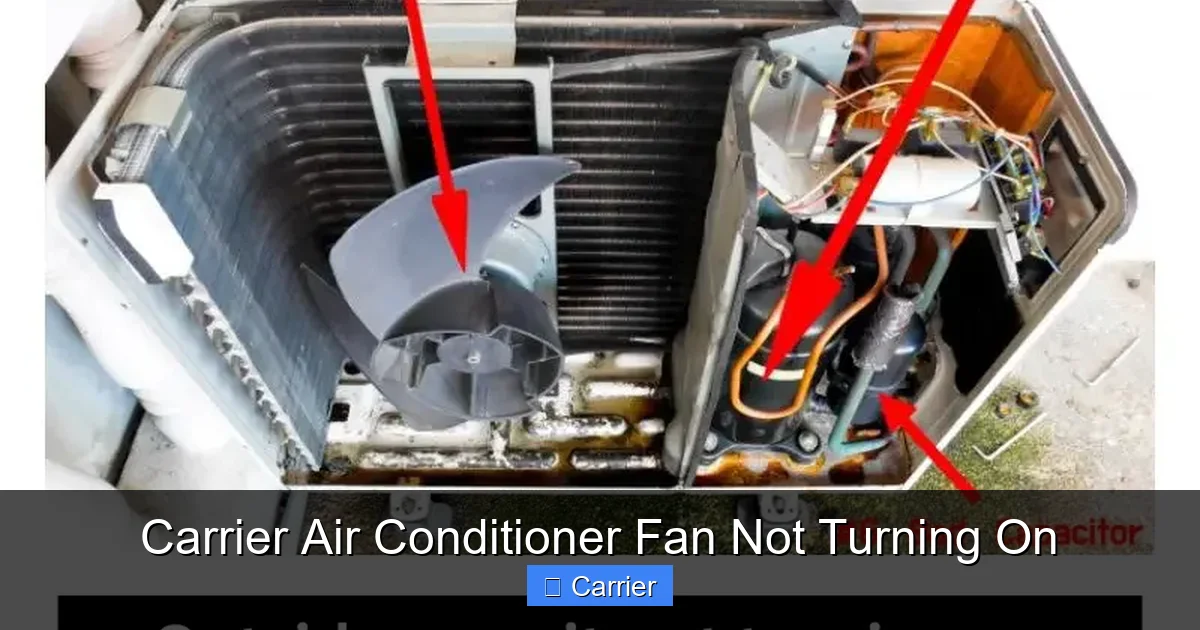
Blower Motor Failure
The heart of your indoor airflow system. Electric motors wear out over 10–15 years due to constant use, heat stress, and voltage fluctuations. Symptoms include burning smells, excessive vibration, or complete immobility. Replacement costs range from $200–$600 depending on model complexity.
Visual guide about Carrier Air Conditioner Fan Not Turning On
Image source: smartacsolutions.com
Clogged Air Filters
This is actually one of the most overlooked causes of “fan not turning on.” When filters become thick with dust and dander, they restrict airflow so severely that safety sensors shut down the entire system to prevent coil freezing. Clean or replace filters every 1–3 months during peak seasons.
Dirty Evaporator Coils or Drain Pan
Mold growth inside the drain pan or mineral deposits on coils create resistance that trips thermal overload switches. These protect the motor from burning out. Regular coil cleaning (once yearly) prevents this cascade of failures.
Faulty Control Board or Relay
The printed circuit board manages power distribution to all components. Moisture intrusion, power surges, or age-related degradation can fry relays that activate the fan. Diagnosing requires an ohmmeter—but swapping in a known-good board often confirms the diagnosis.
Worn Belt-Driven Systems (in older models)
Not all Carrier units use direct-drive motors. Older furnaces rely on rubber belts connecting the motor to the blower wheel. Belts stretch, crack, or slip off track—especially after decades of service. Visually inspect belt tension and alignment monthly.
Each cause demands different solutions. For instance, replacing a filter takes five minutes; replacing a control board might require soldering skills and OEM parts.
DIY Fixes vs. Professional Repair: Making the Right Call
You’re probably wondering: should I tackle this myself or hire someone?
Safe DIY Repairs Include:
- Replacing air filters
- Clearing fan blade obstructions
- Securing loose wire connections
- Testing thermostat functionality
- Checking circuit breakers
These tasks require minimal tools and pose little risk—if you follow safety protocols like shutting off power at the breaker.
When to Call a Technician:
- You smell burning plastic or ozone near the unit
- The blower motor emits grinding or shrieking noises
- Wiring insulation appears melted or blackened
- Your unit is under warranty (self-repair voids coverage)
- You lack confidence handling live electrical components
Certified Carrier technicians carry genuine parts and understand proprietary control systems. They also perform load testing and refrigerant checks that prevent future issues.
Remember: attempting complex repairs without training risks damaging your system further or creating fire hazards. When in doubt, schedule same-day service through Carrier’s official support line.
Preventive Maintenance Tips to Avoid Future Fan Problems
An ounce of prevention truly beats a pound of cure—especially when it comes to HVAC reliability.
Monthly Checks:
- Replace or wash reusable filters
- Vacuum grilles and vents
- Verify thermostat batteries
Quarterly Tasks:
- Inspect outdoor condenser unit for debris
- Clean return air ducts if accessible
- Monitor for unusual odors or vibrations
Annual Professional Service:
- Blower motor lubrication (if applicable)
- Electrical connection torque verification
- Coil cleaning and condensate drainage test
- Refrigerant pressure evaluation
Most Carrier owners sign up for Comfort Club plans that include two annual tune-ups plus priority scheduling during heatwaves. This proactive approach cuts emergency repair calls by up to 80%.
Also consider installing surge protectors on your HVAC circuit—power spikes during storms can silently fry delicate electronics inside your unit.
What to Expect During a Carrier AC Service Call
If you decide to contact a professional, here’s how to prepare:
– **Provide model number**: Found on the outdoor unit label or user manual
– **Describe symptoms clearly**: “Fan spins briefly then stops,” “No sound at all,” etc.
– **Note error codes**: Modern thermostats flash LED patterns indicating specific faults
– **Ask about parts guarantees**: Reputable companies stand behind labor and materials
Technicians arrive with diagnostic tools including infrared thermometers, clamp meters, and digital manifold gauges. They’ll trace voltage drop across the fan circuit, measure amp draw, and compare performance against factory specs.
Expect the visit to last 60–90 minutes unless major components need replacement. Most repairs resolve immediately; others require ordering specialty parts that ship overnight.
Always request a detailed invoice listing replaced items, labor hours, and preventive measures performed—even if no work was needed.
Frequently Asked Questions
Should I replace my Carrier AC fan motor myself?
It’s possible if you’re comfortable with basic electrical work and have OEM-spec replacement parts. However, improper installation can damage the control board or void warranty. For most homeowners, hiring a certified technician ensures correct fitment and safety compliance.
My Carrier AC fan turns on but only blows warm air. What gives?
This indicates the fan works mechanically, but the cooling function failed—likely due to low refrigerant, frozen coils, or a faulty reversing valve (in heat pumps). Since these involve refrigerants, leave diagnosis to professionals equipped with recovery equipment.
Can dust inside the ductwork affect my fan operation?
Indirectly yes. Excessive debris in return ducts increases static pressure, forcing the blower motor to overwork until it overheats and shuts off. Annual duct cleaning improves airflow efficiency and reduces strain on the fan assembly.
Why does my fan restart after 10 seconds then stop again?
This pattern strongly suggests a thermal overload trip. The motor gets too hot, triggers the protector to cut power, cools briefly, then repeats. Causes include restricted airflow, failing bearings, or shorted windings. Immediate professional inspection is advised to prevent burnout.
Are there universal replacement fans for Carrier units?
Some aftermarket blowers claim compatibility, but mismatched dimensions, RPM ratings, or mounting brackets cause inefficiencies or vibration. Always verify physical dimensions, electrical requirements, and mounting holes match your exact model before purchasing.
Does weather impact fan performance in Carrier systems?
Extreme cold (<20°F/-7°C) can thicken motor oil, increasing startup resistance. Conversely, high humidity encourages mold growth that clogs coils and drains. Both scenarios reduce fan efficiency. Ensure adequate clearance around the outdoor unit and maintain indoor humidity below 60%.

