
How to Uninstall Lg Air Conditioner
Uninstalling an LG air conditioner doesn’t have to be stressful. This guide walks you through the entire process—from preparation to final cleanup—ensuring safety and efficiency. Whether you’re replacing, relocating, or storing your unit , we’ve got you covered with expert tips and clear instructions.
Key Takeaways
Safety first: Always turn off power at the circuit breaker before starting to avoid electrical hazards.
Gather the right tools: You’ll need a screwdriver, wrench, vacuum, gloves, and possibly a helper for larger units.
Handle refrigerant properly: Only certified HVAC technicians should remove refrigerant; never release it into the atmosphere.
Document the setup: Take photos during disassembly to make reinstallation or troubleshooting easier later.
Clean as you go: Vacuum dust and debris from the indoor and outdoor units to maintain air quality and efficiency.
Dispose or store responsibly: Follow local regulations for disposal or store the unit in a dry, protected area.
Consider professional help: If you’re unsure about any step, especially refrigerant handling, hire a licensed technician.
Checking local building codes before you start can prevent costly re‑work later.
How to Uninstall LG Air Conditioner: A Complete 2026 Guide
If you’re planning to remove your LG air conditioner—whether to replace it, move it to another room, or prepare for seasonal storage—you’re in the right place. Uninstalling an AC unit might seem daunting, but with the right approach, it’s entirely doable for most homeowners. This comprehensive guide will walk you through every step, from safety precautions to final cleanup, ensuring a smooth and safe uninstallation process in 2026. For more on this, see our guide on are air conditioner brackets required in nyc.
LG air conditioners are known for their energy efficiency, smart features, and reliable performance. But like any HVAC system, they eventually need maintenance, upgrades, or removal. Whether you have a window unit, a split system, or a portable model, the core principles of safe removal remain similar. However, the exact steps may vary slightly depending on your model and installation type.
In this guide, we’ll focus primarily on LG window and split-type air conditioners, which are the most common in residential settings. We’ll cover everything you need to know—tools, safety measures, step-by-step disassembly, refrigerant handling (and why you shouldn’t do it yourself), and what to do with the unit afterward. For more on this, see our guide on air conditioner vs hvac.
By the end of this article, you’ll feel confident tackling the uninstallation process. We’ll also share practical tips, troubleshooting advice, and answers to frequently asked questions to help you avoid common pitfalls.
Let’s get started!
Why You Might Need to Uninstall Your LG Air Conditioner
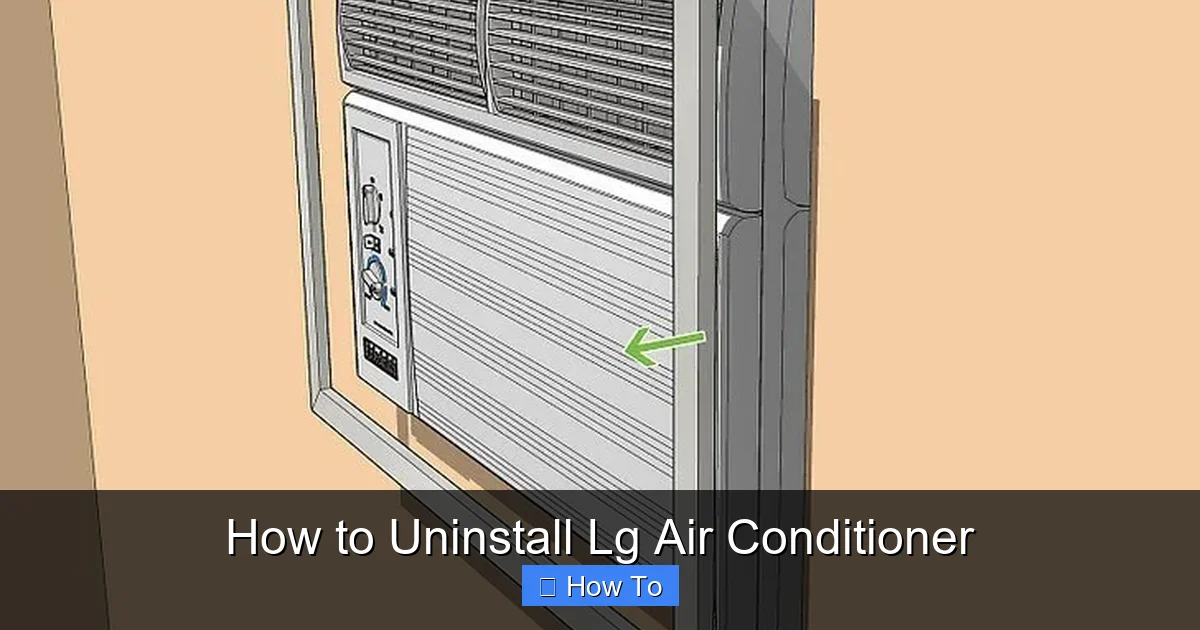
Visual guide showing the main components of an LG window unit before removal.
Image source: wikihow.com
Before diving into the how-to, it’s helpful to understand why you might need to uninstall your LG air conditioner in the first place. Common reasons include:
Replacing an old unit: If your AC is outdated, inefficient, or frequently breaking down, upgrading to a newer LG model with better energy ratings (like those with 2026 ENERGY STAR standards) makes sense.
Moving to a new home: You may want to take your trusted LG unit with you, especially if it’s a high-end model with smart controls or inverter technology.
Seasonal storage: In colder climates, some homeowners remove window units during winter to prevent drafts and improve insulation.
Renovations or remodeling: If you’re redoing a room or changing the layout, you might need to temporarily remove the AC.
Repairs or servicing: Sometimes, major internal issues require the unit to be taken out for professional repair.
Whatever your reason, proper uninstallation ensures your safety, protects your home, and preserves the unit for future use. For more on this, see our guide on air conditioner leak.
Tools and Materials You’ll Need
Before you begin, gather all the necessary tools and materials. Having everything ready will save time and reduce frustration.
Basic Tools
Screwdrivers: Both Phillips and flathead, depending on your unit’s screws.
Adjustable wrench or pliers: For loosening nuts and bolts, especially on split systems.
Drill (optional): Useful if screws are rusted or tightly secured.
Vacuum cleaner: To clean dust and debris from the unit and surrounding area.
Duct tape or zip ties: For securing loose wires or hoses temporarily.
Measuring tape: Helpful if you’re planning to reinstall or replace with a new unit.
Safety Gear
Work gloves: Protect your hands from sharp edges and dirt.
Safety goggles: Prevent dust or debris from getting into your eyes.
Sturdy shoes: Avoid slipping or injury, especially when handling heavy units.
Additional Items
Drop cloth or tarp: Place under the work area to catch dust and water.
Bucket or container: For collecting any residual water or debris.
Camera or smartphone: Take photos during disassembly for reference.
Assistant (recommended): Window units can be heavy and awkward to handle alone.
Adding a magnetic tray for screws and a flashlight for tight spaces can make the job smoother.
Safety First: Pre-Uninstallation Checklist
Safety is the most important part of uninstalling any air conditioner. LG units, like all ACs, involve electrical components, refrigerants, and sometimes heavy parts. Follow these steps before you begin:
1. Turn Off the Power
Never work on an air conditioner while it’s plugged in or receiving power. Locate the circuit breaker that controls the AC unit and switch it off. For extra safety, unplug the unit from the wall outlet. If it’s hardwired (common with split systems), ensure the breaker is off and consider placing a lockout tag to prevent accidental reactivation. For more on this, see our guide on air conditioner vs fan electricity usage.
2. Check for Refrigerant
Modern LG air conditioners use refrigerants like R-32 or R-410A, which are safe when contained but harmful if released into the air. Do not attempt to remove or release refrigerant yourself. This is illegal in many regions and requires EPA certification. If your unit needs refrigerant removal, contact a licensed HVAC technician.
3. Assess the Unit’s Weight and Size
Window units can weigh 50–100 pounds, and split-system indoor units are also heavy. Determine if you can safely lift and carry the unit. If not, enlist help or consider hiring professionals.
4. Clear the Work Area
Remove furniture, decorations, or obstacles near the installation site. Ensure there’s enough space to work comfortably and safely.
5. Prepare for Water Drainage
Even when off, some units may have residual water in the drain pan or coils. Place a bucket or towel underneath to catch any drips.
Using a lockout/tagout kit on the breaker adds an extra layer of protection against accidental power‑on.
Step-by-Step Guide to Uninstalling an LG Window Air Conditioner
Window units are the most common type of LG air conditioner and are relatively straightforward to remove. Here’s how to do it safely and efficiently.
Step 1: Turn Off and Unplug the Unit
As mentioned earlier, switch off the power at the breaker and unplug the AC from the wall. Wait at least 10–15 minutes to allow any internal capacitors to discharge.
Step 2: Remove the Front Panel and Filter
Open the front grille or panel of the LG unit. Most models have a latch or screws holding it in place. Once open, remove the air filter. This is a good time to clean or replace it if you plan to reuse the unit.
Step 3: Disconnect the Drain Hose (if applicable)
Some LG window units have a condensate drain hose that directs water outside. Locate this hose (usually at the back or bottom) and disconnect it. Have a container ready to catch any water.
Step 4: Remove the Mounting Brackets or Supports
Window units are typically secured with brackets, screws, or support arms. Use a screwdriver or wrench to remove these. Be careful—some brackets are under tension and may spring loose.
Step 5: Loosen the Window Seal
Most window ACs are sealed with foam panels or accordion-style extensions on the sides. Remove these by unscrewing or sliding them out. Keep them if you plan to reinstall the unit later.
Step 6: Carefully Slide the Unit Out
With the help of a friend, gently tilt the unit slightly forward and slide it out of the window opening. Never pull the unit by the power cord or control panel. Support the bottom and sides evenly to avoid dropping it.
Step 7: Clean the Area
Once the unit is out, vacuum the window opening and surrounding area to remove dust, insulation debris, or old sealant. Wipe down the window frame if needed.
Step 8: Cap or Seal the Opening
If you’re not replacing the unit immediately, cover the opening with plywood, insulation panels, or a window insert to prevent drafts and pests.
Inspect the window frame for hidden screws or clips before you start pulling the unit out.
Step-by-Step Guide to Uninstalling an LG Split Air Conditioner
Split systems are more complex than window units because they have both indoor and outdoor components connected by refrigerant lines, electrical wiring, and drainage hoses. Removing them requires extra caution.
Step 1: Turn Off Power and Isolate the System
Switch off the power at the main breaker and the outdoor unit’s disconnect switch. This ensures no electricity is flowing to either unit.
Step 2: Schedule Refrigerant Recovery (Professional Only)
This step must be done by a licensed HVAC technician. The refrigerant in the system must be safely recovered and stored—not released. Contact an LG-certified service provider or local HVAC company. They’ll use specialized equipment to pump the refrigerant into a recovery cylinder.
Step 3: Disconnect Electrical Wiring
Once the refrigerant is removed, the technician will disconnect the electrical wires between the indoor and outdoor units. These are usually housed in a conduit or junction box. Take photos before disconnecting to remember the wiring layout.
Step 4: Disconnect the Refrigerant Lines and Drain Hose
Using a wrench, carefully loosen the flare nuts connecting the copper refrigerant lines. Have a container ready in case any residual oil or refrigerant escapes. Also, disconnect the plastic drain hose that carries condensation away.
Step 5: Remove the Indoor Unit
The indoor unit is mounted on the wall with brackets. Remove the screws holding it in place. With help, gently lower the unit from the wall. Be careful not to damage the wall or the unit.
Step 6: Remove the Outdoor Unit
The outdoor unit is typically bolted to a concrete pad or wall bracket. Remove the mounting bolts and disconnect any grounding wires. Lift the unit carefully—it can be heavy and awkward to maneuver.
Step 7: Cap the Refrigerant Lines
To prevent moisture and debris from entering the copper lines, cap them with plastic caps or tape. Label them “liquid” and “suction” if you plan to reuse them.
Step 8: Clean and Inspect
Vacuum both units and inspect for damage. Clean the indoor evaporator coils and outdoor condenser fins if possible.
Label each refrigerant line and wire bundle with colored tape before you disconnect them to simplify re‑assembly.
Troubleshooting Common Uninstallation Issues
Even with careful planning, you might run into problems. Here’s how to handle common issues:
Stuck or Rusted Screws
If screws won’t budge, apply a penetrating oil like WD-40 and let it sit for 10–15 minutes. Use a drill with a screwdriver bit for extra torque. Avoid forcing it—this can strip the screw.
Leaking Water
If water leaks during removal, it’s likely from the drain pan. Tilt the unit slightly to drain it into a bucket. Check for cracks in the pan that may need repair.
Unit Is Too Heavy or Awkward
Don’t risk injury. Use a dolly, lifting straps, or ask for help. For window units, consider removing the front panel and internal components first to lighten the load.
Wires Are Tangled or Hard to Reach
Take photos before disconnecting. Use zip ties to bundle wires neatly. If wires are too short, consult a technician—don’t stretch or splice them.
Refrigerant Smell or Hissing Sound
This indicates a leak. Stop immediately, leave the area, and contact a professional. Do not attempt to fix it yourself.
Keep a small notebook on site to log each step, torque values, and any anomalies you encounter.
What to Do After Uninstalling Your LG Air Conditioner
Once the unit is out, you have several options:
Store It Properly
If you plan to reuse the unit, store it in a dry, climate-controlled area. Cover it with a breathable cloth to prevent dust buildup. Keep it upright to avoid damaging internal components.
Dispose of It Responsibly
LG air conditioners contain metals, plastics, and refrigerants that require proper disposal. Contact your local waste management authority or an e-waste recycling center. Many retailers also offer take-back programs when you buy a new unit.
Donate or Sell
If the unit is still functional, consider donating it to a charity or selling it online. Be transparent about its condition and age.
Prepare for a New Installation
If you’re installing a new LG unit, measure the opening and ensure the electrical system can handle the load. Modern LG models often require dedicated circuits.
Recycling the copper tubing and aluminum fins can recover valuable material and reduce landfill waste.
When to Call a Professional
While many homeowners can handle window unit removal, split systems are best left to professionals—especially when refrigerant is involved. Hire a licensed HVAC technician if:
You’re uncomfortable with electrical work.
The unit is hardwired or part of a central system.
You suspect a refrigerant leak.
The unit is on an upper floor or hard-to-reach location.
You’re unsure about local disposal regulations.
Professional uninstallation typically costs $100–$300 but ensures safety and compliance.
Final Tips for a Smooth Uninstallation
Take your time: Rushing increases the risk of injury or damage.
Label everything: Use tape and markers to identify wires, hoses, and parts.
Keep manuals handy: Refer to your LG user manual for model-specific instructions.
Check local codes: Some areas require permits or inspections for AC removal.
Stay cool: Work during cooler parts of the day to avoid overheating.
Environmental Considerations and Refrigerant Regulations
Refrigerants such as R‑32 and R‑410A are potent greenhouse gases. The U.S. EPA’s Section 608 program requires that anyone who services, maintains, or disposes of equipment containing these substances be certified. Releasing refrigerant to the atmosphere is prohibited and can result in significant fines. For the most current regulatory details, consult the EPA’s refrigerant management page https://www.epa.gov/section608. ENERGY STAR also publishes up‑to‑date efficiency criteria that can help you choose a replacement unit with lower global‑warming potential https://www.energystar.gov.
Permits, Codes, and Professional Certification
Many municipalities require a mechanical permit for the removal of a split‑system air conditioner because the work involves refrigerant recovery and electrical disconnects. Check your city or county building department website before you begin; a quick call can confirm whether a permit and a licensed contractor are mandatory. In some jurisdictions, the permit fee is modest, but failing to obtain one can delay a future sale or trigger a code‑violation notice.
Post‑Uninstallation Inspection and Site Restoration
After the unit is gone, inspect the opening (window or wall sleeve) for water damage, rot, or pest entry. Replace any deteriorated flashing, caulk, or insulation before you close the opening. For split systems, verify that the refrigerant line set has been properly capped and that the electrical circuit is dead‑ended or re‑labeled in the panel. A clean, sealed opening restores the building envelope and prevents energy loss.
Conclusion
Uninstalling an LG air conditioner in 2026 doesn’t have to be a headache. With the right tools, safety precautions, and step-by-step guidance, you can remove your unit safely and efficiently. Whether you’re dealing with a window model or a split system, the key is preparation and caution—especially when it comes to electrical and refrigerant components.
Remember, if you’re ever in doubt, don’t hesitate to call a professional. Your safety and the integrity of your home are worth the investment. Once your LG air conditioner is uninstalled, you’ll be ready for whatever comes next—whether it’s a new installation, a move, or simply a cleaner, more efficient living space.
By following this guide, you’ve taken a smart, informed approach to a common household task. Now, go enjoy that cool, comfortable air—wherever you decide to put it next.
Ready to upgrade? Explore our guide on choosing the right air conditioner for your home. how to choose the right air conditioner for your home
Frequently Asked Questions
Can I uninstall an LG split system by myself?
Only the electrical disconnect and physical removal can be done by a competent DIYer; refrigerant recovery must be performed by an EPA‑certified technician.
What tools are absolutely required for a window unit?
A Phillips screwdriver, flathead screwdriver, adjustable wrench, vacuum, gloves, and a helper are the minimum; a drill and penetrating oil make stuck screws easier.
How do I know if my LG unit uses R‑32 or R‑410A?
Check the data plate on the side of the indoor or outdoor unit; the refrigerant type is listed there along with the charge amount.
Do I need a permit to remove a window air conditioner?
Most jurisdictions do not require a permit for a simple window unit, but always verify with your local building department.
What should I do with the copper line set after removal?
Cap both ends with flare caps or tape, label “liquid” and “suction,” and store them in a dry place if you plan to reuse them; otherwise recycle the copper.
Is it safe to store an uninstalled LG AC in a garage?
Yes, provided the garage stays above freezing, is dry, and the unit remains upright and covered with a breathable cloth.

