
How to Remove Filter from Lg Air Conditioner
Removing the filter from your LG air conditioner is essential for maintaining indoor air quality and system efficiency. This guide walks you through the process with clear, step-by-step instructions tailored for 2026 LG models, including window, split, and portable units.
Key Takeaways
Regular filter cleaning improves air quality: A clean filter traps dust, pollen, and allergens, ensuring fresher, healthier air in your home.
Improves AC efficiency and lowers energy bills: A clogged filter forces your unit to work harder, increasing energy consumption by up to 15%.
Most LG filters are washable and reusable: Save money and reduce waste by cleaning instead of replacing filters every month.
Filter removal varies by model type: Window, split, and portable LG units have different access points—know your model before starting.
Always turn off power before cleaning: Safety first—unplug or switch off the unit at the breaker to avoid electrical hazards.
Clean filters every 2–4 weeks during peak use: Frequency depends on usage, pets, and air quality in your area.
Check for damage during cleaning: Replace filters with tears, mold, or heavy buildup that won’t come clean.
How to Remove Filter from LG Air Conditioner: A Complete 2026 Guide
Keeping your LG air conditioner running smoothly isn’t just about setting the right temperature—it’s about regular maintenance. One of the most important, yet often overlooked, tasks is removing and cleaning the air filter. In 2026, LG continues to lead the HVAC market with innovative, energy-efficient models, but even the smartest units need a little TLC. Whether you’re using a window unit, a ductless mini-split, or a portable AC, knowing how to remove the filter from your LG air conditioner is a skill every homeowner should have. For more on this, see our guide on air conditioner hvac filter.
This guide will walk you through the entire process—from identifying your model type to safely removing, cleaning, and reinstalling the filter. We’ll also cover troubleshooting tips, maintenance schedules, and why this simple task can make a big difference in your comfort and energy bills. By the end, you’ll feel confident handling this essential chore like a pro.
Why Cleaning Your LG Air Conditioner Filter Matters
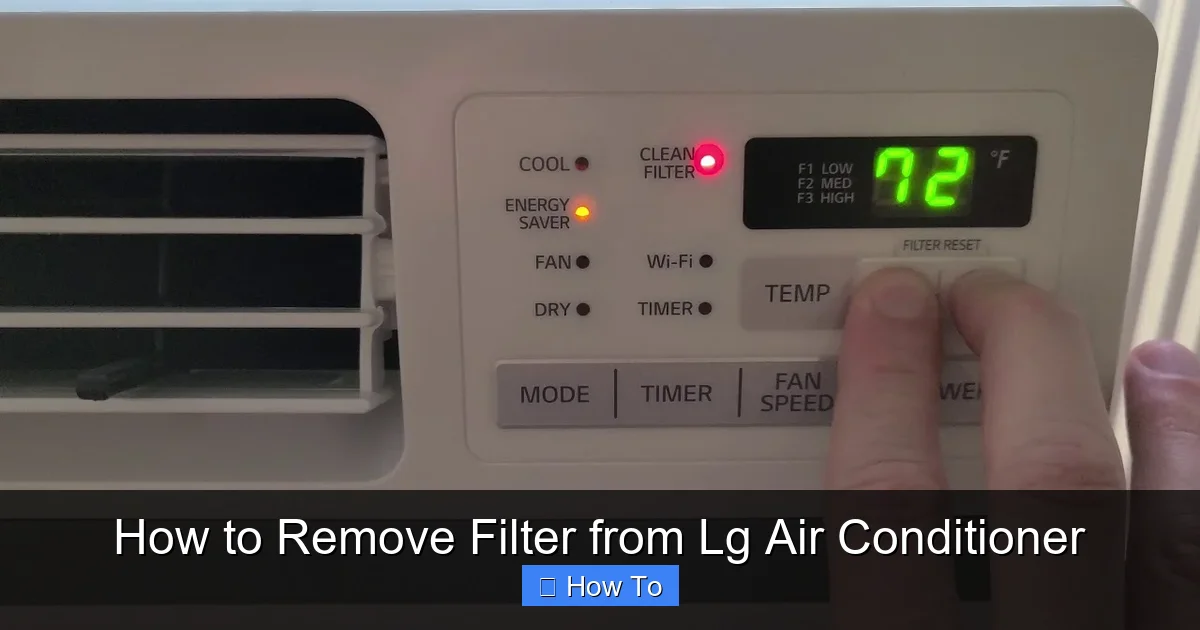
Diagram showing filter access on an LG window air conditioner
Image source: i.ytimg.com
Before diving into the “how,” let’s talk about the “why.” Your air conditioner’s filter plays a crucial role in both performance and air quality. Over time, it collects dust, pet dander, pollen, and other airborne particles. If left unchecked, this buildup restricts airflow, forcing your AC to work harder to cool your space. For more on this, see our guide on hisense window air conditioner filter.
In 2026, energy efficiency is more important than ever. With rising electricity costs and growing environmental concerns, a well-maintained AC unit can reduce your energy consumption by up to 15%. That’s not just good for the planet—it’s good for your wallet. ENERGY STAR estimates that a clean filter can cut cooling costs by up to 15% (ENERGY STAR).
Additionally, a dirty filter can lead to poor indoor air quality. If you or your family members suffer from allergies or asthma, a clogged filter can worsen symptoms by circulating contaminated air. Regular cleaning ensures your LG unit delivers clean, cool air efficiently.
Finally, neglecting the filter can shorten the lifespan of your air conditioner. Overworked motors and frozen coils are common issues caused by restricted airflow. A simple 10-minute filter cleaning every few weeks can prevent costly repairs down the line.
Identifying Your LG Air Conditioner Model
LG offers a wide range of air conditioning units, and the filter removal process varies slightly depending on the type. Before you begin, it’s important to identify which model you have. Here are the most common types in 2026:
Window Units: Self-contained units installed in a window or wall opening. Common in apartments and older homes.
Split (Mini-Split) Systems: Consist of an outdoor compressor and one or more indoor air handlers. Popular for their quiet operation and zoning capabilities.
Portable Air Conditioners: Mobile units that vent hot air through a window kit. Ideal for renters or rooms without ductwork.
Central Air Conditioners with LG Air Handlers: Less common, but some homes use LG indoor units paired with third-party furnaces or air handlers.
To find your exact model, check the label on the unit itself—usually located on the side, back, or inside the front panel. You can also refer to the user manual or search your model number on LG’s official website for specific instructions.
Using LG’s Online Model Lookup
LG’s support portal lets you enter your model number to download the exact owner’s manual and filter part numbers. This is especially handy for newer 2026 models with updated filter designs. Visit LG Support for the lookup tool.
Tools and Supplies You’ll Need
The good news? You don’t need fancy tools to remove and clean your LG air conditioner filter. Here’s what you’ll need:
A soft brush or vacuum with a brush attachment
Mild dish soap or a gentle cleaning solution
A clean, dry towel
A bowl or sink for rinsing
Optional: Compressed air (for stubborn dust)
Avoid using harsh chemicals, bleach, or abrasive scrubbers—these can damage the filter material. Stick to mild soap and lukewarm water for best results.
Tip: If you notice bent aluminum fins behind the filter, a fin comb (inexpensive at hardware stores) can straighten them and restore airflow.
Step-by-Step Guide: Removing the Filter from a Window LG Air Conditioner
Window units are among the most straightforward when it comes to filter access. Here’s how to remove the filter safely and effectively.
Step 1: Turn Off the Power
Safety is paramount. Before touching any part of your air conditioner, turn it off at the remote or control panel. Then, unplug the unit from the wall outlet. If your unit is hardwired, switch off the corresponding circuit breaker. This prevents accidental startup and reduces the risk of electric shock.
Step 2: Locate the Front Panel
Most LG window units have a front grille or panel that covers the internal components. This panel is usually held in place by clips or screws. Look for small tabs along the top or sides of the grille.
Gently press or lift the tabs to release the panel. Some models may require you to slide the panel upward or outward. Be careful not to force it—LG designs these panels to open smoothly with minimal pressure.
Step 3: Find the Filter
Once the front panel is open, you’ll see the air filter positioned just behind the grille. It’s typically a flat, rectangular mesh screen made of plastic or aluminum. In some newer LG models, the filter may be labeled or color-coded for easy identification.
The filter sits in a plastic frame or slide-in track. It’s designed to be removable for cleaning.
Step 4: Remove the Filter
To remove the filter, gently pull it straight out from the frame. Most LG window units have a handle or lip on the edge of the filter to make this easier. If there’s no handle, use your fingers to grip the sides and slide it out.
Avoid bending or twisting the filter, as this can damage the mesh or frame. If it feels stuck, double-check that all clips are released and that the panel is fully open.
Step 5: Inspect and Clean the Filter
Hold the filter up to a light source. If you can’t see through it, it’s time for a cleaning. Use a soft brush or vacuum to remove loose dust from both sides.
For a deeper clean, rinse the filter under lukewarm water. Add a few drops of mild dish soap to a bowl or sink, then gently agitate the filter to loosen embedded dirt. Rinse thoroughly until the water runs clear.
Let the filter air dry completely on a clean towel—never reinstall a wet filter, as moisture can promote mold growth.
Step 6: Reinstall the Filter
Once dry, slide the filter back into its slot. Make sure it’s oriented correctly—most LG filters have a directional arrow or label indicating airflow direction. The arrow should point toward the unit (into the airflow).
Push the filter gently until it’s fully seated. Close the front panel and secure any clips or screws. Plug the unit back in and turn it on to test.
In practice, a common mistake is reinstalling the filter backwards; the airflow arrow must point into the unit.
Step-by-Step Guide: Removing the Filter from a Split (Mini-Split) LG Air Conditioner
Split systems are more complex than window units, but filter removal is still manageable for most homeowners. The indoor unit is mounted high on the wall, so you may need a step stool for access.
Step 1: Power Down the System
Turn off the indoor unit using the remote. Then, switch off the power at the outdoor compressor unit or the main breaker. This ensures no electricity is flowing to the system.
Step 2: Open the Front Panel
LG mini-split units typically have a front panel that swings open like a door. Look for a small latch or button near the bottom of the unit. Press or slide it to release the panel.
Some models have a magnetic seal—gently pull the panel away from the unit until it opens fully. Be careful not to strain the hinge.
Step 3: Locate the Filter
Inside, you’ll see one or two flat filters mounted vertically. These are usually made of fine mesh and may have a plastic frame. In dual-filter models, one filter is for dust and the other for odor or allergens.
The filters are held in place by clips or a slide-in track. They’re designed to be removed easily for cleaning.
Step 4: Remove the Filter
Grasp the filter by its edge or handle and pull it straight out. If there are two filters, remove them one at a time to avoid mixing them up.
Some LG models have a “filter reset” button that lights up when cleaning is needed. If your unit has this feature, note it for future reference.
Step 5: Clean the Filter
Follow the same cleaning process as with window units: vacuum, rinse with soapy water, and air dry. Avoid wringing or folding the filter.
For odor-control filters (often darker in color), avoid soaking—these are usually not washable. Instead, use a soft brush or compressed air to remove dust.
Step 6: Reinstall and Reset
Slide the clean, dry filter back into place. Close the front panel until it clicks securely. If your unit has a filter reset button, press it to clear the maintenance reminder.
Restore power and test the system.
Many 2026 LG mini-splits send a filter-clean reminder to the ThinQ app; resetting the button syncs the alert.
Step-by-Step Guide: Removing the Filter from a Portable LG Air Conditioner
Portable ACs are convenient but can be trickier due to their compact design. Here’s how to access the filter.
Step 1: Turn Off and Unplug
Always start by turning off the unit and unplugging it from the wall. Portable units often have exposed electrical components, so safety is critical.
Step 2: Locate the Filter Access Panel
Most portable LG units have a filter access panel on the back or side. Look for a small rectangular cover held by screws or clips.
Use a screwdriver if needed, or press the clips to release the panel. Some models have a slide-out tray instead.
Step 3: Remove the Filter
Once the panel is open, you’ll see the filter—usually a thin mesh screen. Gently pull it out. Some models have a carbon filter behind the mesh, which should not be washed.
Step 4: Clean and Reinstall
Clean the mesh filter as described earlier. If there’s a carbon filter, replace it every 6–12 months or as recommended by LG.
Reinsert the clean filter, close the panel, and secure it. Plug the unit back in and test.
Troubleshooting Common Issues
Even with careful handling, you might run into problems. Here are some common issues and how to fix them.
Filter Won’t Come Out
If the filter is stuck, don’t force it. Check for hidden clips, screws, or a locked panel. Refer to your user manual for model-specific instructions. Sometimes, the filter frame needs to be tilted at an angle to release.
Filter Is Damaged or Torn
A torn filter won’t trap particles effectively. Replace it with a genuine LG filter or a compatible third-party option. Avoid using duct tape or makeshift fixes—they can damage the unit.
Unit Still Blows Dust After Cleaning
This could mean the filter isn’t fully clean, or there’s buildup inside the unit. Consider having a professional clean the evaporator coils and fan blades. Also, check for leaks or gaps around the filter frame that could let unfiltered air in.
Error Codes After Reinstallation
Some LG units display error codes if the filter isn’t properly seated. Turn off the unit, remove and reinsert the filter, and reset the system. If the error persists, consult LG support.
When to Call a Professional
If the unit still blows warm air, makes unusual noises, or shows persistent error codes after filter cleaning, the issue may be refrigerant charge, coil fouling, or a failing fan motor. Our guide on troubleshooting AC blowing warm air covers those deeper diagnostics.
Maintenance Tips for 2026 LG Models
To keep your LG air conditioner in top shape, follow these best practices:
Clean the filter every 2–4 weeks during cooling season. Increase frequency if you have pets or live in a dusty area.
Use genuine LG filters when replacements are needed. They’re designed to fit perfectly and maintain airflow.
Check for firmware updates on smart LG models. Updated software can improve efficiency and add new maintenance alerts.
Schedule annual professional servicing to clean internal components and check refrigerant levels.
Keep the area around the unit clear of furniture, curtains, or debris to ensure proper airflow.
For a printable seasonal checklist, see our seasonal air conditioning maintenance tips.
Filter Replacement vs. Cleaning: Decision Guide
Not every filter can be washed indefinitely. Use this quick reference to decide:
| Condition | Action |
|---|---|
| Light dust, intact mesh | Wash and reuse |
| Heavy grease or smoke residue | Replace (washing won’t restore full efficiency) |
| Tears, holes, or frame cracks | Replace immediately |
| Mold or mildew spots | Replace; clean housing with antimicrobial spray |
| Odor-control (carbon) filter | Replace per manufacturer schedule (usually 6–12 months) |
Comparison of Filter Access by LG Unit Type
| Unit Type | Filter Location | Tools Needed | Typical Clean Time |
|---|---|---|---|
| Window | Behind front grille | None (clips) | 5–10 min |
| Mini-Split | Inside front panel | Step stool | 5–10 min |
| Portable | Rear/side access panel | Screwdriver (sometimes) | 5–10 min |
| Central (LG air handler) | Return air grille or slot | None | 5 min |
Smart Features & Filter Maintenance Alerts
Most 2026 LG models connect to the ThinQ app, which tracks runtime and sends a “Clean Filter” notification based on actual usage rather than a fixed calendar. After washing, tap “Filter Reset” in the app to clear the alert and restart the timer. This data-driven reminder is more accurate than a manual schedule, especially in households with variable occupancy.
Frequently Asked Questions
How often should I clean my LG air conditioner filter?
Clean every 2–4 weeks during heavy use; monthly in lighter seasons. Homes with pets or high dust may need bi‑weekly cleaning.
Can I run my LG AC without a filter?
No. Operating without a filter lets debris coat the evaporator coil, reducing efficiency and risking costly coil cleaning or replacement.
Are LG air conditioner filters washable?
Most LG mesh filters are washable. Carbon/odor filters are not—replace them instead. Always check the label on the filter frame.
What happens if I don’t clean the filter?
Airflow drops, cooling capacity falls, energy use rises up to 15%, and the compressor may overheat, shortening system life.
Where can I buy genuine LG replacement filters?
Purchase from LG’s official parts store, authorized dealers, or the LG Support site using your model number for exact fit.
Does cleaning the filter improve indoor air quality?
Yes. A clean filter captures allergens, dust, and pollen; a dirty one recirculates them, worsening allergies and asthma symptoms.
Conclusion
Removing the filter from your LG air conditioner is a simple but powerful way to improve performance, save energy, and breathe cleaner air. Whether you have a window, split, or portable unit, the process is straightforward with the right guidance. By following this 2026 guide, you’ll keep your LG AC running efficiently for years to come.
Remember: a little maintenance goes a long way. Set a calendar reminder to check your filter every few weeks, and don’t wait for problems to appear. Your comfort, your health, and your wallet will thank you. For year‑round upkeep, explore our seasonal air conditioning maintenance tips.

