
The timer light blinking on your Panasonic air conditioner usually signals an issue like a dirty filter, remote control malfunction, or internal error. Most of these problems are easy to fix at home, but persistent blinking means it’s time to check settings or contact support. Ignoring it could lead to reduced efficiency or unexpected breakdowns, so addressing the blinking light quickly keeps your AC running smoothly.
Have you ever looked at your Panasonic air conditioner and noticed the timer light blinking? It’s a small detail, but that little light can say a lot about what’s going on inside your unit. Whether you’re trying to sleep, working from home, or just relaxing, seeing that blinking indicator can be annoying—and sometimes worrying. You might wonder: “Is this normal?” or “Did I do something wrong?” Don’t panic. In most cases, a blinking timer light isn’t a sign of disaster. Instead, it’s your AC’s way of sending you a message—a helpful one, once you know how to read it.
Panasonic air conditioners are known for their energy efficiency, quiet operation, and smart features. But like any appliance, they rely on sensors, timers, and user inputs to work properly. When the timer light starts blinking, it usually means the system has detected something out of place—whether it’s a simple setting change or a need for maintenance. The good news? Many of these issues are easy to solve yourself. In this article, we’ll walk through everything you need to know about why your Panasonic AC’s timer light is blinking, what each pattern means, and how to fix it—step by step.
—
Key Takeaways
- Timer light blinking often indicates a minor issue: It commonly points to problems such as a dirty air filter, incorrect remote control settings, or a scheduled timer activation.
- Check the remote control first: A dead or faulty remote can send wrong signals, making the AC behave unexpectedly—replace batteries or test another remote.
- Clean or replace the air filter: A clogged filter restricts airflow, triggering safety features that cause the timer light to blink as a warning.
- Reset the unit if necessary: Power cycling the air conditioner often clears temporary glitches and resets the system’s memory.
- Refer to your model-specific manual: Different Panasonic models have unique blinking patterns—knowing your code helps diagnose the problem faster.
- Persistent blinking may require professional help: If the light blinks continuously after basic troubleshooting, there might be a deeper electrical or mechanical fault.
- Prevent future issues with regular maintenance: Cleaning filters monthly and scheduling annual servicing reduces the chance of error codes and blinking indicators.
Quick Answers to Common Questions
Why is my Panasonic AC timer light blinking once?
It usually means the air filter needs cleaning or the unit is activating a scheduled timer. Check your filter and timer settings first.
Can a dead remote cause the timer light to blink?
Yes. A weak or dead remote may send incorrect signals, confusing the AC. Replace the batteries or use the physical controls.
How do I reset my Panasonic air conditioner?
Unplug it for 30 seconds, then plug it back in. Wait 5–10 minutes for full restart. This often clears temporary errors.
What does multiple blinks mean?
Multiple blinks indicate specific error codes. One blink = minor alert; two blinks = moderate issue; three+ = serious fault. Check your manual for details.
Should I ignore the blinking light?
No. While some blinks are harmless, others signal maintenance needs or potential problems. Addressing them early prevents bigger issues.
📑 Table of Contents
Why Is My Panasonic Air Conditioner Timer Light Blinking?
The timer light on your Panasonic air conditioner is designed to show you the status of your unit’s timer functions. When it blinks, it’s not just random behavior—it’s communicating something specific. Understanding these signals can save you time, money, and frustration. Let’s break down the most common reasons behind a blinking timer light.
1. Scheduled Timer Activation
One of the most frequent causes of a blinking timer light is the activation of a programmed timer. Many Panasonic models allow you to set start and stop times using the built-in timer or remote control. When the scheduled time arrives, the timer activates, and the light blinks briefly to confirm the action. This is completely normal and expected behavior.
For example, if you programmed your AC to turn on at 6 PM, you might see the timer light blink around that time. It’s simply letting you know the system is following your instructions. To verify, check your remote or panel settings. If you didn’t schedule anything, then the blinking might point to something else.
2. Dirty or Clogged Air Filter
Air filters are essential for maintaining airflow and indoor air quality. Over time, dust and debris accumulate on the filter, reducing efficiency and potentially triggering safety warnings. Panasonic ACs are equipped with sensors that monitor airflow. When the filter becomes too dirty, the system may respond by flashing the timer light as a reminder.
This blinking pattern is often accompanied by reduced cooling performance or unusual noises. The solution is simple: locate your filter (usually behind a front panel), remove it, and clean it thoroughly. If it’s heavily soiled, consider replacing it. Most Panasonic units recommend cleaning every 1–2 months during heavy use.
3. Remote Control Issues
Your remote control plays a big role in how your AC operates. If the timer light blinks after pressing buttons, it could mean the remote isn’t communicating properly with the unit. Common culprits include low battery power or signal interference.
Try replacing the remote batteries first. If that doesn’t work, test the remote near the AC unit while pointing directly at it. If the buttons still don’t respond, the remote itself might be faulty. In that case, you can use the physical buttons on the AC unit to control settings temporarily.
4. Incorrect Temperature or Mode Settings
Sometimes, users accidentally change settings—like switching to fan mode instead of cool mode—without realizing it. This can confuse the system and trigger a blinking light. For instance, if the AC is set to heat mode but the room temperature is already warm, the system might interpret this as an error and flash the timer light.
Double-check your current mode (cool, dry, fan, etc.) and ensure it matches your needs. Also, verify that the target temperature is realistic. Setting it too high or too low can cause the unit to cycle abnormally.
5. Power Surge or Reset Needed
Power fluctuations or brief outages can disrupt the AC’s internal programming. After power returns, the system may enter a reset state, indicated by a blinking timer light. This is similar to a computer restarting after losing power.
To resolve this, unplug the AC for 30 seconds, then plug it back in. Wait a few minutes for the unit to fully reboot. Most models will restore normal operation within 5–10 minutes. If the blinking continues, refer to your manual for reset procedures.
—
How to Read Panasonic AC Blinking Light Patterns
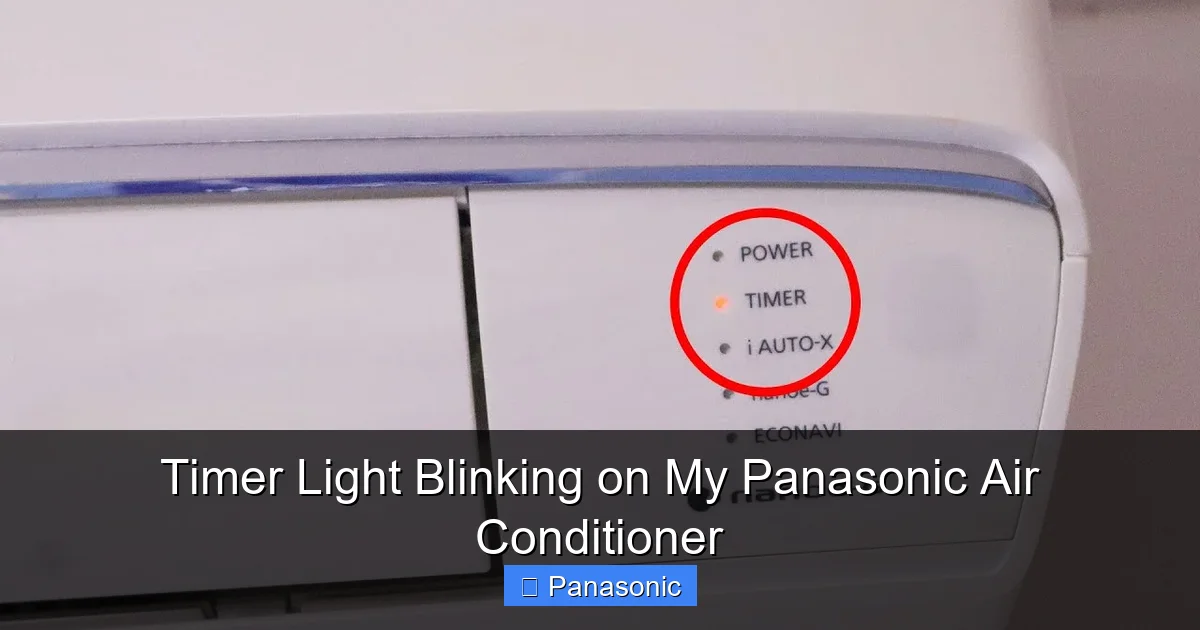
Visual guide about Timer Light Blinking on My Panasonic Air Conditioner
Image source: i.ytimg.com
Each Panasonic air conditioner model uses blinking patterns to convey different messages. While exact codes vary by series, there are general guidelines you can follow. Knowing these patterns helps you diagnose the issue faster.
Understanding Blink Codes
Most Panasonic units blink the timer light a certain number of times to represent a code. For example:
– 1 blink = minor alert (e.g., filter needs cleaning)
– 2 blinks = medium issue (e.g., refrigerant leak suspected)
– 3+ blinks = serious error (e.g., sensor fault)
Some models also use combinations of short and long blinks. Refer to your user manual for your specific model. If you don’t have it, search online using your model number—many Panasonic resources provide detailed blink code explanations.
Common Blink Scenarios
Let’s look at real-life examples:
Example 1: Sarah notices her Panasonic CS/CU-XP12WKUW timer light blinks once every 5 seconds. She checks the filter and finds it dusty. After cleaning, the blinking stops within 10 minutes.
Example 2: Mark’s AC blinks three times repeatedly. He consults his manual and learns it indicates a compressor issue. Since this requires professional attention, he schedules a service appointment.
These examples show how context and knowledge of blink codes make all the difference.
—
Troubleshooting Steps for a Blinking Timer Light
Don’t let a blinking light stress you out. Follow these practical steps to identify and fix the problem.
Step 1: Check the Remote Control
Start by testing the remote. Replace the batteries if they’re old. Press the “Timer” or “On/Off” button and observe if the light responds. If not, try the physical buttons on the AC unit.
Step 2: Inspect the Air Filter
Turn off the AC and locate the filter. Remove it and run it under lukewarm water with mild soap. Let it dry completely before reinstalling. If it’s damaged or too dirty to clean, replace it.
Step 3: Verify Timer Settings
Go into the timer menu (usually via the remote) and check if any programs are active. Cancel any unwanted timers and reset the clock if needed.
Step 4: Power Cycle the Unit
Unplug the AC from the wall outlet. Wait 30 seconds. Plug it back in and turn it on. Allow 5–10 minutes for full startup.
Step 5: Consult the Manual or Online Resources
Search for your model number + “blink code” or “timer light meaning” on Panasonic’s official website or trusted forums.
Step 6: Contact Support if Needed
If the blinking persists after all steps, contact Panasonic customer service or a certified technician. Mention the blink pattern and any error messages.
—
When to Call a Professional
While many blinking light issues are DIY-friendly, some situations demand expert help.
Signs You Need a Technician
– The timer light blinks continuously without stopping.
– You hear unusual noises like grinding or clicking.
– The AC isn’t cooling despite normal settings.
– There’s water leaking around the unit.
– The remote doesn’t work at all.
These could indicate electrical faults, refrigerant leaks, or internal component failures. Attempting repairs without proper training can be dangerous or void your warranty.
—
Preventive Maintenance Tips
Avoid future blinking lights with regular care.
Monthly Maintenance Checklist
– Clean or replace the air filter.
– Wipe down exterior vents with a dry cloth.
– Ensure no furniture blocks airflow.
Annual Servicing
Schedule a professional inspection once a year. Technicians can check refrigerant levels, clean coils, and test sensors.
—
Conclusion
A blinking timer light on your Panasonic air conditioner isn’t necessarily alarming—it’s often a friendly reminder or a simple signal to take action. Whether it’s a dirty filter, a misconfigured timer, or a minor glitch, most issues are manageable with basic troubleshooting. By understanding the meaning behind the blinks, keeping your unit clean, and responding promptly, you can maintain optimal performance and extend your AC’s lifespan.
Remember, Panasonic designs its appliances to be user-friendly and durable. When in doubt, always refer to your manual or reach out to support. With a little attention and care, your AC will continue to keep your space comfortable for years to come.
Frequently Asked Questions
Is it safe to use my Panasonic AC with a blinking timer light?
In most cases, yes—especially if it’s just a filter warning or scheduled timer. However, if the blinking continues or is accompanied by strange noises, stop use and consult a technician.
How often should I clean my AC filter?
Every 1–2 months during regular use, or monthly during peak seasons. A dirty filter triggers the blinking light and reduces efficiency.
Can power surges cause the timer light to blink?
Yes. Sudden power loss or surges can disrupt the AC’s programming, causing it to enter a reset state with a blinking light.
Do all Panasonic models use the same blink codes?
No. Blink patterns vary by model. Always check your specific user manual or Panasonic’s support site for accurate information.
Will cleaning the filter stop the blinking?
Often, yes. If the light was blinking due to poor airflow from a clogged filter, cleaning it usually resolves the issue within 10–15 minutes.
Can I fix a faulty remote myself?
Try replacing the batteries first. If that doesn’t work, the remote may need replacement. Some models allow pairing with new remotes via the AC panel.
