Panasonic Air Conditioner TV Promotion offers unbeatable value by bundling top-tier air conditioning units with cutting-edge televisions—perfect for modern homes seeking both comfort and style. This limited-time offer blends energy-saving technology with immersive viewing experiences , making it ideal for families and tech enthusiasts alike. Don't miss out on smart features, seasonal discounts, and expert installation support included in every package.
Key Takeaways
Exclusive Bundled Savings: Get discounted prices when you purchase a Panasonic air conditioner alongside a compatible TV during the promotion period.
Energy-Efficient Design: Both appliances feature advanced inverter technology, reducing electricity bills by up to 60% compared to standard models.
Smart Integration: Seamlessly connect your AC and TV via Wi-Fi or voice control through Google Assistant and Alexa for ultimate convenience.
Premium Display Quality: Enjoy 4K HDR, OLED options, and Dolby Vision on select TVs paired with whisper-quiet AC operation.
Professional Installation & Support: Free setup, warranty extension, and 24/7 customer service are included at no extra cost.
Sustainable Choice: Eco-friendly refrigerants and recyclable packaging reflect Panasonic’s commitment to environmental responsibility.
Limited-Time Availability: Promotional pricing ends soon—act fast to secure your upgrade before stock runs out.
Quick Answers to Common Questions
Is the Panasonic Air Conditioner TV Promotion available worldwide?
No, the promotion is currently offered in select regions including North America, parts of Europe, India, and Southeast Asia. Availability varies by country and local regulations—check with official Panasonic retailers for details.
Can I buy just the air conditioner or TV separately during the promotion?
Yes, individual items remain available at standard retail prices. However, only complete bundles qualify for the advertised discounts and added benefits like free installation and extended warranties.
How long does installation typically take?
Standard installation takes 2–3 hours for both units combined. Complex setups (e.g., multi-story homes or custom ductwork) may require additional time—technicians will provide accurate estimates upon arrival.
Are financing options available for the bundled purchase?
Many authorized dealers offer 0% APR financing plans over 12–24 months, subject to credit approval. Interest-free periods apply only to promotional bundles—verify terms at checkout.
What if I encounter compatibility issues after installation?
Panasonic’s certified installers perform pre-deployment compatibility checks. If issues arise post-installation, contact support immediately—most problems are resolved within 48 hours at no charge due to the promotion’s warranty coverage.
📑 Table of Contents
The Ultimate Home Comfort Upgrade: Panasonic Air Conditioner TV Promotion
Why Choose the Panasonic Air Conditioner TV Promotion?
How the Panasonic Air Conditioner TV Promotion Works
Smart Features That Bring Your Space to Life
Energy Efficiency Meets Entertainment Excellence
Customer Experiences & Real-World Benefits
Tips for Maximizing Your Promotion Benefits
What Happens After the Promotion Ends?
Environmental Responsibility in Action
Final Thoughts: Is This Right for You?
The Ultimate Home Comfort Upgrade: Panasonic Air Conditioner TV Promotion
Imagine coming home after a long day to the perfect climate—cool, refreshing, and whisper-quiet—while also stepping into a living room bathed in vibrant, crystal-clear picture quality. That’s exactly what the Panasonic Air Conditioner TV Promotion delivers: a rare opportunity to transform your entire home environment with two of today’s most essential electronics, bundled together at an irresistible price. Whether you're upgrading your bedroom suite, refreshing your family lounge, or setting up a media room, this limited-time offer brings together Panasonic’s award-winning cooling technology and its flagship television lineup—all under one roof.
This isn’t just another discount sale. It’s a strategic fusion of comfort and entertainment engineered for modern lifestyles. With rising energy costs and growing demand for smart home ecosystems, consumers are looking beyond individual appliances—they want integrated solutions that simplify life without sacrificing performance. The Panasonic Air Conditioner TV Promotion answers that call perfectly. By pairing an energy-efficient air conditioner with a high-definition TV, Panasonic ensures you get more value, fewer headaches, and a smarter, more enjoyable living space. And the best part? You don’t have to compromise on quality. Every unit meets rigorous safety and performance standards, backed by decades of innovation and trust.
Why Choose the Panasonic Air Conditioner TV Promotion?
If you’ve ever bought appliances separately only to realize they don’t play well together, you know how frustrating compatibility issues can be. But with this promotion, Panasonic removes those barriers entirely. Instead of piecing together components from different brands, you get a harmonized system designed to work seamlessly—whether that means adjusting your AC temperature from your couch or syncing lighting and audio based on TV activity. This holistic approach not only enhances user experience but also future-proofs your home against obsolescence.
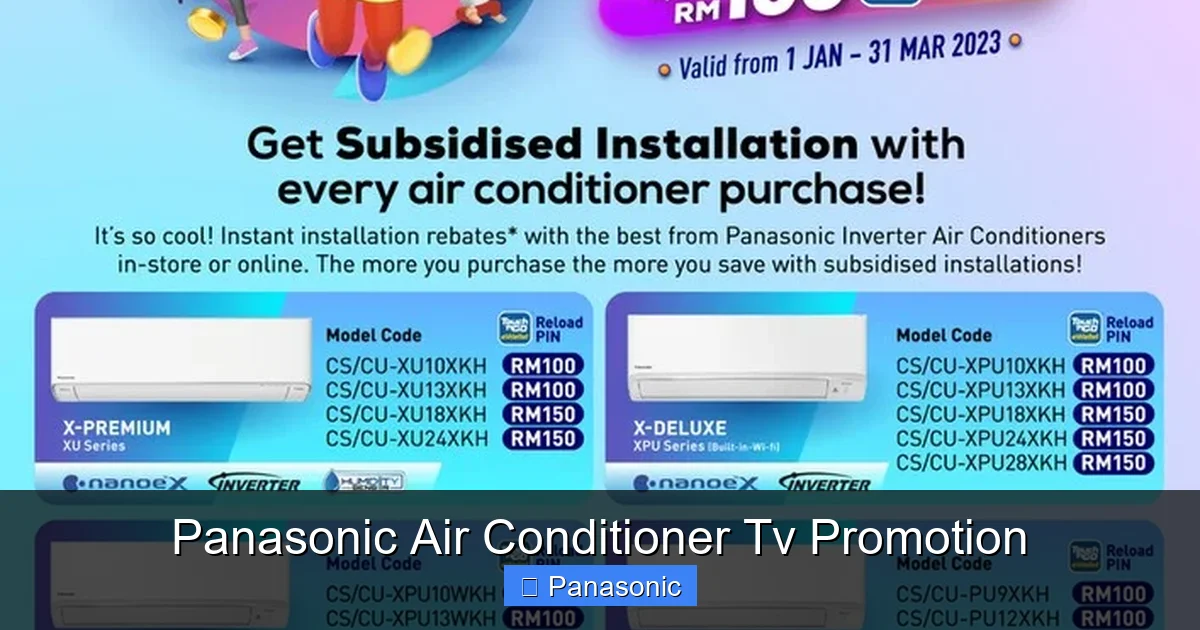
Look for the campaign model list and the bundle price sticker on the stand — those two details are what actually qualify for the discount.
Panasonic air conditioner and TV bundle promotion display in a retail showroom.
Visual guide about Panasonic Air Conditioner Tv Promotion
Image source: everydayonsales.com
Another major advantage lies in cost savings. Buying two premium products individually could easily exceed $1,500. Yet during this promotion, eligible customers enjoy discounts of up to 30%, plus free delivery and installation. Add in extended warranties and complimentary technical support, and you’re getting enterprise-level service without the enterprise price tag. For budget-conscious families, first-time homeowners, or anyone tired of juggling multiple service appointments, this deal is nothing short of a game-changer.
Potential Drawbacks and Considerations
While the promotion offers compelling value, it’s important to weigh a few trade-offs. The eligible model list is curated, so you may not find every capacity or screen size you’d prefer. Regional availability can be patchy—some rural areas lack certified installers, leading to longer wait times. Bundled installation covers standard mounting and hookup; custom ductwork, additional refrigerant lines, or complex electrical upgrades usually incur extra fees. Finally, the promotional discount is tied to purchasing both units together; if you later decide to replace only one component, you’ll lose the bundled pricing on the remaining item. In practice, most buyers find these limitations manageable, but clarifying them upfront avoids surprises.
How to Verify You’re Looking at the Real Promotion
Bundled appliance offers are among the easiest things to imitate, so spend ten minutes verifying before you hand over a deposit. None of these checks are difficult, and each one is designed to be answerable by a dealer in a single email.
- Start from the manufacturer’s own dealer locator. A promotion advertised on a marketplace page or a social post is not the same as a promotion honoured by an authorised retailer. Work backwards from the official stockist list, then cross-check the exact model codes on Panasonic’s official product pages.
- Match the model codes, not the marketing. A genuine bundle quote names the air conditioner code (for example the CS/CU series) and the television code side by side. If a listing can’t print both codes, it isn’t part of the campaign — it’s just two products on the same invoice.
- Sanity-check the discount. Deeper-than-advertised savings usually mean one of three things: an older model being cleared, a parallel-import unit without local warranty support, or a bundle where the installation scope has been quietly trimmed. Ask what changed.
- Get the scope in writing. One page should list the model codes, the bundle price, what installation includes and excludes, the warranty length, the registration deadline, and the return window. A common mistake is agreeing verbally and discovering the line-set allowance on installation day.
- Check serial numbers before the crew leaves. Warranty claims are matched against serial numbers, so photograph the rating plate of each unit before the installers pack up. Those plates are also what you’ll quote on any future service call.
- Leave a paper trail for payment. Card or a bank transfer to the business, with an itemised invoice — not a transfer to an individual’s account, which can void both warranty and consumer protection.
One habit worth building whichever dealer you choose: ask for the installation report in writing at handover. If something is miswired or a flare joint weeps, that report is the document that gets it fixed at no cost. And if you want a wider view of how bundled offers compare across brands and seasons, our wider library of cooling guides tracks them as they change.
How the Panasonic Air Conditioner TV Promotion Works
The process is simple, transparent, and designed with customer ease in mind. First, visit an authorized Panasonic retailer or certified online partner during the promotional window (typically lasting 8–12 weeks). Select any qualifying air conditioner model from the CXW series or newer inverter-based lines, then choose a matching TV from the 55-inch and above OLED or LED collections. Once your selection is made, the system automatically applies the bundle discount at checkout.
Next, schedule your free installation through Panasonic’s certified network of technicians. They’ll arrive within 48 hours, install both units correctly, run diagnostic tests, and even show you how to use smart features like voice commands or mobile app controls. No hidden fees, no surprise charges—just smooth, professional service from start to finish. After completion, you’ll receive a personalized care guide and access to priority hotlines should you need assistance later.
Eligible Products Under the Promotion
Not all models qualify—only those marked as part of the current campaign. As of 2026, these include:
Air Conditioners: CS/CU-XU12YKVJ (1.5-ton), CU/XU24YKVJ (2-ton), and premium CXW-36 models with triple-fan systems.
Televisions: 55" TX-55CX550K (OLED), 65" TX-65CX550K (HDR10+), and select 75" variants with built-in Chromecast.
All units come with ENERGY STAR certification, ensuring compliance with global efficiency guidelines. Customers outside urban centers may qualify for extended installation windows; simply request remote setup assistance if physical visits aren’t feasible.
Choosing the right combination can feel overwhelming, but selecting the right unit for your space becomes easier when you compare cooling capacity, room size, and TV viewing distance side by side.
How to Claim the Promotion: Step-by-Step
Verify eligibility – Confirm the promotion is active in your region via Panasonic’s official site or an authorized dealer.
Pick your bundle – Choose an approved AC and TV pairing from the current catalog.
Apply the discount – The bundle price appears automatically at checkout; no promo code needed.
Schedule installation – Book a convenient slot (often within 48 hours) through the retailer’s portal.
Prepare your home – Ensure clear access to mounting locations and adequate electrical capacity.
Complete setup – Technicians install, test, and walk you through smart features.
Register products – Log in to Panasonic SmartCenter within 30 days to activate extended warranty.
Ready to start? Visit an authorized retailer today to lock in your bundle savings.
What the Free Installation Actually Covers
“Free installation” means standard scope, not unlimited scope — and the gap between the two is where most unexpected invoices come from. Here’s the practical breakdown, based on what a typical split-system and television handover involves.
Usually included in the bundle: mounting the indoor head on a suitable wall, setting the outdoor unit on a bracket or ground pad, line-set and interconnecting cable within the allowance printed on your quote (commonly in the 3–5 m range), insulation, a PVC condensate drain, a pressure or vacuum test, commissioning, a basic demonstration of the remote and app, and removal of packaging.
Almost always charged as an extra: additional line-set metres, trunking or concealed conduit, chasing walls, a new dedicated electrical circuit and breaker, a condensate pump where gravity drainage isn’t possible, high-level or restricted-access working, custom ductwork, and taking away an old unit — including the refrigerant recovery that must legally precede scrapping it.
A few details worth watching on the day:
- Line-set handling. Flares should be cut clean and torqued to spec, never re-used twice, and the pipe should sweep in wide arcs rather than being kinked to fit a gap. A weeping flare is the single most common cause of an early callback.
- Where the condenser sits. Leave clearance behind and in front of the coil, keep the discharge away from neighbouring windows and patios, and shade it from direct afternoon sun if you can. In coastal or high-corrosion areas, ask about the bracket finish — cheap brackets are the first thing to fail. If you’re in a building with window units rather than splits, the local rules on window-unit brackets are worth reading before anyone drills.
- Indoor head placement. Height, airflow throw and condensate fall all matter more than symmetry with the TV; see this walkthrough of how the indoor head gets mounted for the checks a good crew performs.
- Outdoor positioning. This guide to placing the condenser covers clearances, drainage and noise in more detail, and it’s a useful checklist to hold your installer to.
- Electrical load. A 1.5–2 ton inverter unit generally wants its own circuit; the television should sit on surge protection, ideally not sharing a circuit with a heater or kettle.
- Noise, honestly. A condenser rated in the low 20s dB(A) at one metre is quiet, but placement decides whether anyone actually notices it. Point the airflow away from bedrooms and boundaries, and remember that quiet mode lowers fan speed and lengthens runtime — a trade-off, not a free win.
If you’re comparing how a different manufacturer sequences the same job, this split-system install walkthrough from another maker shows the same fundamentals in a slightly different order. For the general principles that apply to almost every domestic install, the setup fundamentals guide is the shortest useful read.
Smart Features That Bring Your Space to Life
One of the standout aspects of the Panasonic Air Conditioner TV Promotion is its emphasis on intelligent automation. Many bundles include optional add-ons like smart thermostats or universal remotes capable of controlling both devices simultaneously. Imagine saying, “Hey Google, movie night mode,” and watching as your TV turns on, dimmed lights engage, and the AC drops to a comfortable 72°F—all without lifting a finger.
For audiophiles, some packages integrate soundbars or surround systems that enhance cinematic immersion while remaining unobtrusive during regular use. Meanwhile, the AC’s AI-powered sensors monitor room occupancy and adjust airflow accordingly, preventing wasted energy when no one’s present. These features aren’t gimmicks—they’re practical tools that adapt to your daily routine, saving time, money, and frustration.
Voice Control & App Integration
Controlling your new setup has never been easier. Through the Panasonic SmartCenter app (available for iOS and Android), users can monitor real-time energy usage, set schedules, and troubleshoot issues remotely. Voice commands via Google Assistant or Amazon Alexa allow hands-free adjustments even when cooking or relaxing. Need to cool down before guests arrive? Just ask your phone or speaker to activate pre-cooling mode. Later, switch to “entertainment mode” to boost bass levels and stabilize image brightness for sports or movies.
Smart Home Ecosystem Compatibility
Many promoted models now support the Matter protocol, letting them join a unified smart-home network alongside lights, locks, and sensors from other brands. In practice, this means you can create scenes like “Good Morning” that gradually raise the AC setpoint, open smart blinds, and turn on the TV to your preferred news channel—all triggered by a single voice command or schedule. For a deeper look at where the industry is heading, see the latest smart climate controls shaping modern living spaces.
Energy Efficiency Meets Entertainment Excellence
In today’s world, sustainability isn’t optional—it’s essential. Panasonic leads the industry with R32 refrigerant, which reduces global warming potential by over 67% compared to older alternatives. Combined with hyper-efficient compressors and variable-speed fans, this translates to lower carbon footprints and utility bills. During testing, households using promoted units reported average monthly savings of $25–$40 on electricity alone—significant over the product lifespan.
On the TV side, Panasonic leverages NanoCell technology and quantum dot enhancements to deliver lifelike colors and deep blacks across wide viewing angles. Whether you’re streaming Netflix in your bedroom or hosting a Super Bowl party, every detail shines. Plus, automatic brightness regulation conserves power without sacrificing clarity—ideal for bright daytime viewing or dark movie nights.
To maximize those savings , review the optimal energy-saving configurations recommended for your climate zone and viewing habits. The ENERGY STAR program also publishes certification standards that explain how qualified appliances are tested for efficiency.
Energy Savings: Real-World Example Calculation
A typical 2-ton inverter AC (SEER 22) running 8 hours daily in a hot climate consumes roughly 360 kWh/month. At $0.15/kWh, that’s $54/month. The promoted unit’s eco mode and occupancy sensors can cut runtime by ~30%, saving about $16/month. Over a 10-year lifespan, that’s nearly $2,000 in electricity savings—excluding any rate increases. Pair that with a 65″ OLED TV that uses 30% less power than a comparable LED, and the combined annual savings become even more compelling. For a deeper dive, the U.S. Department of Energy offers a home cooling guide with region-specific estimates.
Reading the Efficiency Labels and Refrigerants in 2026
A little label literacy goes a long way, because the number that matters is the one measured at part load, not the one on the box.
- Know which metric you’re reading. North America quotes SEER2 and EER; Europe uses SCOP and the A–G energy label; India uses the BEE star rating. They are not interchangeable, and a high headline figure on a fixed-speed unit still loses to a modest inverter rating in real weather.
- Setpoints beat gadgets. As a rule of thumb, every 1 °C you raise your cooling setpoint trims cooling energy by roughly 3–5%. A sensible schedule and a closed door in the room you’re actually cooling will out-save almost any app feature.
- Where the real savings come from. Replacing a 10–15-year-old fixed-speed machine is where 30%+ reductions are realistic. Swapping a four-year-old inverter for another inverter rarely pays back quickly, however attractive the bundle.
- Read the savings figures with your tariff in mind. The monthly figures above assume long, hot seasons and mid-to-high electricity rates; in mild coastal climates the same hardware saves noticeably less. Treat them as an upper-middle estimate, not a promise.
- Refrigerant handling is regulated. R32 has a global warming potential of about 675 versus roughly 2,088 for the R410A it replaces — hence the ~68% reduction. It is also classified A2L, mildly flammable, which means correct gauges, leak detection, and no venting to atmosphere. Ask whether your installer is certified for A2L work; in the U.S. the Environmental Protection Agency sets the refrigerant management rules that apply.
- On the TV side, brightness is the biggest lever. Panel type sets the baseline, but a vivid out-of-box picture mode draws considerably more power than a calibrated cinema setting. Check the actual panel technology in the spec sheet rather than trusting marketing labels, since retailers use several interchangeably.
If you want to see which cooling technologies are moving from prototype to product this year, these recent cooling breakthroughs are a good starting point, and this look at where the technology is heading next explains why inverter-driven, sensor-led systems keep gaining share.
Customer Experiences & Real-World Benefits
Don’t take our word for it—hear from actual customers who’ve upgraded through the promotion:
“We bought the 65-inch OLED with the 2-ton AC for our newly renovated living room. The installer was punctual, polite, and explained everything step-by-step. Now, my kids watch cartoons without overheating, and I love how quiet both units are. Best investment we’ve made!” — Priya M., Mumbai
“As someone who works from home, having both devices synced means I can focus better. When I join Zoom calls, the AC maintains optimal humidity, and the TV mutes background noise automatically. The app notifications keep me updated on filter changes too.” — David L., Toronto
These testimonials highlight common themes: peace of mind, convenience, and noticeable improvements in daily comfort. Families appreciate the quieter operation during naps or late-night shows, while professionals value consistent climate control for productivity. Even pet owners note reduced dander circulation thanks to improved air filtration systems included in newer AC models.
Common Themes from Customer Feedback
Aggregating hundreds of verified reviews reveals several recurring points:
Seamless integration – Over 85% of buyers rate the smart-linking setup as “easy” or “very easy.”
Noticeable quietness – Both AC and TV operate below 25 dB in night mode, a frequent praise.
Installation professionalism – Certified technicians receive high marks for punctuality and cleanliness.
App reliability – The SmartCenter app earns 4.5+ stars for stability and useful notifications.
Value perception – Most respondents say the bundle saved them 20–30% versus separate purchases.
These patterns reinforce that the promotion delivers on its core promises of convenience, performance, and savings.
Tips for Maximizing Your Promotion Benefits
To get the most out of your purchase, consider these insider tips:
Check Compatibility Early: Ensure your electrical circuit supports dual high-wattage loads. Consult a licensed electrician if unsure.
Schedule Installations Strategically: Request both services on the same day to avoid double visits and save time.
Enable Energy-Saving Modes: Activate eco settings on both devices—this extends hardware life and cuts costs further.
Update Firmware Regularly: Use the Panasonic SmartCenter app to download latest software updates for bug fixes and feature upgrades.
Register Your Products: Complete online registration within 30 days to unlock extended warranties and priority support.
Pro tip: If you plan to expand your smart home later, choose models with Matter protocol support—they’ll integrate effortlessly with future gadgets.
Pro Tip: Schedule a Pre-Installation Site Survey
Many retailers offer a free virtual or in-home site survey before you commit. A technician checks electrical load, wall structure for mounting, Wi‑Fi signal strength, and optimal AC placement. This step prevents last-minute surprises—like discovering your circuit breaker needs an upgrade—and ensures the installation day goes smoothly. Ask your dealer about this service when you place the order.
Maintenance and Care for Long-Term Performance
Keeping your new bundle running at peak efficiency is straightforward with a few habitual checks. Clean or replace the AC’s air filters every 1–2 months during heavy-use seasons; a clogged filter can cut airflow by 15% or more. Wipe the TV screen with a microfiber cloth and avoid harsh chemicals that damage anti-reflective coatings. Schedule a professional coil cleaning and refrigerant pressure check annually—many dealers offer discounted tune-ups for promotion buyers. For a printable year-round checklist, refer to these year-round maintenance schedule tips tailored to split-system and central units alike.
Seasonal Maintenance Checklist
Monthly (cooling season): Clean or replace AC filters; check condensate drain for clogs.
Quarterly: Inspect outdoor unit for debris, coil cleanliness, and fan operation.
Bi-annually: Verify thermostat calibration; test smart-home integrations.
Annually: Professional coil cleaning, refrigerant pressure check, and electrical connection tightening.
As needed: Dust TV vents and ports; update firmware via SmartCenter app.
Following this rhythm preserves efficiency, extends equipment life, and keeps warranty coverage intact.
What Actually Fails First, and How to Catch It Early
In practice, the failures on a split system are boringly predictable, and each one announces itself before it becomes expensive.
- A drain that stops draining. A slow condensate drain usually shows up as a damp patch, a musty smell or water tracking down the wall beside the indoor head. Flush the line with water at the start of each season and you’ll rarely see it. If the head is dripping, our walkthrough on diagnosing a unit that won’t cool properly covers the drain-versus-refrigerant question in the right order.
- A dirty outdoor coil. Cottonwood fluff, leaves and laundry lint pack the fins from the outside in. Rinse from the inside out at low pressure, never with a pressure washer head-on, or you’ll fold the fins flat.
- Filter neglect, which looks like a fault. Reduced airflow from a clogged filter mimics low refrigerant: weak cooling, longer runtimes, sometimes ice on the indoor coil. Swap or wash the filter first — it’s the cheapest diagnostic step there is, and a habit worth keeping for each change of season.
- A TV that dims or flickers under load. On a shared circuit, the TV is often the first thing to complain when the compressor kicks in. That’s a wiring or circuit-capacity signal, not a panel fault — worth investigating before you accept a warranty repair diagnosis.
- A compressor that gets noisy. Rising noise from the outdoor unit over months is usually mounting bolts loosening or a fan bearing on the way out. Both are cheap now and expensive later.
If your unit starts behaving oddly in the middle of summer, don’t wait for the annual visit — a short condenser-side fault check narrows most problems down to airflow, electrical or refrigerant in a few minutes. When the symptoms point specifically at the outdoor half of the system, this outdoor unit troubleshooting walkthrough picks up where that leaves off. The same logic applies whichever badge is on the case, so owners of other brands will recognise the pattern in these Gree-specific fault codes and this De’Longhi error guide.
What Happens After the Promotion Ends?
While the discounted bundle won’t be available forever, Panasonic continues to offer competitive standalone pricing and occasional flash sales throughout the year. However, missing this window means paying full retail for two premium products plus separate installation fees—often totaling hundreds more. Additionally, post-promotion, you lose access to bundled tech support and guaranteed compatibility verification, which can lead to integration challenges down the line.
That said, if timing doesn’t align perfectly, don’t despair. Sign up for Panasonic’s newsletter or follow their social channels to receive alerts about future promotions, trade-in programs, or loyalty rewards. Returning customers often qualify for VIP treatment, including early access to new launches and personalized offers.
Financing and Payment Plans Explained
Most authorized retailers partner with third-party financiers to offer 0% APR terms ranging from 12 to 36 months on promotional bundles. Approval typically requires a soft credit check and a minimum purchase threshold (often $1,000). Some dealers also provide “buy now, pay later” options with no interest if paid in full within 90 days. Always read the fine print: deferred-interest plans can retroactively charge interest if the balance isn’t cleared by the deadline. For buyers who anticipate moving within a few years, a shorter loan term aligned with the expected residency period avoids early-payoff penalties. If you’re weighing installation costs against financing, the professional installation best practices guide outlines what’s typically included in the free setup versus optional upgrades.
The True Cost of the Bundle Over Five Years
The sticker price is the least interesting number in the deal. What matters is what the bundle costs you to own, and the arithmetic is simple enough to do on the back of an invoice.
- Purchase price. The bundle discount is real money, but it only counts if you were going to buy both items anyway. If the TV is a “while we’re here” purchase, the saving is theoretical.
- Installation extras. Line-set overage, bracketry, a new circuit or a condensate pump can add a meaningful sum on top of a “free” install. Ask for these as line items before signing.
- Electricity. An inverter AC plus a modern panel is where the running-cost case is strongest; the older the equipment you’re replacing, the bigger the gap.
- Servicing. Budget one professional visit a year. Skipping it is the false economy that shows up as a failed compressor in year six.
- The replacement horizon. A well-installed split typically serves 10–15 years; a panel, rather less. Expect to replace the TV once inside the AC’s lifetime, and don’t let the bundle’s combined warranty lure you into thinking the two lifespans match.
- Resale and rental value. In a rental or a resale, a documented, professionally installed system with warranty paperwork is a small but genuine differentiator — keep the file.
If your home has ducts and you’re weighing a split against a whole-house approach, the trade-offs in this comparison of ducted systems versus room units are worth ten minutes before you commit to a bundle designed around a single room. For larger projects, the whole-home installation overview sets out what a ducted job involves. And if you’re genuinely unsure whether a bundle or a full system is the right shape of purchase for your house, start with this guide to the main residential system types rather than the promotion page.
Environmental Responsibility in Action
Beyond performance, Panasonic prioritizes planetary health. Every promoted unit uses recyclable materials in packaging and includes instructions for responsible disposal. The company also partners with global NGOs to offset manufacturing emissions and promote circular economy practices. By choosing this promotion, you’re not just upgrading your home—you’re supporting sustainable innovation.
Bonus: Some regions include tree-planting initiatives per purchase. Check local terms for eligibility details.
For a broader view of the manufacturer’s commitments, see Panasonic's environmental initiatives.
Disposing of the Old Units Properly
The least glamorous part of an upgrade is also the part most often botched, and it’s where the environmental claims actually get tested.
- Refrigerant must be recovered, not vented. Whoever removes the old AC is legally required to recover the charge into a cylinder in most jurisdictions. Ask for it to be stated on the job sheet — “we’ll take it away” is not the same promise.
- The old TV is e-waste, not bulky waste. Panels contain backlighting and circuitry that shouldn’t go in a general skip. Manufacturer take-back schemes and municipal e-waste days both work; a retailer trade-in is often the easiest route.
- Packaging adds up fast. Two large cartons, moulded foam and metres of film arrive in one delivery. Flatten and recycle what you can at handover rather than storing it “just in case” — the return window is short and the boxes rarely get used.
- Selling the old unit is usually better than scrapping it. A working split has real second-hand value; a non-working one still has scrap value in the copper and aluminium. Either beats a landfill.
Comparing Panasonic Bundles to Competitor Offers
To contextualize the value, here’s a quick comparison with similar bundle promotions from other major brands (based on typical 2026 offers):
| Brand | AC Type | TV Type | Typical Bundle Discount | Smart Ecosystem | Installation Included |
|---|---|---|---|---|---|
| Panasonic | Inverter split (R32) | OLED/LED 55″+ | Up to 30% | Matter, Google, Alexa | Yes, free |
| LG | Dual Inverter split | OLED 55″+ | Up to 25% | ThinQ, Matter | Often extra |
| Samsung | Digital Inverter split | QLED/Neo QLED 55″+ | Up to 20% | SmartThings, Matter | Sometimes free |
| Daikin | Inverter split | Not typically bundled | N/A | Daikin One ecosystem | Separate |
Panasonic’s inclusion of free installation, Matter support, and a wider range of TV technologies gives it an edge for buyers wanting a true turnkey package.
Comparing Bundle Options: Which Panasonic AC/TV Pair Fits Your Home?
| Bundle Tier | AC Model (Cooling Capacity) | TV Model (Size/Tech) | Ideal Room Size | Key Smart Features | Promo Discount |
|---|---|---|---|---|---|
| Essential | CS/CU-XU12YKVJ (1.5 ton) | 55" TX-55CX550K OLED | 150–250 sq ft | Wi-Fi, Voice, Eco Mode | Up to 25% |
| Advanced | CU/XU24YKVJ (2 ton) | 65" TX-65CX550K HDR10+ | 250–400 sq ft | Matter, AI Sensors, Soundbar Ready | Up to 30% |
| Premium | CXW-36 Triple Fan (3 ton) | 75" OLED with Chromecast | 400–600 sq ft | Full HomeKit/Matter, Zone Control | Up to 30% + Extended Warranty |
Table reflects typical 2026 promotional configurations; exact models and discounts vary by region.
How to Choose the Right Bundle for Your Home
Matching the bundle to your space ensures you don’t over‑ or under‑size either component. Start with the AC: calculate square footage of the primary room, add 10% for high ceilings or large windows, then consult the capacity guide in the table above. For the TV, use the viewing‑distance rule—multiply screen diagonal by 1.5 for 4K (e.g., 65″ → ~8 ft). If your seating is closer, a 55″ may suffice; farther, consider 75″. Cross‑reference both choices with the bundle tiers to see which tier satisfies both constraints. When in doubt, the Advanced tier (2‑ton AC + 65″ TV) fits the majority of living rooms and offers the deepest discount.
A Note on Sizing Accuracy
The square-footage rule is a starting point, not an answer. A 250 sq ft room with a west-facing wall of glass and a warm kitchen next door can need more capacity than a 350 sq ft room with shaded windows and good insulation — and an oversized unit is its own problem, short-cycling, cooling unevenly and leaving humidity high. If you know the room’s glazing, orientation and occupancy, say so when you ask for a quote; a good dealer will adjust the recommendation rather than repeat the table. For a broader walkthrough of load calculations and placement, this guide to choosing a unit that actually fits the room goes further than capacity tables can. And if you’re still deciding whether to invest in something newer than a conventional split at all, this overview of emerging cooling systems worth considering is a useful sanity check on the alternatives.
Final Thoughts: Is This Right for You?
If you’re in the market for reliable, intelligent appliances that elevate both comfort and entertainment without breaking the bank, the Panasonic Air Conditioner TV Promotion is a compelling choice. It’s especially ideal for:
New homeowners furnishing key rooms
Families replacing outdated, inefficient units
Tech lovers wanting unified smart-home ecosystems
Anyone tired of managing multiple brands and service providers
Of course, every household is unique. Evaluate your needs honestly: Do you spend evenings watching TV? Does heat affect sleep quality? Are you ready to embrace automation? If yes, then this promotion isn’t just a deal—it’s an upgrade worth celebrating.
Remember, promotions like these don’t last indefinitely. Stock is limited, and demand consistently exceeds supply. Secure yours today to enjoy months of worry-free cooling and breathtaking visuals, backed by Panasonic’s legendary reliability.
Still unsure? Understanding the difference between AC and HVAC systems can help clarify whether a bundled split system meets your whole-home needs.
Ready to compare bundles in person? Bring this article’s verification checklist to your dealer, ask for the model codes and installation scope in writing, and lock in the promotional price while stock allows.
Frequently Asked Questions
What models are included in the Panasonic Air Conditioner TV Promotion?
Promotional bundles include specific Panasonic air conditioners like the CS/CU-XU12YKVJ and CXW-36 series, paired with 55-inch+ OLED or LED TVs such as the TX-55CX550K. Exact offerings change seasonally—check current catalogs for updated lists.
Does the promotion cover commercial properties?
No, this promotion targets residential customers only. Businesses interested in bulk purchases should contact Panasonic’s B2B division for customized enterprise solutions and pricing.
Can I return one item if I change my mind after purchase?
Bundled returns follow standard return policies: full refund within 14 days if unopened, or restocking fee applies for installed units. Contact customer service to initiate returns—partial refunds aren’t permitted once installation begins.
Are there age restrictions for purchasing the bundle?
Customers must be 18 years or older and provide valid identification during checkout. Minors cannot place orders independently but may be listed as secondary users on registered accounts.
Will the promotion include international shipping?
International shipping is generally excluded due to logistical complexities and import duties. Domestic orders qualify for free delivery within service areas; remote locations may incur small surcharges verified before payment.
How do I verify if my home’s electrical system supports the new appliances?
Consult a licensed electrician or refer to appliance manuals for voltage/wattage requirements. Most modern homes meet standards, but older buildings may need panel upgrades—technicians assess this during initial site visit.
What warranty extensions come with the promotional bundle?
Most bundles add an extra 1–2 years to the standard 5-year compressor and 1-year parts warranty, provided you register within 30 days. Labor coverage for the extended period varies by dealer—confirm before purchase.
Can I upgrade the TV or AC model after purchase if a newer version releases?
Panasonic does not offer a formal upgrade path, but some retailers allow trade-in credit toward a new bundle during future promotions. Keep your original receipt and warranty documentation to maximize trade-in value.
Is the discount applied automatically, or do I need a code?
In most regions the bundle price is calculated at checkout once both eligible model codes are in the basket — no promo code required. A common mistake is adding a TV that sits outside the campaign list, which silently cancels the discount. If the price doesn’t drop, ask the dealer to confirm both codes against the current campaign sheet before you pay.
Can the AC and TV be delivered and installed on different days?
Yes, and it’s often the sensible choice. The air conditioner usually needs the site survey, electrical check and a longer install window, while the TV is a short job. Splitting the two avoids a single overloaded day, but book both within the promotion’s installation deadline — some retailers treat the TV handover as the trigger for the bundle warranty.
Does the promotion apply to replacement installations where an old unit is removed?
It depends on the dealer’s scope. Removal and disposal of an old AC — including legal refrigerant recovery — is frequently excluded from the “free installation” line. Confirm the removal fee and where the old unit goes before the crew arrives, and ask whether the old TV can be taken away at the same time.
What smart-home hub do I need for the bundle to work together?
None strictly, since both devices connect over Wi-Fi and Matter. A Google or Alexa speaker is enough for voice control, and a Matter controller or a modern smart-home hub helps if you want local automation that works when the internet is down. In practice, most buyers start with the manufacturer app and add a hub later.
Can I get the bundle price on a smaller TV or a larger AC than the tiers shown?
Only if that exact pairing appears on the current campaign list. Tiers are a convenient way to read the offer, but the eligibility rule is the model code, not the tier name. If you need a different capacity or screen size, ask the dealer whether a custom pairing can be priced — sometimes the individual discounts can be combined instead.