
The Panasonic air conditioner inverter remote control is a smart, user-friendly device that brings precision cooling and energy savings to your fingertips. Designed for seamless operation, it works with Panasonic’s inverter AC units to maintain optimal temperatures while reducing power consumption. Whether you’re adjusting settings on the go or scheduling cool comfort before you return home, this remote offers intuitive control and long-term value.
Key Takeaways
- Energy Efficiency: The inverter technology adjusts compressor speed based on room temperature, saving up to 40% more energy compared to traditional ACs.
- Smart Controls: The remote allows precise temperature adjustments, timer settings, sleep modes, and fan speed control—all from the comfort of your couch.
- Universal Compatibility: Most Panasonic inverter models come with a dedicated remote; replacement remotes are also available if needed.
- User-Friendly Interface: Large buttons, backlit display, and simple icons make it easy to use even at night or by those with limited vision.
- Additional Features: Includes auto-clean, eco mode, turbo cooling, and Wi-Fi connectivity options (on select models).
- Durability & Design: Built with high-quality materials and ergonomic design for comfortable handling and long-lasting performance.
Have you ever walked into a stuffy room on a hot afternoon only to realize your air conditioner wasn’t running? Or worse, come home to a house so cold it feels like walking into a freezer? If this sounds familiar, you’re not alone. For many homeowners, getting the perfect indoor climate is less about turning the AC on and more about fine-tuning it just right. That’s where the Panasonic air conditioner inverter remote control comes into play. It’s not just any remote—it’s a gateway to smarter, quieter, and far more efficient cooling. In this article, we’ll walk through everything you need to know about this essential accessory: what makes it special, how it works, why it matters for your comfort and wallet, and even how to troubleshoot common issues.
Panasonic has long been recognized as a leader in climate control technology, especially when it comes to inverter-based air conditioners. These systems are different from older, fixed-speed models because they don’t simply turn on and off like a light switch. Instead, they modulate their output to match the cooling demand of your space. And the remote control is the command center for all these intelligent operations. With just a few button presses, you can activate eco-friendly modes, set timers, switch between airflow directions, and more. But beyond basic functionality, the remote reflects Panasonic’s commitment to innovation, comfort, and sustainability.
In today’s world, where energy bills continue to climb and environmental concerns grow louder, having an efficient air conditioning system is no longer optional—it’s a necessity. The Panasonic inverter remote doesn’t just help you stay cool—it helps you do so responsibly. Whether you’re upgrading an old unit or installing a new one, understanding how to use your remote effectively can transform your experience. From maximizing energy savings to preventing unnecessary wear on your machine, every click counts. Let’s dive deeper into what makes this small but mighty device so powerful.
Key Takeaways
- Understanding panasonic air conditioner inverter remote control: Provides essential knowledge
Quick Answers to Common Questions
Can I replace my broken Panasonic AC remote myself?
Yes, you can replace it yourself by ordering the exact model number from Panasonic’s website or an authorized retailer. Make sure to verify compatibility with your specific AC unit before purchasing.
Do all Panasonic inverter ACs come with a remote?
Yes, every new Panasonic inverter air conditioner includes a compatible remote control in the box. Additional remotes are also sold separately if needed.
How do I know if my remote is working correctly?
Point the remote at a camera or smartphone camera and press any button. You should see a flashing light—this confirms the IR transmitter is functioning. If nothing appears, replace the batteries first.
Is the remote waterproof?
No, Panasonic remotes are not designed to be waterproof. Keep them away from spills and moisture to prevent damage.
Can I use a universal remote instead?
It’s possible on some models, but not guaranteed. Universal remotes must be programmed to match your AC’s frequency and command set. Panasonic recommends using the original remote for full functionality.
📑 Table of Contents
- How the Panasonic Inverter Remote Enhances Your Air Conditioner Experience
- Key Features of the Panasonic Air Conditioner Inverter Remote Control
- Energy Savings and Environmental Impact
- Compatibility and Replacement Options
- Tips for Maximizing Remote Functionality
- Common Issues and Troubleshooting
- Conclusion: Why the Panasonic Inverter Remote Is More Than Just a Remote
How the Panasonic Inverter Remote Enhances Your Air Conditioner Experience
At first glance, a remote control seems like a simple accessory—just a few buttons that let you change channels or adjust volume. But in the case of the Panasonic air conditioner inverter remote control, it does much more than that. It’s the interface through which you communicate with your AC’s brain, telling it exactly how you want your environment to feel. Unlike non-inverter units that cycle on and off repeatedly (a process called “cycling”), inverter models adjust their speed continuously. This means your room stays consistently cool without sudden temperature swings.
One of the standout features of the inverter remote is its ability to support dynamic responses. For example, when you press “ECO Mode,” the remote sends a signal that tells the compressor to reduce power usage during peak hours. Similarly, selecting “Turbo Cool” triggers rapid cooling for immediate relief. These aren’t just marketing terms—they translate into real-world benefits like lower electricity bills and reduced carbon footprint. Plus, because the compressor runs smoothly instead of stuttering on and off, your AC lasts longer and requires fewer repairs over time.
Another advantage is customization. Many Panasonic remotes allow you to program schedules, lock settings to prevent kids from changing them, and even integrate with smart home systems (depending on the model). Imagine coming home to a perfectly chilled living room after work—without lifting a finger. That’s the magic of intelligent control.
Key Features of the Panasonic Air Conditioner Inverter Remote Control
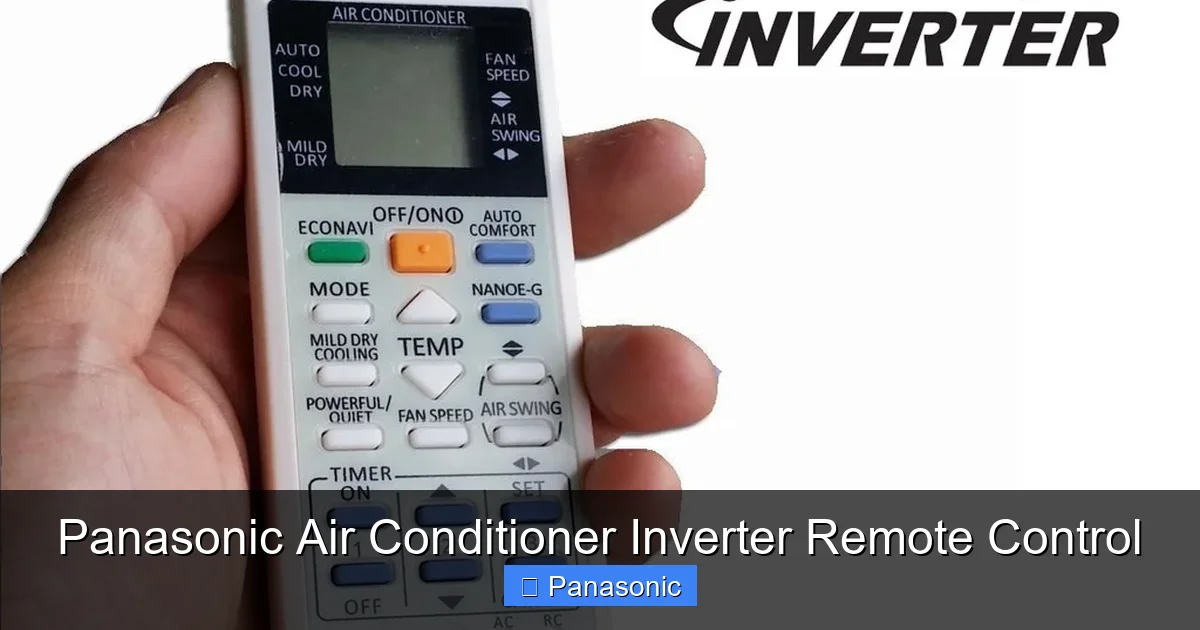
Visual guide about Panasonic Air Conditioner Inverter Remote Control
Image source: cf.shopee.com.my
Understanding the anatomy of your remote can help you unlock its full potential. While designs vary slightly between models, most Panasonic inverter remotes share several core features:
Backlit Display
Many newer remotes include a backlit screen that illuminates when you press any button. This makes nighttime adjustments effortless—no squinting in the dark! The display typically shows current temperature, mode (cool/heat/dry), fan speed, and timer status.
Multiple Operation Modes
You’ll find dedicated buttons for:
– Auto mode (ideal for unpredictable weather)
– Cool mode (standard air conditioning)
– Dry mode (removes excess moisture, great for humid days)
– Heat mode (available on split-system heat pumps)
– Fan-only mode (for circulating air without cooling)
Each mode uses the inverter technology differently, optimizing energy use for your needs.
Timer Functionality
Set your AC to turn on 30 minutes before you leave for work or shut off automatically after you fall asleep. Some advanced remotes even let you schedule recurring timers—perfect for early risers or shift workers.
Fan Speed Adjustment
Choose from low, medium, high, or auto. Auto adjusts fan speed based on room conditions, so you never have to manually tweak it again once activated.
Sleep Mode
This feature gradually increases the set temperature slightly throughout the night, ensuring comfort without overworking the unit. It also reduces noise levels for undisturbed rest.
Airflow Direction Control
Use the swing or vertical/horizontal airflow buttons to direct cool air where it’s needed most—whether that’s toward the ceiling or directly at your desk.
Eco and Powerful Modes
Eco mode prioritizes energy conservation, while powerful mode delivers maximum cooling in hot conditions. Both demonstrate how the remote tailors performance to your situation.
These features may seem minor individually, but together they create a highly responsive system that adapts to your lifestyle.
Energy Savings and Environmental Impact
If you’ve ever received a shockingly high utility bill after summer, you’re aware of how expensive air conditioning can be. Traditional window or central AC units waste energy by constantly restarting the compressor. Every time they do, they draw a surge of electricity—even if only briefly. Over time, this adds up significantly.
In contrast, Panasonic inverter ACs use variable-speed compressors that ramp up or down based on demand. The inverter remote plays a crucial role here: it signals the compressor to slow down when the room reaches the desired temperature. Because the unit isn’t cycling on and off, it avoids those energy spikes. Studies show that inverter systems can reduce energy consumption by up to 40% compared to conventional models.
But it’s not just about saving money. By using less electricity, you indirectly reduce greenhouse gas emissions, especially if your grid relies on fossil fuels. In regions with strict environmental regulations, manufacturers like Panasonic go further—offering recyclable components and encouraging responsible disposal of old units.
Moreover, the remote’s ECO mode takes this a step further. When enabled, it limits the lowest possible temperature and caps runtime, ensuring you’re always comfortable without wasting resources. Combined with timer functions and sleep mode, users report noticeable drops in their monthly bills—sometimes by $20–$50 depending on usage patterns.
Compatibility and Replacement Options
Not every remote fits every AC unit—but most Panasonic inverter models share a standardized protocol for their remotes. Generally speaking, if you own a Panasonic wall-mounted, floor-standing, or portable inverter AC from the last decade, there’s a strong chance the included remote will work seamlessly. However, accidents happen: batteries die, remotes get lost, or buttons stop responding.
When this occurs, don’t panic. Panasonic offers official replacement remotes through authorized service centers and online retailers. You can usually identify the correct model by checking the label inside the AC unit or referring to your original purchase documentation. Be cautious of third-party clones—while cheaper, they may lack reliability or compatibility.
For added peace of mind, consider keeping a spare remote on hand. It’s a tiny investment that prevents future inconvenience during heatwaves or family gatherings. Also note that some newer Panasonic models support Bluetooth or infrared pairing with smartphones via companion apps. While these digital alternatives are convenient, physical remotes remain popular due to their simplicity and battery independence.
Tips for Maximizing Remote Functionality
Even the best remote won’t deliver optimal results if misused. Here are practical tips to get the most out of your Panasonic inverter remote control:
Calibrate Your Thermostat
Sometimes, perceived room temperature differs from actual readings due to placement of the indoor unit. If you notice inconsistent cooling, try moving the unit slightly or adjusting airflow direction using the remote’s swing function. Also, avoid placing curtains over vents—they block airflow and fool sensors into thinking the room is cooler than it is.
Use Timers Wisely
Instead of leaving the AC running all day, set a timer to activate just before you arrive home. This saves energy while still providing comfort when needed. Similarly, schedule shutdown during naptime or bedtime to minimize unnecessary operation.
Combine Modes Strategically
For instance, use Turbo Cool briefly upon arrival, then switch to Eco Mode once the room stabilizes. This approach balances speed and efficiency. Likewise, pair Dry Mode with moderate fan speeds during rainy seasons to combat dampness without excessive cooling.
Keep the Remote Clean
Dust and grime can interfere with button sensitivity. Wipe the surface regularly with a soft cloth and avoid liquids near openings. Replace batteries promptly when the display dims—weak signals may cause erratic behavior.
Reset Occasionally
If the remote stops responding, try removing the batteries for 30 seconds before reinserting them. This resets the internal circuitry and often resolves glitches.
By following these guidelines, you’ll extend both the life of your AC and the usability of your remote.
Common Issues and Troubleshooting
Like any electronic device, remotes can develop problems over time. Fortunately, most issues are easy to diagnose and fix:
Batteries Not Working
Start by replacing with fresh alkaline batteries. Ensure proper polarity (+/- alignment). Weak batteries are the #1 cause of unresponsive remotes.
Buttons Sticking or Unresponsive
Clean gently with compressed air or a cotton swab dipped in rubbing alcohol. Avoid harsh chemicals that might damage plastic coatings.
No Response at All
Check if the AC itself powers on. If the unit doesn’t respond to the remote, the issue may lie with the receiver inside the indoor unit rather than the remote. Try pointing the remote directly at the AC’s sensor panel.
Inconsistent Signal Range
Interference from walls, metal objects, or other IR-emitting devices (like TV remotes) can disrupt communication. Move closer or remove obstacles between you and the AC.
Display Flickering or Dim
Replace batteries immediately. If flickering persists, the LED inside may be failing—a sign it’s time for a replacement remote.
If none of these steps work, contact Panasonic customer support or visit an authorized service center. Attempting DIY repairs on internal components is not recommended and may void warranties.
Conclusion: Why the Panasonic Inverter Remote Is More Than Just a Remote
The Panasonic air conditioner inverter remote control is far more than a convenience—it’s a cornerstone of modern climate control. By enabling precise, energy-efficient operation, it empowers users to enjoy consistent comfort while minimizing costs and environmental impact. Its thoughtful design, combined with advanced features like ECO mode, timers, and airflow adjustment, makes it indispensable for anyone invested in smart home living.
Whether you’re upgrading an outdated system or simply learning how to better utilize your existing setup, mastering your remote is the first step toward total control. Remember: every button press represents an opportunity to save energy, enhance comfort, and protect the planet. With proper care and understanding, your Panasonic inverter remote will serve you faithfully for years to come.
Frequently Asked Questions
What is the difference between inverter and non-inverter AC remotes?
Non-inverter AC remotes simply turn the compressor on or off, while inverter remotes support variable speed control, enabling smoother temperature regulation and greater energy efficiency. Inverter remotes also often include advanced modes like ECO and Sleep.
How often should I replace the batteries in my Panasonic remote?
Batteries should be replaced annually or whenever the display becomes dim or unresponsive. Using high-quality alkaline batteries extends lifespan and ensures reliable performance.
Can I control my AC remotely using my smartphone?
Some newer Panasonic models offer Wi-Fi connectivity and companion apps for smartphone control. However, physical remotes remain the standard for most users due to their simplicity and independence from internet connections.
Why does my remote sometimes fail to work even when new batteries are installed?
This could be due to obstructions between the remote and the AC’s receiver, dead batteries despite appearance, or interference from other electronic devices. Try cleaning the remote and ensuring clear line-of-sight.
Are replacement remotes expensive?
Replacement remotes are generally affordable, ranging from $15 to $40 depending on the model. Official Panasonic remotes may cost slightly more than third-party options, but they guarantee compatibility and durability.
Does the remote affect how long my air conditioner lasts?
Indirectly, yes. Proper use of the remote—especially avoiding constant manual adjustments and leveraging energy-saving modes—helps reduce wear on the compressor, potentially extending the AC’s operational life.
