
This guide shows you exactly how to turn off the timer on your Panasonic inverter air conditioner, whether using the remote or unit controls. You’ll find clear steps for different models and learn why timers might keep turning back on automatically. With simple instructions, you can stop unwanted scheduling and enjoy full climate control freedom.
Have you ever noticed your Panasonic inverter air conditioner keeps turning itself on or off at certain times—even when you didn’t set it that way? That’s likely the built-in timer function kicking in. While convenient for saving energy, sometimes you just want full control without interruptions.
This complete guide walks you through **how to turn off timer on Panasonic inverter air conditioner**, covering both remote-controlled and wall-mounted unit methods. Whether you’re dealing with a blinking light, unexpected shutdowns, or simply want peace of mind knowing your AC won’t activate unexpectedly, we’ve got you covered. By following these steps, you’ll regain full manual control over your cooling system.
—
Key Takeaways
- The timer function is designed for energy savings – it automatically turns your AC on or off at set times to reduce electricity usage during peak hours.
- You can disable the timer completely through your remote’s menu or directly on the indoor unit panel, depending on your model.
- Timer settings vary by series – newer Inverter models like CS/CU-XP or CSCU-XX use digital displays, while older units rely more on physical buttons.
- A blinking timer light usually means a scheduled operation is active – this indicator helps confirm when the feature is enabled.
- Resetting the remote or unplugging the unit may be needed if the timer won’t turn off due to a software glitch or battery issue.
- Always check the user manual first – specific button combinations or menu paths differ slightly between Panasonic inverter AC models.
Quick Answers to Common Questions
Can I disable just the ON timer but keep the OFF timer?
Yes! Navigate to the timer menu and select only the “ON TIMER” option, then set its duration to zero. This leaves the “OFF TIMER” active for automatic shutdowns while preventing unwanted startups.
Why does my AC still turn on even after setting timer to zero?
This could indicate a stuck button, dirty control panel, or remote malfunction. Try cleaning the unit’s front panel gently and replace remote batteries. If unresolved, perform a full power cycle by unplugging for 10 minutes.
Is it safe to leave the timer disabled permanently?
Absolutely. Disabling the timer has no negative impact on your unit’s lifespan or performance. It simply removes scheduled operations—your AC remains fully functional otherwise.
Do all Panasonic inverter models have identical timer interfaces?
No. Older models (pre-2018) use simpler interfaces with fewer buttons, while newer Smart models support touchscreen remotes and voice commands. Always check your specific model number before assuming compatibility.
What if my remote lost pairing with the AC unit?
Reset both devices: Hold the remote’s “POWER” and “MODE” buttons together for 5 seconds, then repeat on the indoor unit’s physical controls. This forces a reconnection protocol.
Understanding the Timer Function on Panasonic Inverter ACs
Panasonic inverter air conditioners come equipped with an intelligent timer feature designed to optimize comfort and energy efficiency. This function allows users to schedule automatic start and stop times—perfect for waking up to cool air before bed or ensuring the room isn’t unnecessarily cooled overnight.
The timer works by programming two key settings:
– **On Timer**: Activates the AC at a specified time
– **Off Timer**: Shuts down the AC after a set duration
These features are especially useful during summer months when electricity demand peaks. However, if you’re away from home frequently, traveling, or prefer manual adjustments, disabling the timer ensures your unit only operates when you command it.
It’s important to note that not all Panasonic inverter models support identical timer functionalities. Newer Smart Inverter Pro+ systems offer enhanced scheduling via Wi-Fi connectivity, while standard models rely solely on basic digital controls.
—
How to Identify If Your Timer Is Active
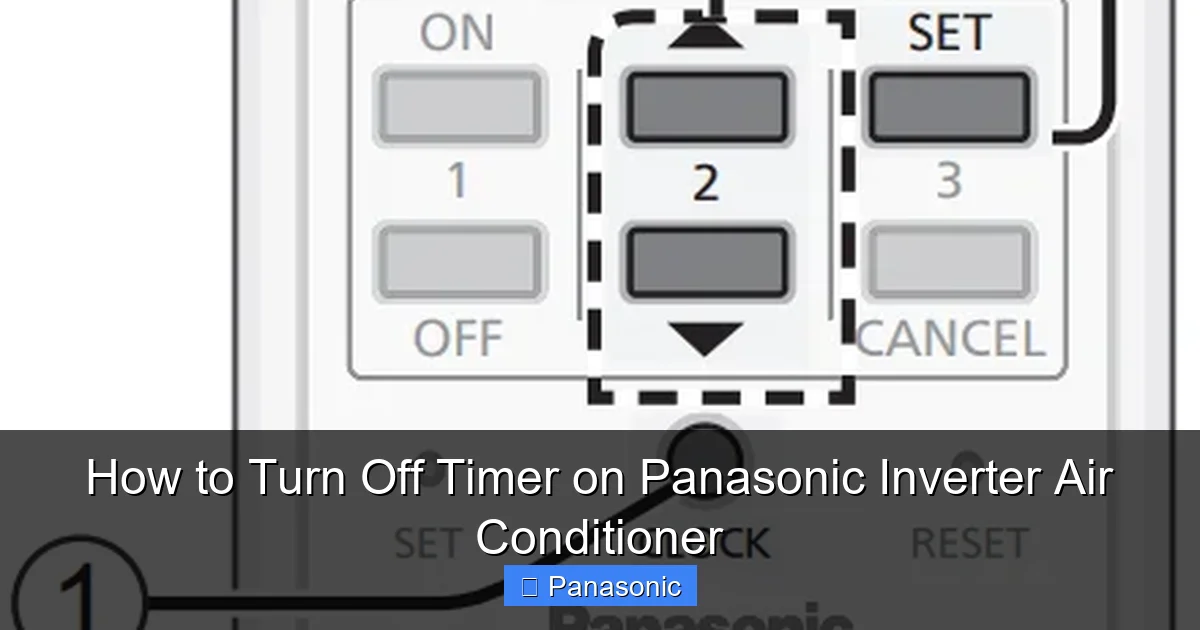
Visual guide about How to Turn Off Timer on Panasonic Inverter Air Conditioner
Image source: acguide.pk
Before attempting to disable the timer, verify whether it’s actually running. Most Panasonic inverter units display a small icon or light near the front panel when the timer is engaged.
Common signs include:
– A blinking **clock symbol** (🕒) on the display
– An amber or red LED light flashing intermittently
– The unit powering on briefly even when set to OFF mode
If you see any of these indicators, proceed to the next section to turn off the timer permanently.
—
Method 1: Using the Remote Control (Most Common)
The vast majority of Panasonic inverter air conditionitioners allow timer deactivation through the included remote handset. Follow these steps carefully:
Step 1: Turn On the Remote
Ensure your remote has fresh batteries and is pointed toward the indoor unit’s signal receiver (usually located near the top center of the front grille).
Step 2: Access the Timer Menu
Press and hold the **TIMER** button until the display changes. Alternatively, look for a dedicated **CLOCK** or **SCHEDULE** button, depending on your remote model.
Step 3: Navigate to Off Timer Setting
Use the arrow keys (**▲▼**) to scroll through options until you reach **”OFF TIMER”** or **”ON TIMER.”** Select the one currently active.
Step 4: Set Duration to Zero Hours
Once selected, press the **SET** or **ENTER** button. Then use the numeric keypad or arrows to change the countdown value to **0**. This effectively cancels the scheduled action.
Step 5: Confirm and Save Changes
Press **OK** or **BACK** twice to exit the menu. The display should return to normal operation mode without the clock icon.
💡 *Tip*: Some remotes require pressing **MODE** + **TIMER** simultaneously to access advanced settings.
—
Method 2: Disabling Timer via Indoor Unit Controls
Not all Panasonic models respond to remote commands perfectly—especially older units or those with damaged IR sensors. In such cases, you can disable the timer directly from the wall-mounted unit.
Step 1: Locate the Control Panel
Open the front panel gently and find the physical buttons beneath the display screen. These are typically labeled **POWER**, **MODE**, **FAN**, **SWING**, and **TIMER**.
Step 2: Press the Timer Button
Press the **TIMER** button once. The LCD screen will show current timer settings.
Step 3: Clear Existing Schedule
Hold the **TIMER** button for 3–5 seconds until the countdown resets to **00:00**. Release the button.
Step 4: Close the Panel Securely
Ensure the front cover clicks into place properly—this prevents accidental button presses during cleaning or maintenance.
—
Troubleshooting Common Timer Issues
Even after following instructions, some users report persistent timer behavior. Here’s how to resolve frequent problems:
Problem: Timer Re-enables After Power Cycle
This often occurs because default factory settings reset certain functions. To prevent this:
– Disable both **ON TIMER** and **OFF TIMER** separately
– Avoid using quick-start modes that auto-enable scheduling
Problem: Remote Doesn’t Respond to Timer Commands
Try these fixes:
– Replace batteries in the remote
– Clean the infrared emitter lens with a soft cloth
– Point the remote directly at the sensor (no obstacles)
Problem: Display Shows “TMR” But No Actual Scheduling
In rare cases, firmware bugs cause false indicators. Perform a hard reset:
1. Unplug the AC unit from the wall outlet
2. Wait 10 minutes
3. Restore power and test
—
Why Timers Might Keep Turning Back On Automatically
If your Panasonic inverter AC reactivates its timer without your input, several factors could be responsible:
– **Energy-saving mode activation**: Some models prioritize eco-settings that reintroduce timers after long idle periods.
– **Child lock enabled**: Accidentally activated child safety locks may restrict manual overrides.
– **Faulty memory chip**: Rare hardware issues can corrupt stored settings.
To eliminate these causes:
1. Disable **ECO MODE**
2. Turn off **CHILD LOCK** (if present)
3. Consult a technician if issues persist beyond 48 hours
—
Best Practices for Managing Air Conditioner Timers
While disabling timers offers total control, consider these balanced approaches instead of permanent deactivation:
✅ Use timers strategically during high-electricity-rate hours
✅ Combine with smart thermostats for adaptive cooling
✅ Enable only **OFF TIMER** during nighttime sleep
Remember: Panasonic designs its inverter technology precisely to reduce energy waste—so only disable timers when truly necessary.
—
Conclusion: Regain Full Control Over Your Climate
Turning off the timer on your Panasonic inverter air conditioner doesn’t require technical expertise. Whether you choose remote-based menus or direct unit controls, the process takes under two minutes. By understanding how the timer functions and knowing exactly where to find the right buttons, you eliminate surprise startups and shutdowns.
Should complications arise, remember that most issues stem from simple oversights—like dead batteries or misread icons. When in doubt, consult your owner’s manual (available digitally at Panasonic.com/support) or contact certified technicians.
With this knowledge, you’re now empowered to customize your cooling experience exactly as you wish—without letting automation override your preferences.
—
