
Setting a timer on your Panasonic air conditioner helps you automate cooling for better energy efficiency and comfort. Whether you’re using the remote control or the built-in panel, our simple steps make it easy to program start and stop times. With just a few button presses, you can wake up to a cool room or return to fresh air—without wasting electricity.
Key Takeaways
- Timer Function: The timer allows you to automatically turn your Panasonic AC on or off at scheduled times, saving energy and improving convenience.
- Remote vs. Manual Control: Most models support timer setup via the remote; some also allow programming through the unit’s physical buttons.
- Energy Savings: Using the timer prevents unnecessary operation when no one is home, reducing electricity bills.
- Sleep Mode Integration: Combine timer settings with sleep mode for optimal nighttime comfort and power efficiency.
- Troubleshooting Tips: If the timer doesn’t work, check batteries, ensure correct time/date settings, and consult your user manual.
- Model Variations: Timer features may differ slightly between Panasonic inverter and non-inverter models—always refer to your specific manual.
- Pre-Programmed Options: Some advanced models offer preset timer schedules like “Away” or “Wake-Up” modes for quick setup.
Quick Answers to Common Questions
Can I set both an ON and OFF timer at the same time?
Answer: Yes! Many Panasonic AC models support dual timers. You can schedule the unit to turn ON at 7:00 PM and OFF at 6:00 AM, creating a complete overnight cycle without manual intervention.
Does setting a timer affect my AC’s warranty?
Answer: No. Programming timers is a normal operation covered under standard warranty terms. As long as you follow manufacturer guidelines, your warranty remains valid.
What if my remote doesn’t have a “Timer” button?
Answer: Try pressing “Menu” or “Function” repeatedly until you find “Timer.” Alternatively, consult your user manual—some models hide advanced features behind secondary menus.
Will the timer work during a power outage?
Answer: Generally, no. The timer relies on continuous power to keep track of time. After an outage, you’ll need to reset the clock and reactivate any scheduled timers.
How do I cancel a scheduled timer?
Answer: Press the “Timer” button and select “Cancel” or “Clear.” Some remotes require holding the button for 3 seconds. The timer icon will disappear from the display once canceled.
How to Set Timer on Panasonic Air Conditioner: A Complete Step-by-Step Guide
If you own a Panasonic air conditioner, you’re already ahead of the curve when it comes to efficient cooling technology. But did you know that setting a timer on your Panasonic AC isn’t just convenient—it’s smart? Whether you want your home to be cool before you arrive from work or prevent the unit from running all night, mastering the timer function can save you money, extend your appliance’s life, and improve indoor comfort. In this detailed guide, we’ll walk you through everything you need to know about setting a timer on your Panasonic air conditioner—whether you’re using the remote control, the physical buttons, or even smartphone connectivity (in select models).
By the end of this article, you’ll understand not only how to set a basic timer but also how to optimize it for different lifestyles, troubleshoot common issues, and integrate it with other energy-saving features like sleep mode and eco settings. Let’s dive in!
Understanding the Timer Function on Panasonic Air Conditioners
Before jumping into the steps, let’s clarify what the timer actually does. On most Panasonic air conditioners, the timer feature allows you to program the unit to turn ON or OFF at specific times. For example:
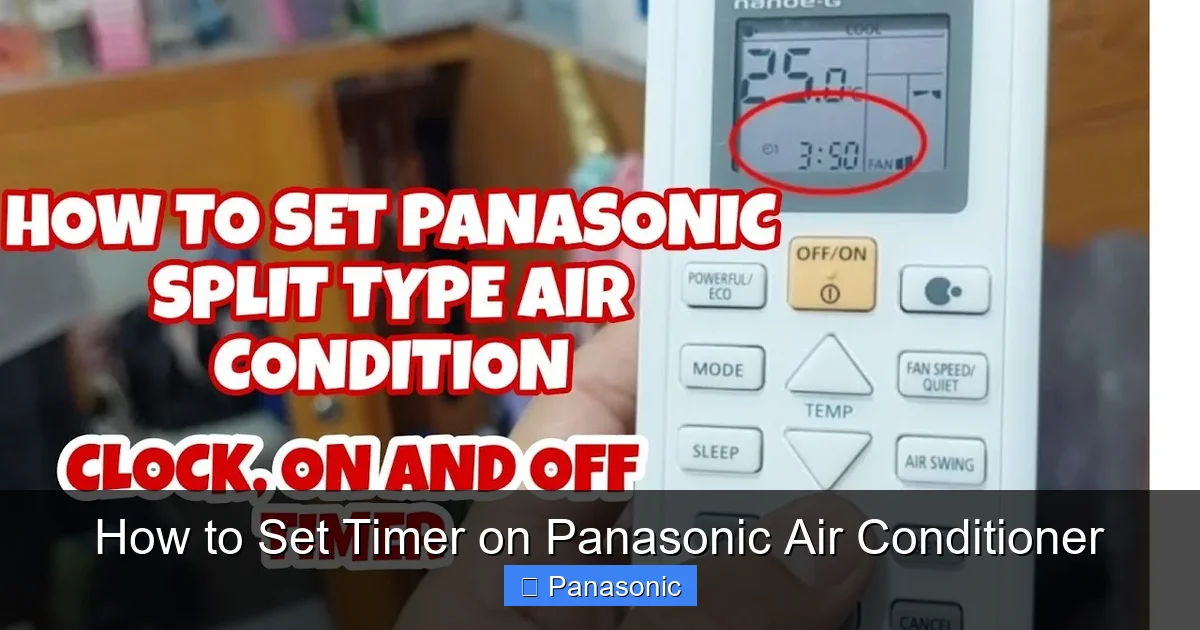
Visual guide about How to Set Timer on Panasonic Air Conditioner
Image source: i.ytimg.com
- You can set the AC to turn ON at 7:00 PM so your living room is comfortable when you get home.
- You can schedule it to shut off at 6:00 AM so it doesn’t run while you’re sleeping.
This functionality is especially useful during peak summer months when electricity rates are higher in the afternoon. Instead of leaving your AC running continuously, you can program it to activate only when needed.
It’s important to note that not all Panasonic AC models have identical interfaces. However, the core timer logic remains consistent across most residential units. Whether you have a wall-mounted split system, a portable model, or an inverter-based unit, the principles remain similar. Always refer to your user manual for model-specific instructions.
Checking Your Model and Remote Compatibility
The first step in setting a timer is confirming whether your Panasonic AC supports timer programming. While virtually all modern Panasonic air conditioners include this feature, older models might require firmware updates or have limited functionality.
Tip: Look for symbols like “Timer,” “Clock,” or “Auto On/Off” on your remote control. These indicate built-in timer capabilities. If your remote has a digital display showing the current time, you’re likely ready to proceed.
For users with Wi-Fi-enabled models (such as those compatible with the Panasonic Comfort Cloud app), additional scheduling options may be available through smartphone apps. We’ll cover app-based timers later in this guide.
Gathering What You Need Before Starting
To set a timer efficiently, make sure you have the following ready:
- Your Panasonic air conditioner remote control
- Batteries (if applicable) – replace them if they’re weak to avoid input errors
- A stable power source for the AC unit
- Access to the user manual (digital or printed)
Having these items nearby will prevent interruptions during setup and help you confirm settings quickly.
Step-by-Step: Setting a Timer Using the Remote Control
Step 1: Turn On the Air Conditioner
Press the power button on your remote or press the “ON/OFF” switch on the AC unit itself. The display should light up, indicating the system is active.
Step 2: Access the Timer Menu
Locate the “Timer” or “Clock” button on your remote. It’s usually labeled clearly or represented by a clock icon. Press it once to enter the timer setup mode.
Step 3: Set the Current Time (If Not Already Done)
Many Panasonic remotes require the correct time to be set before scheduling timers. Use the “+” and “−” buttons next to the clock symbol to adjust hours and minutes. Confirm by pressing “OK” or “Enter.”
Step 4: Choose Between ON Timer or OFF Timer
You’ll typically see two options:
- ON Timer: Turns the AC on at a specified time
- OFF Timer: Turns the AC off after a set duration or at a specific time
Press the corresponding button to select your preferred option.
Step 5: Set the Desired Time
Use the arrow keys or number pad to input the hour and minute. For example, if you want the AC to turn on at 8:30 PM, select 20 (for 8 PM) and then 30 for minutes. Double-check the AM/PM setting if your remote uses 12-hour format.
Step 6: Confirm and Save
Once the time is entered, press “Set” or “Confirm.” The timer icon should appear on the display, indicating the schedule is active.
Using Manual Controls (For Units Without Remotes)
If your Panasonic air conditioner doesn’t come with a remote or the remote is lost, many models still allow timer programming through physical buttons on the unit. Here’s how:
Step 1: Power On the Unit
Press the “Power” button on the main unit until it turns on.
Step 2: Enter Setup Mode
Press and hold the “Timer” or “Mode” button for 3–5 seconds until the clock flashes on the LED panel.
Step 3: Adjust Time and Timer Settings
Use the “Up” and “Down” arrows to scroll through options. Navigate to “Timer On,” “Timer Off,” or “Duration Timer.” Input your desired time using the same directional buttons.
Step 4: Lock the Setting
Press the “Menu” or “Enter” button to save. The timer icon should stabilize on the display.
Note: Manual controls are less intuitive than remotes but fully functional for basic scheduling needs.
Advanced Timer Features: Duration-Based Scheduling
Some Panasonic AC models support “duration timers,” which let you set how long the unit runs instead of a fixed end time. This is ideal for short bursts of cooling—like refreshing a room before guests arrive.
How to Set a Duration Timer:
- Press the “Timer” button on the remote.
- Select “Duration Timer” or look for a “Countdown” option.
- Input the number of minutes (e.g., 60 for one hour).
- Press “Start” to activate. The AC will run for the set duration and then shut off automatically.
This feature works well in conjunction with fan-only or dry modes to remove humidity without overcooling.
Syncing With Sleep Mode for Nighttime Efficiency
One of the best ways to use the timer is in combination with Panasonic’s sleep mode. This intelligent function gradually increases the temperature by 1–2°C over several hours while reducing fan speed—perfect for undisturbed rest.
Recommended Routine:
- Set the AC to turn ON at 9:00 PM via timer.
- Enable sleep mode before bedtime.
- Schedule the OFF timer for 6:00 AM to avoid early-morning noise.
This setup ensures comfort throughout the night while minimizing energy use.
Smartphone App Integration (For Connected Models)
Panasonic offers the Comfort Cloud app for compatible inverter models. Through Wi-Fi, you can set daily timers, monitor usage, and receive maintenance alerts remotely.
Steps to Set Timer via App:
- Download the “Comfort Cloud” app from iOS App Store or Google Play.
- Create an account and add your AC by entering the serial number (found on the unit or packaging).
- Navigate to “Schedule” or “Timer Settings.”
- Tap “Add New Schedule” and choose “Turn On” or “Turn Off.”
- Set repeat days (e.g., weekdays only) and confirm.
App timers override physical remote commands but can be disabled temporarily if needed.
Practical Tips for Optimal Timer Usage
- Plan Around Your Routine: If you leave for work at 8:00 AM, don’t set the AC to run until 7:30 AM unless you’re away. Instead, program it to shut off earlier to save power.
- Use Eco Mode with Timers: Pair timer schedules with eco settings to maximize energy savings without sacrificing comfort.
- Check Daylight Saving Changes: Reset the clock manually when daylight saving starts or ends to avoid timer confusion.
- Combine Multiple Timers: Some models allow both ON and OFF timers simultaneously—ideal for full-day automation.
- Clean Filters Regularly: Dirty filters reduce airflow and force the AC to work harder, making timers less effective.
Troubleshooting Common Timer Issues
Even with perfect setup, occasional glitches happen. Here’s how to resolve them:
Problem: Timer Doesn’t Activate
Solution: Ensure the AC is plugged in and receiving power. Weak remote batteries can cause signal loss—replace them. Also verify that the internal clock is accurate.
Problem: Timer Turns Off Unexpectedly
Solution: Check for power outages or brownouts that may reset the unit. Reconfigure the timer afterward. If the issue persists, the capacitor might be failing—contact Panasonic service.
Problem: App Timer Not Working
Solution: Confirm Wi-Fi connectivity. Restart the app and router. Make sure your AC firmware is updated via the app settings.
Problem: Display Shows Erratic Characters
Solution: This often indicates a faulty control board. Disconnect power for 10 minutes (to reset), then reconnect. If the problem continues, professional repair is recommended.
When to Call a Technician
While most timer issues are software-related and fixable at home, certain signs warrant professional attention:
- The unit won’t respond to any remote commands
- Error codes appear on the display (e.g., E1, E2)
- Cooling performance drops significantly despite proper settings
- Physical damage to buttons or display panel
Panasonic’s customer care team can provide model-specific diagnostics and warranty support.
Conclusion: Master Your AC for Comfort and Savings
Setting a timer on your Panasonic air conditioner is simpler than you think—and far more beneficial than leaving it on all day. By automating your cooling schedule, you take control of your energy consumption, reduce utility costs, and maintain consistent indoor comfort. Whether you rely on a simple remote, a sophisticated app, or even voice commands (with smart home integration), Panasonic designs its systems for ease of use and reliability.
Remember: the key is consistency. Once programmed correctly, your AC handles the rest—turning on when you need it and turning off when you don’t. Over time, these small habits compound into noticeable savings and longer equipment life.
So go ahead—set that timer tonight. Wake up to a cool, quiet home and sleep soundly knowing you’ve made a smart choice for both your wallet and the planet.
