
Manually turning on your Panasonic air conditioner is simpler than you think! Whether you’re dealing with a remote malfunction or just want to bypass it, this guide walks you through safe, effective methods. From physical buttons to reset procedures, we’ve got you covered for quick cooling relief.
Key Takeaways
- Manual power button access: Most Panasonic units have a physical power switch behind the front grille—locate it using a flashlight if needed.
- Remote control backup: If your remote dies, try replacing its batteries or using the manual override mode on select models.
- Reset procedure: A full power cycle (unplugging for 3–5 minutes) can resolve unresponsiveness and restore normal operation.
- Model-specific differences: Older vs. newer Panasonic ACs vary in manual controls—always consult your user manual for exact steps.
- Safety first: Never force panels open; use only approved tools and avoid water exposure during internal checks.
- Prevent future issues: Keep firmware updated (for smart models) and clean filters regularly to maintain reliable performance.
- Professional help: If manual methods fail, contact Panasonic support or a certified technician—never attempt complex repairs yourself.
Quick Answers to Common Questions
Can I turn on my Panasonic AC without a remote?
Yes! Most models have a physical power button behind the front panel. Simply remove the filter cover, locate the ON/OFF switch, and press it to activate the unit.
What if the manual button doesn’t work?
Try a full power cycle: unplug the unit for 3–5 minutes, then reconnect. This resets the control board and often resolves unresponsiveness.
Is it safe to open the AC panel myself?
Generally yes—but always unplug the unit first. Use plastic tools only. If unsure, consult your Panasonic air conditioner manual or contact support.
Do all Panasonic ACs have manual overrides?
Almost all do, but locations vary by model. Smart units may rely more on app control, yet still include physical buttons as backup.
Why does my AC turn on but not cool?
Common causes include clogged filters, low refrigerant, or blocked airflow. Clean the filter first—then check for obstructions outside the unit.
📑 Table of Contents
- How to Manually Turn On Your Panasonic Air Conditioner: A Complete Guide
- Understanding Your Panasonic Air Conditioner Controls
- Method 1: Using the Physical Power Button
- Method 2: Resetting the System via Power Cycle
- Method 3: Using the Remote Control as a Last Resort
- Model-Specific Considerations
- Troubleshooting Common Problems
- Maintenance Tips to Prevent Future Issues
- When to Call a Professional
- Conclusion: Stay Cool, Stay Prepared
How to Manually Turn On Your Panasonic Air Conditioner: A Complete Guide
Ever been in the middle of a hot afternoon, sweat dripping down your back, only to realize your Panasonic air conditioner isn’t responding to the remote? It’s frustrating—but don’t panic! Every Panasonic unit comes with a manual override option, even if the remote has given up the ghost. Whether you’re dealing with dead batteries, signal interference, or just forgot where the remote is, knowing how to manually turn on your Panasonic air conditioner can save the day.
This guide walks you through every possible method—from simple button presses to full system resets—so you can get cool again fast. We’ll also cover why your AC might not be turning on, how to avoid common mistakes, and when it’s time to call in the pros. Let’s dive in!
Understanding Your Panasonic Air Conditioner Controls
Before jumping into manual activation, it helps to know what kind of control setup your unit uses. Panasonic offers several types of air conditioners, each with slightly different interfaces. Most residential models fall into one of these categories:
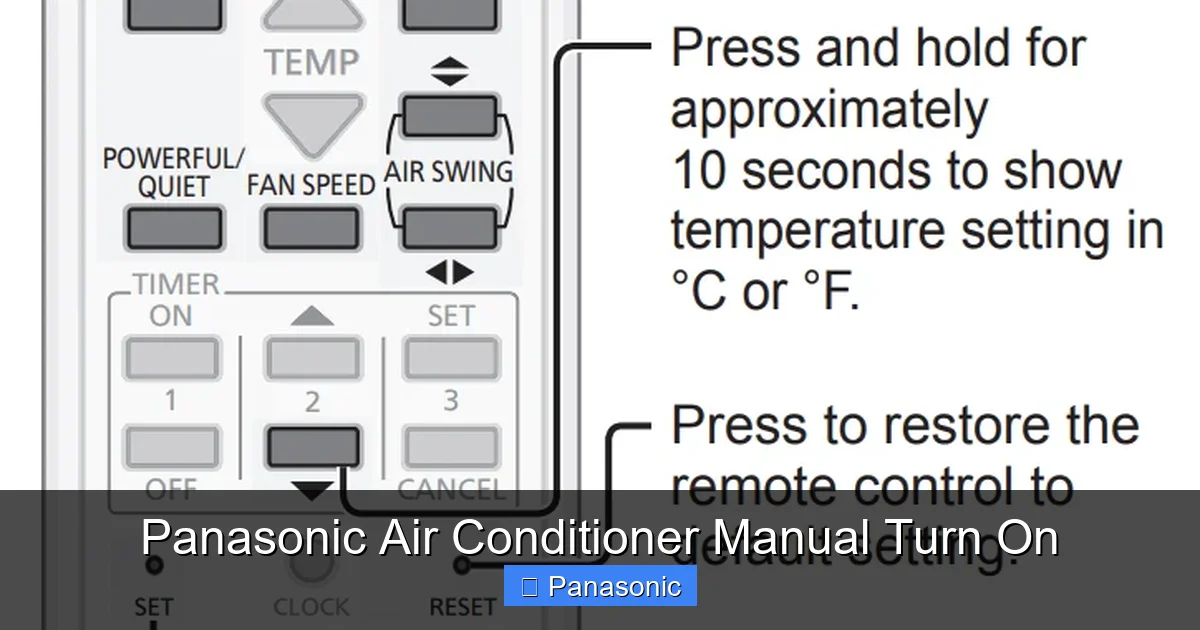
Visual guide about Panasonic Air Conditioner Manual Turn On
Image source: acguide.pk
Types of Panasonic AC Control Systems
- Remote-Controlled Models: These are the most common. They rely on an infrared remote to send signals to the indoor unit. If the remote stops working, the AC often becomes unresponsive.
- Wall-Mounted Units with Manual Buttons: Some older or budget-friendly models feature physical buttons on the unit itself—usually behind a removable panel.
- Smart Wi-Fi Enabled Units: Newer Panasonic ACs support app control via the Panasonic Comfort Cloud app. Even here, there’s usually a manual fallback.
- Inverter vs. Non-Inverter Models: While inverter technology affects energy efficiency, both types typically include manual override features.
Knowing your model type helps you pick the right manual method. For example, if you have a smart unit but lost your remote, you might still use the wall buttons or even the mobile app as a last resort. Let’s explore each approach in detail.
Method 1: Using the Physical Power Button
The simplest way to manually turn on your Panasonic air conditioner is by accessing the physical power button. Most wall-mounted units hide this behind the front panel. Here’s how to find and use it:
Step-by-Step: Accessing the Manual Power Switch
- Turn off the unit: Press the “Stop” or “Off” button on the remote (if functional), then wait 30 seconds.
- Locate the front grille: Look at the top edge of the indoor unit. There’s usually a small notch or tab near the corners.
- Gently lift the panel: Use your fingers or a plastic pry tool (like a credit card) to carefully lift the bottom edge of the air filter cover. It should pop off with minimal force.
- Find the power switch: Inside, near the center, you’ll see a small red or green button labeled “ON/OFF” or just “Power.”
- Press and hold: Push the button firmly. You may hear a click, and the display should light up.
Pro Tip: If the panel feels stuck, check for screws at the base—some models secure it that way. Avoid metal tools; they can scratch surfaces or damage internal components.
What If No Button Is Visible?
Not all Panasonic models have an obvious manual switch. In those cases:
- Check the side or top edges of the unit for hidden tabs.
- Consult your Panasonic air conditioner manual—it includes diagrams specific to your model number (e.g., CS/CU-XE12WKYV).
- Look for a “Reset” button near the power switch—pressing it briefly can activate standby mode.
Still stuck? Try Method 2 below.
Method 2: Resetting the System via Power Cycle
If your Panasonic AC won’t respond at all—not even to the manual button—a full power cycle often does the trick. This clears temporary glitches in the control board and restores communication between components.
How to Perform a Full Power Reset
- Turn off everything: Remove the remote batteries (if applicable) and set the thermostat to the lowest setting.
- Unplug the unit: Locate the power cord at the wall outlet or circuit breaker. Pull it gently out.
- Wait 3–5 minutes: This allows capacitors to discharge fully. Patience is key!
- Reconnect power: Plug the unit back in or flip the breaker.
- Test the unit: Wait 2–3 minutes, then press the manual power button (if available) or try the remote.
Why This Works: Modern ACs use microprocessors that can freeze under stress or voltage fluctuations. A hard reset reboots them like restarting a computer.
When to Use This Method
- The AC turns on but immediately shuts off.
- No lights appear on the control panel.
- You recently had a power surge or brownout.
Note: Don’t skip the waiting period—it ensures safety and effectiveness.
Method 3: Using the Remote Control as a Last Resort
Even if your remote seems dead, it might still work! Sometimes batteries lose charge gradually, leaving just enough juice for basic functions. Here’s how to test it properly:
Testing and Replacing Remote Batteries
- Remove old batteries: Slide out the compartment on the back of the remote.
- Inspect terminals: Look for corrosion (white/green crust). Wipe gently with a dry cloth if present.
- Install new batteries: Match polarity (+/−) as marked in the slot. Use fresh alkaline batteries.
- Point and press: Aim the remote directly at the receiver window (usually a dark lens on the indoor unit) and hold the “Power” button for 3 seconds.
Alternative Trick: Some remotes have a “Manual Mode” switch underneath the battery cover. Flip it to “On” if available.
Signal Interference Issues
If the remote works intermittently, consider:
- Moving reflective objects (mirrors, TV screens) away from the AC unit.
- Avoiding direct sunlight on the remote sensor.
- Using a universal remote compatible with Panasonic IR codes.
Model-Specific Considerations
Panasonic produces hundreds of AC models across regions—and their manual override features aren’t identical. Below are notes for popular series:
CS/CU Series (Split Systems)
- Most have a visible manual button behind the front panel.
- Model numbers like CS-12FKYV or CU-18FKYV follow this design.
- Always unplug before opening panels for safety.
N-Series and Elegant Models
- Some premium models integrate the power button into the control dial.
- Rotating the knob clockwise past “Cool” often powers on the unit.
- Refer to page 12 of your Panasonic air conditioner manual for confirmation.
Smart Wi-Fi Models (e.g., CU/XE12WKYV)
- May require app login even after manual power-on.
- If the app says “Offline,” try resetting the router or re-pairing the device.
- Firmware updates sometimes fix unresponsiveness—check via the app settings.
Important: Never assume all Panasonic ACs work the same. When in doubt, download the official manual from Panasonic’s website using your exact model number.
Troubleshooting Common Problems
Even with manual overrides, some issues persist. Below are solutions based on real user reports:
AC Turns On but Won’t Cool
- Cause: Dirty air filter or blocked outdoor unit.
- Fix: Clean the filter monthly. Trim foliage around the condenser unit.
Unit Makes Strange Noises After Manual Start
- Cause: Loose mounting brackets or debris in fan blades.
- Action: Tighten screws (use screwdriver sparingly). Call a technician if noise continues.
Display Shows Error Codes
- Example: “E1” = Indoor temperature sensor fault.
- Response: Note the code, write it down, and search “Panasonic AC error E1” online or in your manual.
Remote Still Doesn’t Work After Battery Swap
- Try this: Point the remote at a smartphone camera. Press any button—you should see a blinking LED light.
- If no light appears, the remote is faulty and needs replacement.
Remember: Manual override doesn’t fix mechanical failures. If your compressor hums but won’t start, or you smell burning, turn off the unit immediately and contact Panasonic support.
Maintenance Tips to Prevent Future Issues
Prevention beats panic. Follow these habits to keep your Panasonic AC responsive:
- Monthly Filter Cleaning: Remove the filter, rinse under lukewarm water, let dry, then reinstall.
- Annual Professional Service: Schedule a tune-up before summer heat peaks.
- Keep the Remote Handy: Store it in a consistent spot—or buy a spare.
- Update Firmware: For smart models, enable auto-updates in the app.
- Protect from Dust: Cover the unit when not in use for long periods.
These small efforts extend your AC’s life and ensure manual overrides always work when needed.
When to Call a Professional
Manual methods solve most problems—but not all. Seek expert help if you notice:
- Water leaking inside the room (indoor unit issue).
- Tripping circuit breakers when the AC starts.
- Persistent error codes after multiple resets.
- Strong electrical smells or visible sparks.
Panasonic-certified technicians have diagnostic tools to detect refrigerant leaks, capacitor faults, or wiring issues that DIY fixes can’t address safely.
Conclusion: Stay Cool, Stay Prepared
Knowing how to manually turn on your Panasonic air conditioner puts you in control—no matter what goes wrong with the remote or power supply. From accessing hidden buttons to performing power cycles, these steps empower you to handle minor hiccups confidently.
But remember: manuals are guides, not magic wands. If your unit still refuses to cooperate after trying everything, trust the experts. Regular maintenance and timely servicing are your best defenses against breakdowns.
Next time the heat rises and your remote dies, you’ll know exactly what to do. Stay cool, stay prepared, and breathe easy knowing help is always within reach.
Frequently Asked Questions
How do I find the manual power button on my Panasonic AC?
It’s usually behind the front grille near the bottom edge. Gently lift the filter cover using your fingers or a plastic pry tool. The button is often red or green and labeled “ON/OFF.”
My remote isn’t working—can I still use the AC?
Yes. Replace the remote batteries first. If that fails, access the manual power button or perform a full power reset by unplugging the unit for 3–5 minutes.
What should I do if the AC makes loud noises after manual startup?
Turn off the unit immediately. Check for loose parts or debris. If the noise persists, stop use and contact a certified technician—do not attempt repairs yourself.
Can I use a universal remote instead of the original?
Possibly. Ensure it supports Panasonic’s infrared protocol. Test it by pointing at the AC’s receiver window. Not all universal remotes are compatible with every model.
How often should I clean my Panasonic AC filter?
At least once a month during heavy usage seasons. Remove the filter, rinse under running water, let it dry completely, then reinstall. Dirty filters reduce efficiency and airflow.
Where can I download my Panasonic AC manual?
Visit Panasonic’s official support site, enter your exact model number (e.g., CS/CU-12FKYV), and download the PDF manual. It includes model-specific override instructions.
