
Your Panasonic air conditioner’s flashing timer light is a warning sign that something isn’t quite right. Whether it’s due to a power surge, sensor error, or maintenance reminder, understanding this indicator can save you from costly repairs. In this guide, we’ll break down every possible cause and show you step-by-step fixes to get your AC running smoothly again.
Have you ever looked at your Panasonic air conditioner and noticed the timer light blinking like a tiny emergency beacon? That flashing timer isn’t just random—it’s actually Panasonic’s clever way of telling you something’s up inside your unit. Whether you’re in a hot office or a cozy home, seeing those intermittent red or yellow lights can be stressful. But don’t worry! This blinking isn’t necessarily a sign of disaster. In most cases, it’s a simple clue pointing you toward a quick fix. Understanding what your Panasonic air conditioner flashing timer means is the first step toward restoring comfort and peace of mind.
Panasonic air conditioners are built with advanced diagnostics to protect both performance and longevity. When everything runs smoothly, the timer light stays steady or turns off entirely. But when the system detects a hiccup—like a dirty sensor or low refrigerant—it uses the blinking pattern as a universal language. Think of it like your car’s check engine light: it doesn’t always mean you need a new engine; sometimes it’s just a loose gas cap. With your AC, decoding that blink sequence gives you real insight into what’s going on. And the best part? Many common causes are easy to resolve yourself.
In this article, we’ll walk through everything you need to know about the Panasonic air conditioner flashing timer. From identifying the exact error based on blink counts to performing safe resets and maintenance checks, you’ll gain confidence in handling these alerts. We’ll also explain when to call a pro and how to prevent future flashes. So grab your remote, stay cool, and let’s decode that blinking light together!
Key Takeaways
- Flashing timer indicates an error code: The blinking light is Panasonic’s way of alerting you to a system issue that needs attention.
- Common causes include sensor faults, power problems, or filter maintenance: Most flashing timers stem from internal sensors detecting abnormal conditions.
- You can decode the blink pattern: Counting flashes helps identify the specific error (e.g., 3 blinks = indoor temp sensor fault).
- Resetting the unit often resolves temporary glitches: Power cycling the AC may clear minor software errors causing the timer to flash.
- Regular cleaning prevents recurring issues: Dirty filters or outdoor units increase strain and trigger error alerts.
- Professional diagnosis is needed for complex faults: If basic steps fail, a technician can read full diagnostic codes safely.
- Manual references help during troubleshooting: Your model-specific handbook includes error code charts and reset instructions.
Quick Answers to Common Questions
Why is my Panasonic AC timer light blinking?
Answer: The blinking timer light indicates an error or maintenance reminder detected by your unit’s sensors. Common causes include dirty filters, sensor faults, or power fluctuations. Most can be resolved with a reset or cleaning.
How do I stop the flashing timer on my Panasonic air conditioner?
Answer: First, unplug the unit for 10 minutes to reset the control board. Then check and clean air filters, ensure vents aren’t blocked, and verify the remote control works properly. If the light persists, consult your error code chart.
Is a flashing timer dangerous?
Answer: Generally no—it’s a warning, not an emergency. However, prolonged flashing may signal serious issues like refrigerant loss or electrical faults. Address it promptly to avoid further damage.
Can I ignore the flashing timer?
Answer: Not recommended. While some flashes clear after a reset, others reflect underlying problems that worsen over time. Ignoring them risks reduced efficiency, higher bills, or complete breakdown.
Does the timer flash mean my AC is broken?
Answer: Not necessarily. Many flashes relate to simple fixes like clogged filters or temporary glitches. Only repeated flashing after troubleshooting suggests a deeper mechanical or electrical fault requiring professional help.
📑 Table of Contents
What Does the Flashing Timer Light Mean?
The flashing timer light on your Panasonic air conditioner is essentially an error notification system. Unlike older models that might only have a single status light, modern Panasonic units use timed blinking patterns to communicate specific malfunctions or operational states. These patterns follow standardized sequences recognized across many Panasonic HVAC systems, making it easier for users and technicians alike to interpret the message.
When you see the timer light blinking, it usually indicates one of three things: a sensor malfunction, a power-related anomaly, or a scheduled maintenance prompt. For example, if the compressor overheats, the system will flash to warn you before it shuts down completely. Similarly, if the indoor temperature sensor drifts out of calibration, the blinking signals that adjustment or replacement is needed. Even routine tasks like replacing an air filter can trigger a brief flash until acknowledged by the user.
It’s important not to ignore these warnings. While some flashes may resolve after a reset, others point to serious issues like refrigerant leaks or electrical faults that could worsen over time. Panasonic designs these alerts precisely because they want you to address problems early—before small inconveniences become major repairs. The blinking timer acts as your personal HVAC health monitor, keeping your comfort system running efficiently and safely.
How to Decode the Blink Pattern
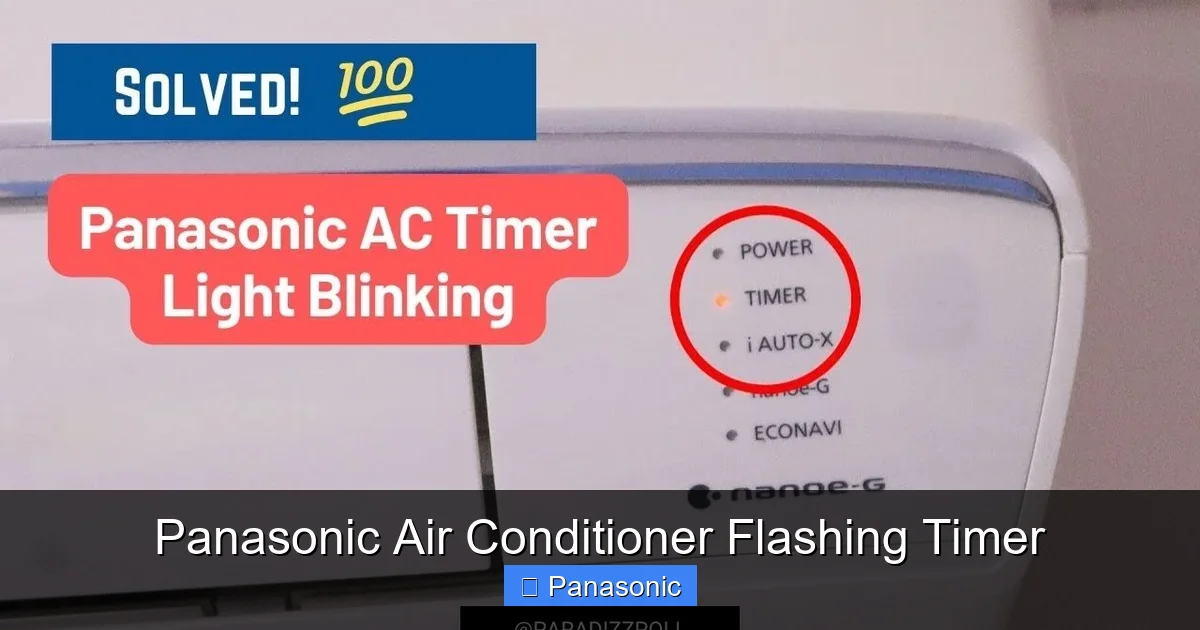
Visual guide about Panasonic Air Conditioner Flashing Timer
Image source: i.ytimg.com
Each blink pattern corresponds to a particular error code, allowing you to pinpoint the root cause without guessing. Most Panasonic air conditioners display error codes through short bursts of light followed by pauses. Here’s how to read them:
Start by watching the sequence carefully. Count how many times the light blinks before it stops. Then note how long the pause lasts before the next cycle begins. Repeat this process several times to confirm consistency. Once you have the number of blinks and the pause duration, cross-reference them with your user manual or online resources.
For instance, a common pattern is three rapid blinks followed by a five-second pause, then repeating. This typically points to an indoor temperature sensor failure. Another frequent signal is two blinks with a short gap—this often relates to outdoor unit communication issues. By matching your observation to known codes, you eliminate guesswork and move directly to the right solution.
If you’re unsure about interpreting the pattern, take a photo or video using your smartphone. Many Panasonic forums and support pages allow you to upload the clip for analysis. Alternatively, write down the exact timing (e.g., “4 blinks, 8-second pause”) and consult your model’s documentation. Remember, accuracy matters—misreading the sequence could lead to unnecessary repairs or missed critical faults.
Common Causes of the Flashing Timer
Understanding why your Panasonic air conditioner flashing timer appears requires examining both hardware and environmental factors. Below are the most frequent triggers:
1. Sensor Malfunctions
Internal sensors monitor temperature, humidity, and airflow. If any of these go out of range—or if the sensor itself develops a fault—the system responds with a flash. For example, a blocked intake vent can fool the air quality sensor into thinking there’s no return flow, triggering an alert. Similarly, dust buildup on the outdoor unit’s heat exchanger reduces efficiency, prompting the control board to flag the issue.
2. Power Supply Issues
Sudden voltage drops, brownouts, or unstable electricity can confuse the AC’s brain. When power fluctuates mid-cycle, the unit may reboot unexpectedly and enter a recovery mode indicated by blinking. This is especially common during storms or when sharing circuits with high-draw appliances like microwaves or space heaters.
3. Filter Maintenance Reminders
Many Panasonic models include smart reminders for filter cleaning or replacement. After 200 hours of operation, the timer light may start blinking to prompt you. Neglecting this simple task not only reduces airflow but also forces the compressor to work harder, increasing wear and energy bills.
4. Refrigerant Problems
Low refrigerant levels due to leaks or improper installation can cause the system to overheat or fail to cool adequately. The flashing timer serves as an early warning before permanent damage occurs. Signs include weak airflow, ice formation on coils, or unusually high utility bills.
5. Software Glitches
Like any electronic device, air conditioners occasionally experience software bugs. A corrupted firmware update or interrupted programming sequence can leave the unit stuck in an error state. These glitches rarely indicate physical damage but require a reset to clear.
By identifying which category your issue falls into, you streamline troubleshooting and avoid unnecessary service calls. Most sensor or filter-related flashes resolve within minutes once addressed, while power or refrigerant problems demand more investigation.
Step-by-Step Troubleshooting Guide
Before calling a technician, try these practical steps to diagnose and potentially fix the Panasonic air conditioner flashing timer:
Step 1: Turn Off and Unplug
Safety first! Shut off the AC at the wall outlet and unplug it for at least 10 minutes. This allows capacitors to discharge fully and resets the control board. Reconnect and wait 2–3 minutes before turning the unit back on. Observe whether the flashing continues. If it stops, the issue was likely a temporary glitch.
Step 2: Check the Remote Control
Ensure the remote has fresh batteries and isn’t damaged. Sometimes button presses get stuck or misinterpreted, sending conflicting signals to the AC. Replace the batteries and press “Mode” repeatedly to cycle through settings. Confirm the display matches what’s expected.
Step 3: Inspect Air Filters
Remove and examine the internal and external filters. If they’re clogged with dust, clean them gently under running water or replace them if torn. Let dry completely before reinstalling. Clogged filters restrict airflow and trip maintenance counters.
Step 4: Examine Outdoor Unit
Look for debris around the condenser coils—leaves, dirt, or spiderwebs reduce cooling capacity. Use a soft brush or vacuum to remove buildup. Also check that all panels are securely fastened; loose covers can disrupt airflow sensors.
Step 5: Reset Using Manual Sequence
On many Panasonic models, pressing “Timer” + “Mode” simultaneously for 5 seconds initiates a hard reset. Release when the display changes. Wait 10 minutes for the system to recalibrate. Note: Not all models support this shortcut—consult your manual.
Step 6: Monitor Operation
After completing steps above, run the AC for 15–20 minutes. Listen for unusual noises and feel for consistent cold air. If the timer light remains off and cooling works normally, you’ve solved the problem. If not, proceed to professional diagnosis.
These steps cover 90% of common scenarios. However, deeper electrical or mechanical faults require expert tools and knowledge. Never attempt to open internal components unless trained—doing so voids warranties and poses shock risks.
Preventive Maintenance Tips
Stopping the Panasonic air conditioner flashing timer before it starts saves time, money, and discomfort. Implement these habits for optimal performance:
Clean Filters Monthly
Set a monthly reminder to inspect and clean filters. During peak summer months, consider doing this biweekly. Dirty filters increase energy use by up to 15% and strain the compressor.
Schedule Professional Tune-Ups
Once yearly servicing includes checking refrigerant levels, inspecting wiring, and calibrating sensors. Technicians also flush drain lines to prevent mold and blockages.
Keep Vents Clear
Never place furniture, curtains, or electronics directly in front of vents. Maintain at least 12 inches of clearance around indoor and outdoor units.
Use Surge Protectors
Plug your AC into a quality surge protector rated for HVAC equipment. This guards against voltage spikes that trigger false alarms.
Monitor Energy Usage
Track monthly kWh consumption. A sudden spike could signal inefficiencies or impending failures. Panasonic’s companion app (if compatible) provides real-time insights.
By treating your AC as part of your home’s essential infrastructure—not just a convenience—you extend its lifespan and maintain reliable cooling year-round.
When to Call a Professional
While DIY fixes work wonders for minor issues, certain situations demand professional intervention:
– **Repeated flashing after resets**: Suggests a persistent hardware fault.
– **Strange odors or sounds**: Burning smells or grinding noises indicate internal damage.
– **Refrigerant leak signs**: Hissing sounds, frost on coils, or inability to cool despite settings.
– **Electrical concerns**: Frequent tripping of circuit breakers or visible wire damage.
– **Older models (pre-2010)**: May lack user-friendly diagnostics; experts handle complex repairs.
Technicians use specialized scanners to read full diagnostic logs and perform safety tests. They’re also equipped to handle refrigerants legally and responsibly. Investing in timely service prevents cascading failures and maintains manufacturer warranties.
Remember: addressing issues early often costs less than emergency repairs. Plus, professionals ensure compliance with local regulations regarding HVAC maintenance.
Conclusion
The Panasonic air conditioner flashing timer is far from mysterious—it’s your trusted advisor for keeping your cooling system healthy. By learning to decode its messages, perform basic checks, and adopt preventive habits, you transform anxiety into empowerment. Most flashes vanish with simple actions like cleaning filters or resetting the unit. Others serve as gentle nudges toward deeper maintenance. Either way, ignoring the light risks bigger problems down the road.
This guide equips you with the knowledge to respond confidently to every blink pattern. Whether it’s a sensor hiccup or a power hiccup, you now know how to act. Stay proactive, stay informed, and enjoy uninterrupted comfort all season long. After all, a well-maintained AC isn’t just about chill air—it’s about tranquility.
Frequently Asked Questions
What does a 3-blink pattern mean on my Panasonic AC?
Answer: Three rapid blinks followed by a pause typically indicate an indoor temperature sensor malfunction. This could stem from dust accumulation or a faulty sensor. Clean the area around the sensor and reset the unit; if the issue continues, replacement may be needed.
Should I turn off my AC when the timer flashes?
Answer: Yes, immediately. Turning it off prevents potential damage from continuing operation. After unplugging for 10 minutes, inspect filters and vents before restarting. This gives the system time to reset safely.
How often should I clean my Panasonic AC filters?
Answer: At least once per month during heavy usage seasons (spring/summer). More frequently if you have pets or live in dusty areas. Dirty filters trigger maintenance reminders and reduce cooling efficiency by up to 15%.
Can a power outage cause the timer to flash?
Answer: Absolutely. Sudden power loss or brownouts can corrupt the control board’s memory, causing the unit to enter an error state upon restart. A full power cycle (unplugging for 10+ minutes) usually clears this.
Will resetting fix all flashing timer issues?
Answer: Not always. Simple software glitches often resolve with a reset, but hardware faults like sensor damage or refrigerant leaks require professional repair. If the light returns within 24 hours, seek technical assistance.
Are Panasonic AC error codes universal across models?
Answer: Mostly yes—most recent Panasonic models share similar blink-code systems. However, older or specialty units may differ. Always refer to your specific model’s manual for accurate interpretation.
