
Turning off the timer on your Panasonic air conditioner is simple and helps you save energy when you don’t need automatic cooling. This guide walks you through every method, from remote controls to manual buttons, so you can stop unwanted cycles anytime. Whether it’s a sleep timer or a daily schedule, we’ve got clear instructions for all Panasonic models.
Key Takeaways
- Locate the Timer Button: Most Panasonic AC units have a dedicated “Timer” button on the remote or unit panel.
- Use the Remote First: The easiest way to turn off the timer is via the remote control using the timer function menu.
- Check for Sleep Mode: If the AC turns off at night, it might be in sleep mode—reset it by pressing the timer or power button.
- Manual Reset Works Too: Some models require holding the timer button for 3–5 seconds to cancel scheduled settings.
- Power Off Completely: For stubborn timers, unplug the unit for 1–2 minutes to reset the system.
- Consult Your Manual: Model-specific differences exist—always refer to your user guide for accurate steps.
- Prevent Future Issues: Regularly check timer settings after power outages or firmware updates.
Quick Answers to Common Questions
Can I turn off the timer without a remote?
Yes! Most Panasonic AC units have a physical control panel with a “Timer” button. Press and hold it for 3–5 seconds to cancel the timer.
Why does my AC turn off at night if the timer is off?
It might be in sleep mode. Press the “Mode” button until “Sleep” disappears from the display to disable it.
Will turning off the timer save electricity?
Not directly. Timers save energy by preventing unnecessary operation. But disabling an unwanted timer ensures your AC runs only when needed.
How do I set a new timer correctly?
Press “Timer,” choose “OFF” or “ON,” set the desired time using arrow keys, then press “Enter.” Always double-check the display.
Is it safe to unplug my AC frequently?
Yes, as long as you wait 1–2 minutes between plugging and unplugging. This safely resets the internal memory and clears timers.
How to Turn Off Air Conditioner Timer Panasonic: A Complete Step-by-Step Guide
If you’ve ever come home to a room that’s either freezing cold or uncomfortably warm because your Panasonic air conditioner turned on or off automatically, you’re not alone. One of the most common causes is the timer function, which many users set without realizing it. Whether you meant to schedule cooling during a nap or planned to wake up to a comfortable room, knowing how to turn off air conditioner timer Panasonic is essential for comfort and energy savings.
In this comprehensive guide, we’ll walk you through every possible method to disable the timer function on your Panasonic AC—whether you’re using a remote, control panel, or even troubleshooting a stubborn setting. We’ll explain why timers exist, how they work, and what to do if your AC keeps turning on unexpectedly. By the end, you’ll feel confident controlling your climate like a pro.
Why Does My Panasonic AC Have a Timer?
The timer feature on Panasonic air conditioners serves several practical purposes. It allows users to schedule when the AC turns on or off, which is especially useful for:
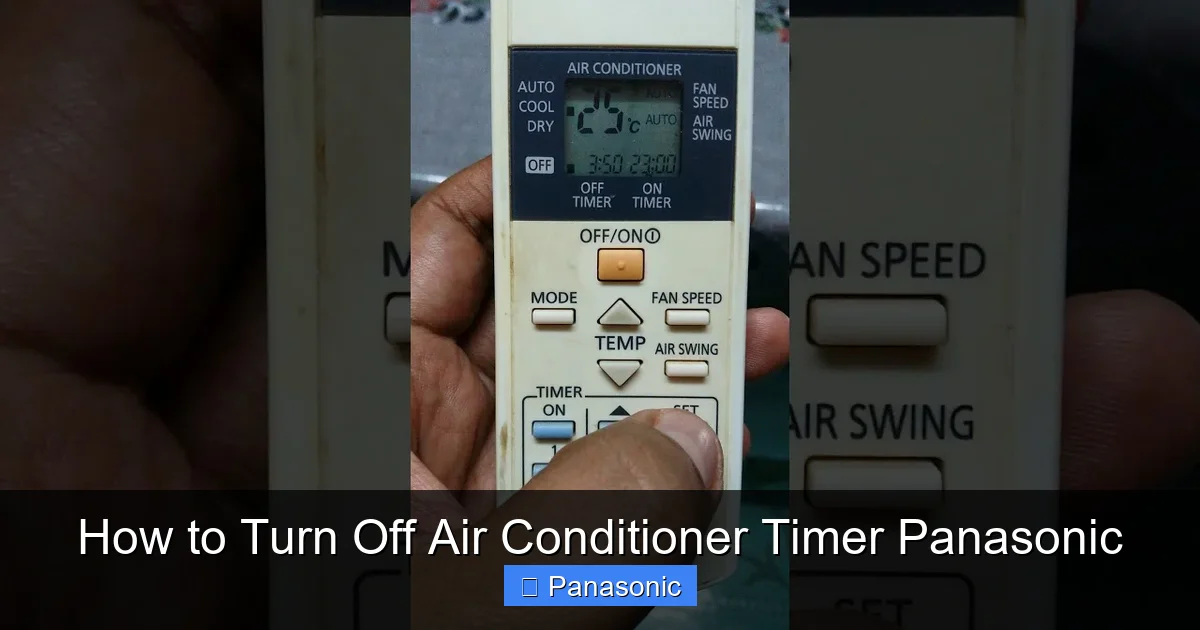
Visual guide about How to Turn Off Air Conditioner Timer Panasonic
Image source: i.ytimg.com
- Energy conservation: Turning off the AC during the day while you’re at work or school.
- Sleep comfort: Setting the AC to shut off after you fall asleep to avoid overcooling.
- Quick cooling: Starting the AC before you arrive home on a hot day.
- Maintenance scheduling: Automatically turning off during filter cleaning times.
While these features are helpful, they can become frustrating when the timer activates unintentionally—especially after power outages or remote battery changes. That’s why learning how to turn off air conditioner timer Panasonic is so important.
Before You Begin: Know Your Model
Panasonic offers a wide range of AC models—from compact portable units to high-end inverter wall-mounted systems. While the general process is similar, some models use slightly different button layouts or menu structures. Before diving into the steps below, check your model number. It’s usually printed on a sticker inside the front grille, on the side panel, or on the original packaging.
Common series include:
- CS/CU Series (Wall-Mounted): Popular in homes and offices.
- CQ Series (Portable): Freestanding units with built-in wheels.
- CU-Y Series (Inverter): Energy-efficient models with advanced controls.
Knowing your model helps you follow the correct instructions and avoid confusion. If you’re unsure, visit Panasonic’s official website and enter your serial number for support.
Method 1: Using the Remote Control (Most Common)
The easiest way to turn off air conditioner timer Panasonic is through the remote control. Most remotes have a dedicated Timer or Clock button, often labeled with a clock icon or “TMR”.
Step-by-Step Instructions
- Point the remote toward the AC unit. Make sure there are no obstructions between the remote and the sensor on the AC.
- Press the “Timer” or “TMR” button. This opens the timer menu on the display.
- Look for “OFF” or “Cancel Timer.” Use the arrow keys (▲▼) to highlight the option.
- Press “Enter” or “OK” to confirm. The timer indicator light should disappear.
- Test by checking the display. If the timer symbol (often “TMR” or a clock) is gone, you’re done!
Pro Tip: Some models show a countdown timer in hours (e.g., “4H OFF”). To cancel, press the timer button repeatedly until the number resets to “0.”
Example Scenario
Imagine you set your AC to turn off in 2 hours while watching TV. You realize you want it to keep running. Simply press the “Timer” button twice—once to open the menu, once to select “OFF.” The display will show “0H,” confirming the timer is disabled.
Method 2: Using the Control Panel on the Unit
If your remote is lost, dead, or not working, you can still turn off the air conditioner timer Panasonic directly from the unit itself. Most wall-mounted models have a small control panel on the front or side.
How to Access the Manual Controls
- Turn off the AC. Press the “Power” button to ensure the unit isn’t running.
- Locate the physical buttons. Look for labels like “Timer,” “Clock,” or “Mode.”
- Press and hold the “Timer” button for 3–5 seconds. This resets the timer function.
- Listen for a beep or watch the display. A single beep or flashing light indicates the timer has been canceled.
Note: Some older models may not have a physical timer button. In those cases, try pressing the “Mode” and “Fan” buttons together for 3 seconds.
Troubleshooting Tip
If the control panel doesn’t respond, check if the unit is in “Child Lock” mode. Press and hold the “Timer” and “Swing” buttons for 5 seconds to unlock it.
Method 3: Resetting After a Power Outage
After a blackout, your Panasonic AC might restart with default settings, including an active timer. This is a common issue and easily fixed.
Steps to Reset Post-Power Outage
- Unplug the AC unit from the wall outlet.
- Wait 2 minutes. This allows the internal memory to fully reset.
- Plug the unit back in.
- Press the “Power” button. The display should show current time and no active timer.
- Verify by checking the timer symbol. If it’s gone, the timer has been cleared.
This method works because it forces the system to reboot and discard any saved timer settings.
Method 4: Disabling Sleep Mode (Often Confused with Timer)
Some users mistake the sleep mode for a timer. Sleep mode gradually increases temperature after a set period to prevent overcooling during sleep. It’s different from the timer but can have similar effects.
How to Turn Off Sleep Mode
- Press the “Mode” button until you see “Sleep” or “SLEEP” on the display.
- Press the “Timer” or “Power” button to exit sleep mode.
- Alternatively, press and hold the “Mode” button for 3 seconds.
Once sleep mode is off, the AC will maintain its current temperature unless manually changed.
Troubleshooting: Why Isn’t the Timer Turning Off?
If you’ve tried all methods and the timer won’t turn off, here are some common issues and fixes:
Problem 1: Remote Not Responding
Solution: Replace the batteries. Weak batteries can cause erratic behavior. Also, clean the remote’s sensor area with a dry cloth.
Problem 2: Display Shows “TMR ON” But No Action
Solution: The timer may be set to turn on at a specific time, not just turn off. Check for both “ON” and “OFF” timers. Cancel both using the same steps.
Problem 3: Timer Reactivates After a Few Hours
Solution: Some models auto-enable timers after firmware updates. Perform a full reset by unplugging the unit for 5 minutes.
Problem 4: Child Lock Is Enabled
Solution: Unlock by pressing and holding two buttons (usually “Timer” and “Fan”) for 5 seconds until a light blinks.
Problem 5: Faulty Control Board
Solution: If none of the above work, contact Panasonic customer support. There may be a hardware issue requiring professional repair.
Energy-Saving Tips Beyond Timers
While disabling timers is helpful, consider these habits to reduce energy use:
- Set the thermostat to 78°F (26°C). This balances comfort and efficiency.
- Use ceiling fans. They help circulate cool air, allowing higher thermostat settings.
- Clean filters monthly. Dirty filters reduce airflow and force the AC to work harder.
- Seal windows and doors. Prevent cool air from escaping.
- Use a programmable thermostat. Even non-Panasonic models can sync with smart apps.
Conclusion: Take Control of Your Comfort
Learning how to turn off air conditioner timer Panasonic empowers you to manage your home’s climate efficiently and stress-free. Whether you’re dealing with an unexpected shutdown, a forgotten setting, or a post-power outage glitch, the methods above cover all scenarios. Remember: the key is knowing whether it’s a timer, sleep mode, or child lock causing the issue.
By following this guide, you’ll save energy, extend your AC’s lifespan, and enjoy consistent comfort. And when in doubt—check the manual, unplug and reboot, or reach out to Panasonic support. Your perfect indoor temperature is just a few button presses away.
