
You can open a Panasonic air conditioner without a remote by using the manual control panel, reset button, or physical buttons on the unit itself. This guide walks you through safe, step-by-step methods for most models, including troubleshooting tips and quick fixes. Whether your remote is lost or broken, these techniques help you regain control of your AC quickly and safely.
Key Takeaways
- Step-by-step: Easy to follow instructions
Quick Answers to Common Questions
Can I use my phone as a Panasonic AC remote?
Yes, if your Panasonic model supports it. Download the “Panasonic Comfort Cloud” app or use third-party apps like “AnyMote” with an IR blaster (available on some Android phones). Make sure your phone has an infrared emitter.
Where exactly is the manual control panel located?
It’s typically on the lower front or side of the indoor unit, behind a small plastic cover. Look for a label with “Manual” or a tiny arrow pointing down. If you can’t find it, consult your user manual or search online with your exact model number.
How do I know if my Panasonic AC uses a 38 kHz signal?
Most Panasonic air conditioners use 38 kHz. Check your original remote’s label or search “Panasonic [model] IR frequency.” Universal remotes usually support 38 kHz by default.
What if the reset button doesn’t fix the problem?
After resetting, if the AC still won’t respond, check for error codes on the LED display. If there’s no display or the code persists, there may be a hardware fault. Contact Panasonic customer support or a certified technician.
Is it safe to press buttons inside the unit without turning off power?
No. Always disconnect power before opening any panel or touching internal components. Even if the unit is off, residual electricity can cause harm. Safety first!
How to Open Panasonic Air Conditioner Without Remote: A Complete Step-by-Step Guide
Ever been caught in a heatwave only to realize your Panasonic air conditioner remote has gone missing? Or maybe the batteries died at the worst possible moment? Don’t panic—you can still operate your Panasonic air conditioner without a remote. In this comprehensive guide, we’ll walk you through multiple safe, reliable methods to control your unit even when the remote isn’t available. Whether you’re dealing with a broken remote, a forgotten one, or just want a backup plan, this guide covers everything from manual overrides to universal remotes and reset procedures.
This article is designed for homeowners, renters, and anyone who owns a Panasonic window or split-system air conditioner. We’ll explain each method clearly, step by step, with practical tips and troubleshooting advice. No technical jargon—just simple, easy-to-follow instructions anyone can follow.
Why You Might Need to Operate Your AC Without a Remote
There are several common reasons why you might need to control your Panasonic air conditioner without a remote:
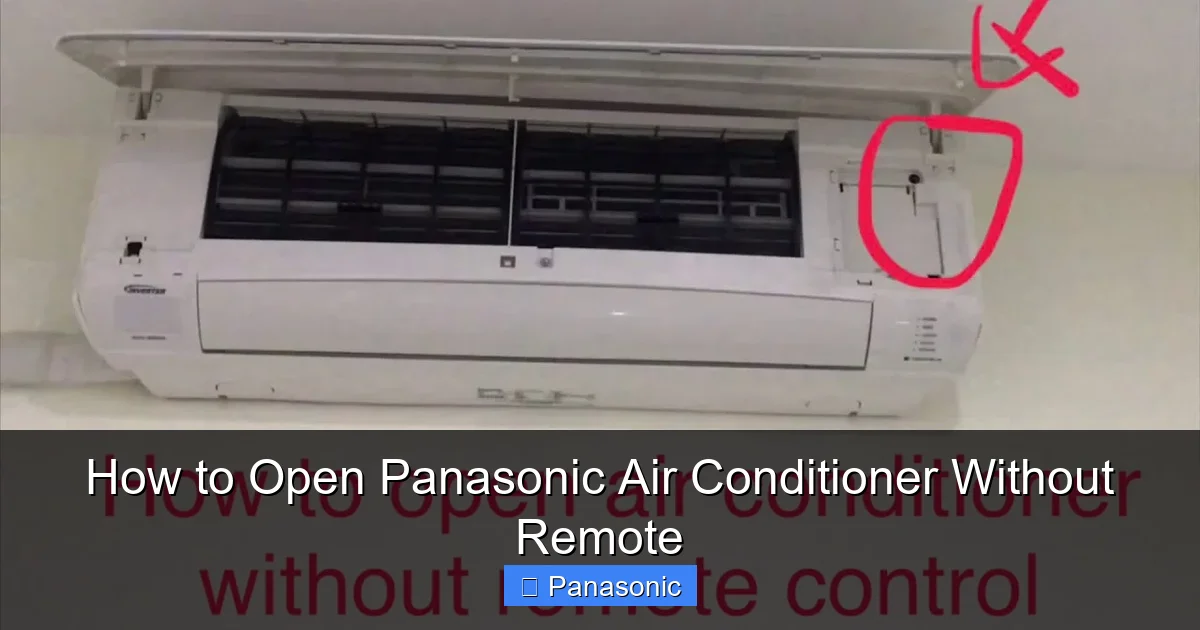
Visual guide about How to Open Panasonic Air Conditioner Without Remote
Image source: i.ytimg.com
- Lost or misplaced remote: It’s easier than you think to misplace a small remote in a couch cushion or drawer.
- Dead batteries: Remotes often die silently, leaving you stranded on a hot day.
- Battery compartment issues: Corrosion or loose connections can render the remote useless.
- Remote malfunction: Buttons may stop responding due to wear or liquid damage.
- New installation or relocation: Sometimes the original remote doesn’t come with the new unit during delivery.
In all these cases, knowing how to bypass the remote gives you peace of mind and ensures your comfort isn’t dependent on a single piece of plastic.
Understanding Your Panasonic Air Conditioner Model
Before diving into the steps, it’s important to know your Panasonic air conditioner model. Models vary slightly in design, especially between older and newer versions. Look for a label on the back or side of the indoor unit—it usually starts with “CS” or “CU” and includes numbers like CS/CU-XW12PKXV. This helps determine which control method applies.
Also, identify whether your unit is an inverter model or not. Inverter ACs are more advanced and may have different reset or control procedures compared to standard models.
Method 1: Use the Manual Control Panel
Most Panasonic air conditioners include a manual control panel behind a small access panel. This allows you to adjust temperature, fan speed, and mode without a remote. Here’s how to find and use it:
Step 1: Turn Off the Power
For safety, switch off the air conditioner using the wall switch or circuit breaker. Wait about 10 seconds before proceeding.
Step 2: Locate the Access Panel
Look for a small rectangular panel on the lower part of the indoor unit (the wall-mounted or ceiling unit). It’s often labeled “Manual Control” or marked with a small arrow. Some models hide it behind a decorative cover.
Step 3: Open the Panel
Gently pry open the panel using a flat tool like a plastic card or screwdriver tip. Be careful not to scratch the surface. Inside, you’ll see a few buttons: Mode (Mode), Temperature (+ and –), and Fan Speed.
Step 4: Adjust Settings Manually
- Press Mode once to cycle through modes: Cool, Dry, Fan, Auto, Heat (if applicable).
- Use + and – buttons to set your desired temperature (typically 16°C to 30°C).
- Fan Speed button changes airflow intensity.
- Press the Power button (if visible) to turn the unit on or off.
Example:
If you want cool air at 24°C, press Mode until “Cool” appears, then press + twice and – once to reach 24. Press the manual power button to activate.
Method 2: Use the Reset (RST) Button
The reset button is another way to regain control when the unit becomes unresponsive. This is especially useful if the AC is stuck in an error state or won’t turn on.
Step 1: Unplug the Unit
Disconnect the power cord from the wall outlet or turn off the circuit breaker. Wait 1–2 minutes to allow capacitors to discharge.
Step 2: Locate the RST Button
The reset button is usually near the power input or on the circuit board inside the indoor unit. It’s a small recessed button that may require a paperclip or pin to press.
Step 3: Press and Hold the RST Button
Insert a paperclip into the reset hole and hold for 5–10 seconds. The unit will emit a beep or flash lights, indicating a reset.
Step 4: Reconnect Power
Plug the unit back in and wait for it to boot up. The display should show normal operation. Try adjusting settings manually via the control panel or buttons.
Tip:
If the reset doesn’t work, check for error codes on the LED display. Refer to your manual to interpret them.
Method 3: Use Physical Buttons on the Indoor Unit
Some Panasonic models feature physical buttons directly on the indoor unit, eliminating the need for a remote or manual panel. These are common in newer or compact models.
Step 1: Find the Button Panel
Look for a small keypad on the front or side of the indoor unit. It may have labels like Power, Mode, Temp, and Fan.
Step 2: Press the Power Button
Press the power button once to turn the AC on. The indicator light should glow.
Step 3: Select Mode and Settings
Use the Mode button to choose Cool, Dry, etc. Adjust temperature with the up/down arrows.
Example:
A user in Mumbai wants dry mode at 26°C. They press Power, then Mode until “Dry” appears, then press the up arrow twice.
Method 4: Use a Universal Remote Control
A universal remote is a great long-term solution if you frequently lose remotes or have multiple devices. Most modern universal remotes can program with Panasonic ACs.
Step 1: Identify Your AC’s Frequency
Check your original remote or look up your model online. Most Panasonic ACs use 38 kHz infrared signals.
Step 2: Program the Universal Remote
Turn on the AC manually (using buttons or panel). Point the universal remote at the unit and follow the programming steps in its manual—usually involving holding the Power button and entering a code.
Step 3: Test All Functions
Try turning on/off, changing temperature, and switching modes. If one doesn’t work, try another code from the list.
Recommended Brands:
- GE Universal Remote (compatible with many Panasonic models)
- One For All UC9000B
- Broadcom BRCM IR Remote
Method 5: Emergency Manual Operation During Power Outage
If the power goes out and returns, your AC may not restart automatically. You can force it on using the manual panel:
Step 1: Wait 3–5 Minutes After Power Return
Panasonic units have a built-in delay to protect the compressor.
Step 2: Open the Manual Panel
Access the control buttons as described earlier.
Step 3: Press Power and Set Mode
Turn on the unit and select your preferred settings.
Practical Tips for Smooth Operation
- Keep a spare battery: Store extra AAA batteries in a labeled container near the AC.
- Label the manual panel: Use a sticky note to mark “+” and “–” for temperature if buttons are unclear.
- Clean the unit regularly: Dust buildup can affect sensor accuracy and button response.
- Check for obstructions: Ensure nothing blocks the IR receiver on the AC or remote.
- Update firmware: Some newer models support app-based control via Panasonic’s official apps like “Panasonic Comfort Cloud.”
Troubleshooting Common Issues
Problem: AC Won’t Turn On
- Check power supply and circuit breaker.
- Ensure the manual panel is accessible and not blocked.
- Try resetting the unit.
Problem: Buttons Don’t Respond
- Clean the button area with a soft cloth.
- Ensure no moisture is present.
- Inspect for physical damage.
Problem: Error Code Displayed
Refer to your manual. Common codes include:
- E1/E2: Sensor issue
- F1/F2: Communication error
- P1/P2: Overheating or pressure problem
Contact Panasonic support if the issue persists.
Conclusion
You now have five reliable ways to open and operate your Panasonic air conditioner without a remote. From the manual control panel and reset button to universal remotes and physical buttons, you’re equipped to handle any situation. Remember to prioritize safety—always unplug before accessing internal parts. With these methods, you’ll never be left sweating in the heat again.
Bookmark this guide for future reference, and consider investing in a universal remote or keeping a spare battery pack. Your comfort shouldn’t depend on a lost piece of plastic.
