
The Panasonic air conditioner remote control is a smart, user-friendly tool designed to enhance comfort and energy efficiency. With intuitive buttons and advanced functions, it allows precise temperature adjustments, scheduling, and mode selection for optimal cooling performance. Whether you’re replacing a lost remote or learning new features, this guide walks you through setup, usage, and troubleshooting—ensuring your Panasonic AC stays cool and convenient.
Key Takeaways
- Easy Operation: The remote offers simple controls like power, temperature, fan speed, and timer settings for everyday use.
- Energy Efficiency: Features such as Eco Mode and sleep function help reduce electricity consumption without sacrificing comfort.
- Smart Connectivity: Many models support infrared (IR) technology and can be paired with Wi-Fi-enabled systems for smart home integration.
- Battery Management: Regularly replace CR2032 batteries and avoid extreme temperatures to maintain reliable performance.
- Troubleshooting Tips: If the remote isn’t working, check alignment, clean sensors, or reset the unit before seeking professional help.
- Compatibility Matters: Always verify model-specific remotes—using the wrong one may cause malfunctions.
- Safety First: Keep the remote away from water and direct sunlight to preserve its lifespan and functionality.
Quick Answers to Common Questions
Can I use any remote with my Panasonic AC?
No—remotes are model-specific due to unique infrared codes. Using an incompatible one may cause partial or no response. Always verify your AC’s exact model number before purchasing.
Why does my remote stop working after rain?
Water damage affects internal circuits. Even if it seems dry, corrosion can occur internally. Replace the remote immediately and inspect the AC unit for moisture ingress.
How do I pair my AC with Alexa?
Enable Bluetooth/Wi-Fi on your Panasonic AC (check manual for steps), then use the Panasonic Comfort Cloud app to link it to your Amazon account via voice setup.
What’s the difference between Eco and Auto modes?
Eco Mode prioritizes energy savings by limiting cooling intensity. Auto Mode adjusts based on room temperature fluctuations but consumes more power during peak demand.
Is it safe to clean the remote with soap?
Only mild soap and water are acceptable. Harsh detergents degrade plastic and labels. Dry thoroughly before reuse to prevent short circuits.
📑 Table of Contents
- Introduction: Mastering Your Panasonic Air Conditioner Remote Control
- Understanding the Layout of Your Panasonic AC Remote
- How to Use Your Panasonic Air Conditioner Remote Effectively
- Common Issues with Panasonic AC Remotes & How to Fix Them
- Maintaining Your Panasonic Air Conditioner Remote
- Advanced Features: Beyond Basic Controls
- Choosing the Right Replacement Remote
- Environmental Impact and Energy Savings
- Conclusion: Your Trusted Climate Companion
Introduction: Mastering Your Panasonic Air Conditioner Remote Control
If you’ve ever reached for your air conditioner remote only to find it unresponsive, dead, or confusing to use, you’re not alone. The Panasonic air conditioner remote control is more than just a plastic wand—it’s the command center for your indoor climate. Designed with both simplicity and sophistication in mind, this compact device packs powerful features that make managing your comfort effortless.
From turning on your AC before you even walk into the room to setting a sleep timer so you don’t wake up sweating at night, the remote does it all. And thanks to Panasonic’s commitment to innovation, many modern remotes come with enhanced capabilities like voice control compatibility and app-based management. In this complete guide, we’ll explore every aspect of your air conditioner remote control Panasonic, from understanding its layout to solving real-world problems.
Understanding the Layout of Your Panasonic AC Remote
Before diving into advanced features, let’s break down what you see when you pick up your remote. Most Panasonic air conditioner remotes follow a consistent design philosophy: clarity, accessibility, and efficiency. While slight variations exist between models (like the SRKxx series or newer inverter-compatible units), core elements remain familiar.
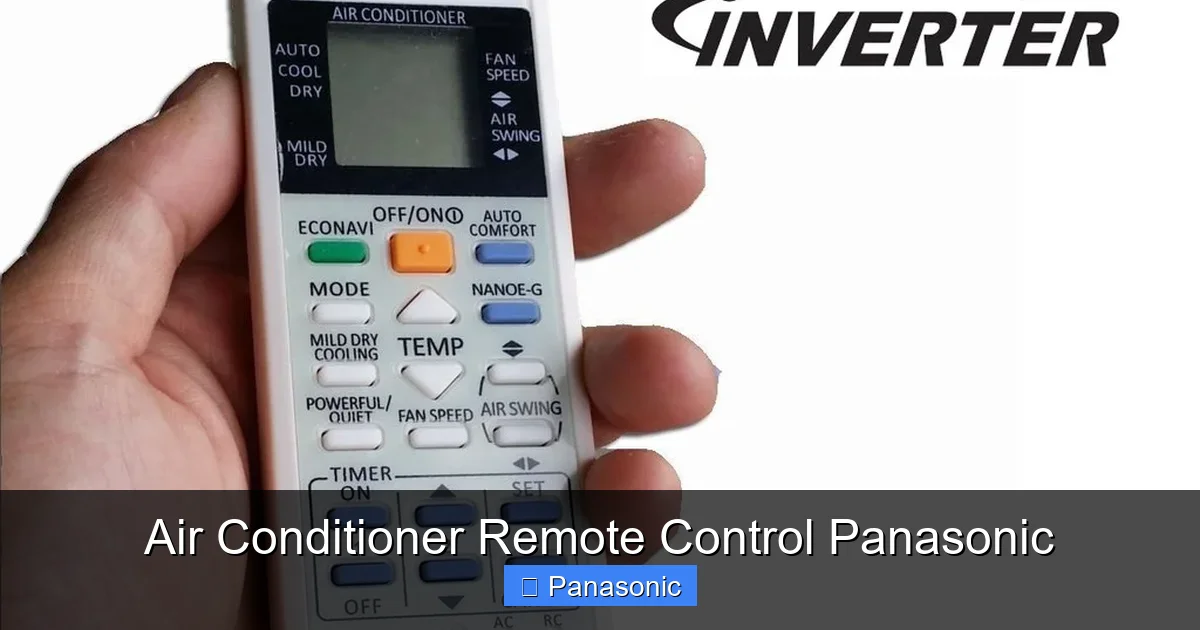
Visual guide about Air Conditioner Remote Control Panasonic
Image source: cf.shopee.com.my
Button Functions Explained
The front panel usually includes these essential buttons:
- Power Button: Turns the unit on/off instantly. A red LED often lights up when active.
- Mode Selector: Cycles through Cool, Dry, Fan, Auto, and sometimes Heat modes depending on your unit type.
- Temperature Adjustment: +/- keys let you raise or lower the setpoint by 1°C increments.
- Fan Speed Control: Options range from Low to High or Auto, which adjusts based on room conditions.
- Timer Buttons: Set delayed start (On Timer) or automatic shutdown (Off Timer) for energy savings.
- Eco/Intelligent Eye: Activates power-saving algorithms or motion-sensing features in select models.
Some remotes also include dedicated buttons for Swing, Clean Mode, or display toggles—always consult your manual for model-specific details.
Indicator Lights and Symbols
Look for small LEDs near the top or side of the remote. These show current status:
– A blinking light might indicate a timer is active.
– Flashing icons could signal error codes or low battery.
– Icons like snowflakes (cooling), sun (heating), or fans represent operating modes clearly visible from across the room.
How to Use Your Panasonic Air Conditioner Remote Effectively
Now that you know the basics, here’s how to put your remote to work without wasting energy or risking discomfort.
Setting the Right Temperature
Panasonic recommends maintaining indoor temperatures between 24–26°C for optimal balance of comfort and efficiency. Using the +/- keys, adjust gradually rather than making large jumps. For example, if it’s 30°C outside and your room feels warm, aim for 25°C first—then fine-tune based on how you feel after 15 minutes.
Pro Tip: Avoid cranking the thermostat below 20°C unnecessarily—your compressor will run longer, increasing wear and utility bills.
Using Eco and Intelligent Eye Modes
In hot weather, switch to Eco Mode by pressing the corresponding button. This reduces compressor workload, lowers noise levels, and cuts energy use by up to 40%. Similarly, the Intelligent Eye feature (available in premium models) uses sensors to detect occupancy and airflow patterns, automatically adjusting settings for maximum efficiency.
Example: If no one enters the room for 30 minutes, the AC may enter standby mode until motion resumes.
Scheduling with Timers
Set an Off Timer before bedtime to prevent overcooling. Say you want the AC off by midnight but still enjoy 23°C all evening. Press Timer > Off > 180 mins. You’ll save electricity while waking up in a pleasant environment.
Similarly, use the On Timer to cool your room while sleeping—perfect for summer nights when you’d rather not hear the compressor kick on at 3 AM.
Common Issues with Panasonic AC Remotes & How to Fix Them
Even the best-designed remotes face hiccups. Here are frequent problems and practical solutions.
Remote Not Responding
This usually stems from one of three causes:
- Battery depletion: Replace with fresh CR2032 lithium batteries (not alkaline).
- Signal obstruction: Ensure nothing blocks the IR sensor (usually at the top edge). Try pointing directly at the outdoor unit’s receiver.
- Dirty sensor window: Wipe gently with a microfiber cloth. Dust buildup disrupts infrared transmission.
If none of these work, try resetting the AC: Turn off the circuit breaker for 5 minutes, then restore power. This clears temporary glitches in the control board.
Buttons Sticking or Unresponsive
Dirt or moisture under membrane layers causes this issue. Remove the battery cover carefully and inspect beneath. Use compressed air to blow out debris, or dab a cotton swab lightly dampened with isopropyl alcohol around affected areas—never spray liquid directly.
Display Flickering or Blank
A blank screen typically means dead batteries. However, flickering may indicate poor contact between battery terminals. Open the compartment, clean the metal contacts with a pencil eraser, and reinsert firmly.
Maintaining Your Panasonic Air Conditioner Remote
Like any electronic device, your remote benefits from routine care to ensure longevity.
Battery Care Best Practices
- Replace batteries annually or when LED indicators dim.
- Never mix old and new cells—this creates voltage imbalance.
- Store spare batteries in dry conditions; humidity corrodes contacts.
Physical Cleaning Tips
Wipe the exterior weekly with a soft, slightly damp cloth. Avoid harsh chemicals that may damage labels or plastic. Never submerge in water—even waterproof models have sealed internals.
Storage Recommendations
When not in use, store the remote upright in a drawer or on a shelf. Prolonged bending or pressure can crack circuit boards hidden inside. Also, keep away from magnets (e.g., speakers) which interfere with internal components.
Advanced Features: Beyond Basic Controls
Modern Panasonic remotes go beyond simple on/off commands. Explore these hidden gems:
Voice Control Compatibility
Pair your AC with Amazon Alexa or Google Assistant using compatible models like the CZ-TACG10. Once linked, say, “Alexa, set living room AC to 24 degrees” instead of fumbling with buttons.
Mobile App Integration
Download the Panasonic Comfort Cloud app (iOS/Android) to monitor usage, receive alerts, and adjust settings remotely. Ideal for vacation homes or forgetful users who leave windows open during winter.
Learning Mode for Universal Remotes
Some universal remotes can mimic your original Panasonic remote via “learning” function. Point the original at the universal device and press matching sequences to transfer codes.
Choosing the Right Replacement Remote
Losing your original remote doesn’t mean buying a new AC. But selecting the correct replacement is critical.
Check Your Model Number
Locate it on the unit’s label (often behind the grille or on the back). Common formats include:
– SRKxxGSVW-S (indoor)
– PKEQxxxxxx (outdoor)
Verify Key Features Match
Ensure the replacement has identical buttons for:
– Mode selection
– Temperature range
– Timer resolution
– Any specialty functions (e.g., Clean Mode)
Buy from Authorized Sources
Avoid third-party sellers offering “universal” remotes. Counterfeits often lack proper coding, leading to erratic behavior. Visit Panasonic’s official website or authorized dealers for guaranteed compatibility.
Environmental Impact and Energy Savings
Your remote plays a subtle but vital role in reducing your carbon footprint. By using Eco Mode consistently and avoiding unnecessary temperature swings, you can cut annual AC energy use by 15–30%. That’s equivalent to planting several trees each year!
Additionally, regular maintenance (clean filters, clear vents) ensures your system runs efficiently—so even tiny remote actions multiply into big savings over time.
Conclusion: Your Trusted Climate Companion
The Panasonic air conditioner remote control isn’t just a gadget—it’s your gateway to personalized comfort, energy savings, and peace of mind. From mastering basic operations to leveraging smart integrations, every interaction shapes how effectively your AC serves you.
Remember: a few mindful habits—battery checks, gentle cleaning, and thoughtful scheduling—can keep your remote reliable for years. And when issues arise, armed with this knowledge, you’re ready to solve them fast.
Whether you’re upgrading to a newer inverter model or simply learning the ropes of your current unit, embracing your remote’s full potential transforms air conditioning from a chore into a seamless part of daily life.
Frequently Asked Questions
How often should I replace the batteries?
Replace CR2032 batteries once per year or whenever the LED indicator dims. Frequent use accelerates drain—consider rechargeable options if you have smart-enabled models.
Can I program multiple timers?
Most basic remotes allow one On Timer and one Off Timer per day. Advanced models support weekly schedules via the app or multi-step programming on the remote itself.
Why won’t my remote turn on the AC even when new batteries are installed?
Check if the AC’s physical switch (if present) is off, or if it’s in Sleep Mode. Also ensure the remote faces the receiver unobstructed—try moving closer or removing barriers.
Do all Panasonic ACs come with remotes?
Yes—every new Panasonic air conditioner includes a compatible remote. Older units purchased separately may require separate purchase unless bundled.
What should I do if the remote freezes?
Remove batteries for 30 seconds, then reinsert. This resets the microcontroller. If freezing persists, the logic board may need servicing—contact Panasonic support.
Are there child locks on Panasonic remotes?
Some models feature a Child Lock function to prevent accidental changes. Usually activated by holding the “Mode” and “Timer” buttons simultaneously for 3 seconds.
