Is your computer room feeling more like a sauna lately? You’re not alone! The heat generated by powerful PCs, monitors, and networking gear can turn a comfortable workspace into an oven, impacting both your comfort and your tech’s performance. That’s where a dedicated cooling solution comes in handy. Finding the best portable air conditioner for computer room use can be a game-changer, keeping you cool and your electronics happy.
We know how crucial a comfortable and cool environment is, especially when you’re deep into a gaming session, coding spree, or an important work meeting. Overheated equipment can lead to slower performance and even component damage. A portable AC unit offers a flexible and efficient way to target those heat pockets without needing a full-blown central air overhaul.
In this article, we’ve rounded up five fantastic portable air conditioners that are perfect for tackling the specific cooling challenges of a computer room. We’ll break down their features, what makes them stand out, and what users are saying, helping you pick the ideal unit to maintain that optimal temperature.
Why Your Computer Room Needs a Portable Air Conditioner
Modern computer setups, especially those with high-performance gaming rigs, multiple monitors, or even server equipment, generate a significant amount of heat. This isn’t just about your comfort; it directly affects your technology. High ambient temperatures can cause CPUs and GPUs to throttle performance to prevent overheating, leading to frustrating lag and slowdowns. In extreme cases, prolonged exposure to heat can shorten the lifespan of your expensive components.
A portable AC unit provides a targeted cooling solution. Unlike a general home AC system that might struggle to cool a specific, heat-intensive room, a portable unit can be placed exactly where it’s needed most. Many also come with dehumidifier functions, which is excellent for electronics as excessive humidity can also be detrimental. Plus, their mobility means you can move them around if your workspace shifts or you need to cool another small area.
How We Chose the Best Portable ACs for Computer Rooms
When searching for the best portable air conditioner for computer room applications, we considered several key factors:
- Cooling Power (BTUs): Measured in British Thermal Units (BTUs), this indicates how much space an AC can effectively cool. We looked for units suitable for various room sizes.
- Noise Level: A quiet operation is crucial for a computer room where concentration is key, or you’re using a microphone for calls or streaming.
- Portability & Installation: Easy setup, wheels, and handles make a big difference.
- Additional Features: Dehumidifier, fan modes, smart controls, and remote functionality add value.
- Efficiency: How well it cools relative to its energy consumption.
Ready to beat the heat? Let’s dive into our top picks!
BLACK+DECKER Portable Air Conditioner, 8,000 BTU (3,950 BTU SACC)

This BLACK+DECKER unit is a fantastic entry-level option for smaller computer rooms or offices up to 400 sq. ft. What makes it shine is its simplicity and effectiveness. It’s a true three-in-one unit, offering not just cooling but also dehumidification and a fan mode, making it versatile for year-round comfort. The “Follow Me” remote is a clever touch, ensuring the temperature is precisely regulated based on where you are in the room, not just where the unit is sitting.
- Key Features:
- 8,000 BTU (3,950 BTU SACC) for rooms up to 400 sq. ft.
- Three-in-One: AC, Dehumidifier, & Fan.
- Full-function remote control with “FOLLOW ME” thermostat feature.
- Top-mounted control panel with LED display.
- Easy mobility with casters and side handles.
- Includes an easy-to-install window kit.
- Pros:
- Great for smaller computer rooms or personal workspaces.
- “Follow Me” remote provides accurate temperature control.
- Relatively compact and easy to move around.
- Simple to install with the included window kit.
- Cons:
- Lower BTU might not be sufficient for larger rooms with many heat-generating devices.
- Not a smart AC unit, lacking Wi-Fi or voice control.
- User Impressions: Customers appreciate this unit for its reliable cooling in smaller spaces and its user-friendly controls. Many highlight the convenience of the “Follow Me” remote for personalized comfort, especially when working at a desk. It’s often praised as a solid, no-frills option that gets the job done without breaking the bank.
- Call to Action: See it on Amazon here
Dreo Portable Air Conditioners, 12,000 BTU AC Unit for Large Rooms

If your computer room is on the larger side or houses a lot of hot hardware, the Dreo AC515S is a powerhouse that can cool spaces up to 16 ft away with its massive 12,000 BTU ASHRAE cooling capacity. This unit truly stands out with its innovative noise isolation system, keeping the sound down to a minimum 46dB – a huge plus for focused work or immersive gaming sessions. Plus, its smart features mean you can control your comfort with just your voice or a tap on your phone.
- Key Features:
- Massive 12,000 BTU ASHRAE cooling capacity.
- 3-in-1 mode: Cooling, Dehumidifying, and Fan.
- New noise isolation system reduces operation to a minimum 46dB.
- Drainage-free system for most conditions (humidity <85%).
- Smart control via Amazon Alexa, Google Home, or the Dreo App.
- Temperature range from 65°F to 86°F.
- Pros:
- Exceptional cooling power for larger computer rooms.
- Impressively quiet operation, ideal for focus and calls.
- Smart home integration offers convenient control.
- Reduced drainage needs mean less hassle.
- Cons:
- Higher BTU might be overkill for very small rooms, potentially leading to higher energy consumption.
- Still requires a drain hose for very high humidity environments.
- User Impressions: Reviewers are consistently impressed by the Dreo AC515S’s powerful cooling ability and, more importantly, its remarkably quiet operation. Many users working from home or with elaborate gaming setups laud its smart features, finding the app and voice control incredibly convenient for adjusting settings without interrupting their workflow. The minimal drainage is also a frequently praised point.
- Call to Action: See it on Amazon here
BLACK+DECKER Smart Portable Air Conditioner with Heat, 12,000 BTU ASHRAE (8,000 BTU SACC)

This isn’t just an air conditioner; it’s a year-round climate control solution for your computer room. The BLACK+DECKER Smart Portable AC offers both powerful 12,000 BTU cooling and a substantial 9,000 BTU heating function, making it ideal for maintaining perfect comfort regardless of the season. What truly elevates this unit for a modern computer room is its smart connectivity – Wi-Fi, app control, and voice assistant compatibility mean you can adjust settings without even getting up from your desk.
- Key Features:
- Four-in-One Unit: 12,000 BTU ASHRAE (8,000 BTU SACC) AC, 9,000 BTU Heat, Dehumidifier, & Fan.
- Cools rooms up to 550 sq. ft.
- Smart AC with Wi-Fi connectivity, mobile app (iOS/Android), and voice control (Alexa/Google Assistant).
- “FOLLOW ME” remote control acts as a thermostat.
- Easy-to-install window kit included.
- Pros:
- Versatile year-round use with both cooling and heating.
- Smart features offer ultimate convenience and control.
- High cooling capacity suitable for larger computer rooms or open layouts.
- “Follow Me” remote ensures accurate temperature where you are.
- Cons:
- Higher price point due to smart features and heating capability.
- Larger footprint compared to smaller AC-only units.
- User Impressions: Customers love the versatility of this unit, especially those who experience seasonal temperature extremes. The smart features receive high praise for their convenience, allowing users to pre-cool their space before starting work or adjust settings from another room. Many also highlight its powerful cooling and heating performance, making it a valuable investment for dedicated workspaces.
- Call to Action: See it on Amazon here
BLACK+DECKER Portable Air Conditioner, 10,000 BTU (6,300 BTU SACC)

Striking a balance between power and portability, this 10,000 BTU BLACK+DECKER unit is an excellent choice for medium-sized computer rooms up to 450 sq. ft. It offers the familiar reliable cooling, dehumidification, and fan modes that BLACK+DECKER is known for, all within a compact and easily movable design. For those who need more cooling muscle than an 8,000 BTU unit but don’t require smart home integration or heating, this model hits a sweet spot.
- Key Features:
- 10,000 BTU (6,300 BTU SACC) for rooms up to 450 sq. ft.
- Three-in-One Unit: AC, Dehumidifier, & Fan.
- Full-function remote control with “FOLLOW ME” thermostat.
- Top-mounted control panel with LED display.
- Easy mobility thanks to casters and side handles.
- Includes an easy-to-install window kit.
- Pros:
- Good cooling capacity for most medium-sized computer rooms.
- “Follow Me” remote ensures personalized comfort.
- Very portable and easy to maneuver between rooms.
- Reliable and straightforward operation.
- Cons:
- Lacks smart features like Wi-Fi or voice control.
- Doesn’t offer heating functionality.
- User Impressions: This unit is a popular choice for users who need a robust cooling solution without all the bells and whistles. Many appreciate its dependable performance, stating that it effectively cools their computer rooms and keeps their tech from overheating. The ease of setup and mobility are frequently mentioned positives, making it a hassle-free addition to any workspace.
- Call to Action: See it on Amazon here
JYew Portable Air Conditioners Evaporative Mini Room Air Cooler
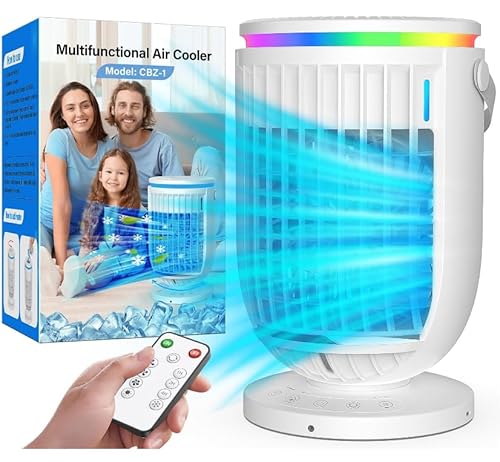
For those looking for a truly personal cooling experience, perhaps for a very small computer nook, a single desk area, or as a supplement to existing cooling, the JYew Evaporative Mini Room Air Cooler offers a unique approach. This isn’t a traditional compressor-based AC, but an evaporative cooler that adds moisture to the air while cooling it. Its compact size, 7-color ambient nightlight, and dual mist modes make it perfect for creating a personalized comfort zone right where you need it, and its whisper-quiet operation is a big bonus.
- Key Features:
- Massive water tank capacity for up to 12 hours of continuous cooling (low-mist).
- 120° wide-angle auto-oscillation for even air distribution.
- 7-color ambient nightlight with gradient shifts.
- Dual mist modes (gentle humidity or powerful cooling).
- Compact, lightweight, and whisper-quiet operation.
- Indoor-outdoor versatility, battery/USB-powered (if applicable).
- Pros:
- Extremely quiet, perfect for sensitive work environments.
- Very energy-efficient compared to traditional ACs.
- Adds humidity, which can be beneficial in dry climates.
- Portable for ultimate personal cooling.
- Nightlight feature adds ambiance.
- Cons:
- Not a true air conditioner; cooling effect is less powerful and depends on humidity.
- Less effective in high-humidity environments (it adds more humidity).
- Requires regular water refills.
- Only suitable for very small personal spaces, not entire rooms.
- User Impressions: Users love this mini cooler for its personal cooling capabilities and quiet operation, especially for sleeping or focused work. The ambient lighting is a popular feature, and many appreciate its energy efficiency. It’s often highlighted as a great desk companion or for small, specific cooling needs, though users are aware it’s not a replacement for a full AC unit.
- Call to Action: See it on Amazon here
FAQ: All Your Questions About Portable ACs for Computer Rooms Answered
Q1: What BTU level do I need for my computer room?
A: The ideal BTU depends on your room size and how much heat your equipment generates.
* Small rooms (150-250 sq. ft.) with light computer use: 6,000-8,000 BTU
* Medium rooms (250-450 sq. ft.) with multiple computers/gaming rigs: 8,000-12,000 BTU
* Larger rooms (450+ sq. ft.) or those with extensive server equipment: 12,000+ BTU
When in doubt, a slightly higher BTU is better than too low, as it can cool faster and run less frequently.
Q2: Are portable air conditioners noisy?
A: Older models or some budget options can be. However, many modern portable ACs, like the Dreo reviewed above, feature advanced noise isolation technology, bringing noise levels down to a minimum of 45-50dB, which is comparable to a quiet refrigerator. Look for models that specifically highlight “quiet operation” if noise is a major concern for your concentration or calls.
Q3: How do portable ACs get rid of hot air?
A: Portable ACs typically use an exhaust hose that vents hot air out of your room, usually through a window or sometimes a wall vent. An included window kit helps seal the opening around the hose to maximize efficiency. It’s crucial to properly install this exhaust hose for the unit to work effectively.
Q4: Do portable air conditioners need to be drained?
A: Most portable ACs collect condensed water as they cool and dehumidify. Some units have a “self-evaporating” system that expels most of this moisture out with the hot exhaust air, significantly reducing the need for manual drainage. However, in very humid conditions, or if the self-evaporating system can’t keep up, you might still need to manually drain a reservoir or use a continuous drain hose. Always check the manufacturer’s instructions.
Q5: Are portable air conditioners energy efficient?
A: Energy efficiency varies greatly between models. Look for units with an Energy Efficiency Ratio (EER) or Seasonal Energy Efficiency Ratio (SEER) rating, with higher numbers indicating better efficiency. While portable ACs use more energy than a fan, they are much more efficient than trying to cool an entire house just to keep one room comfortable, making them an excellent choice for targeted cooling in your computer room.
Q6: Can I use a portable AC in a room without a window?
A: Traditional compressor-based portable ACs require a way to vent hot air outside, typically through a window. If you don’t have a window, you’d need to explore alternative venting options like a drop ceiling vent, a dryer vent, or even creating a custom vent in a wall. Evaporative coolers (like the JYew reviewed) don’t require venting, but they provide less powerful cooling and add humidity.
Q7: How does a “Follow Me” remote work?
A: A “Follow Me” remote has a built-in thermostat. When you activate this feature, the AC unit will sense the temperature around the remote’s location rather than its own internal sensor. This ensures that the temperature is maintained precisely where you are in the room, offering more accurate and personalized comfort, especially useful when you’re seated at your desk.
Conclusion
Keeping your computer room cool isn’t just about personal comfort; it’s about protecting your valuable equipment and ensuring optimal performance. Choosing the best portable air conditioner for computer room use can make a world of difference. From the powerful and quiet Dreo for larger spaces to the versatile BLACK+DECKER models offering both cooling and heating, and even the personal evaporative cooler for targeted comfort, there’s a solution out there for every setup and budget.
Consider your room size, the heat output of your devices, and your personal preferences for noise and smart features. With the right portable AC, you can transform your hot computer room into a productive, comfortable oasis, letting you and your tech truly keep your cool.