
What Does E3 Mean on a Lg an Air Conditioner
If your LG air conditioner displays an E3 error code, it usually signals a problem with the outdoor unit’s fan motor or communication between indoor and outdoor components. This issue can prevent cooling, but often has simple solutions like checking power connections, cleaning debris, or resetting the system.
Key Takeaways
E3 indicates a fan motor or communication fault: The error typically points to an issue with the outdoor unit’s fan motor or a breakdown in signal between indoor and outdoor units.
Power and wiring are common culprits: Loose connections, tripped breakers, or damaged wiring can trigger the E3 code even if the motor is fine.
Debris and blockages matter: Leaves, dirt, or ice buildup around the outdoor fan can cause it to stall, leading to the error.
Resetting may solve temporary glitches: A simple power cycle can clear minor electronic hiccups causing the E3 message.
Professional help is sometimes needed: If basic troubleshooting fails, the fan motor, capacitor, or control board may need replacement by a certified technician.
Regular maintenance prevents E3 errors: Cleaning filters, checking coils, and inspecting outdoor units seasonally reduces the risk of this error.
Model-specific variations exist: While E3 generally means the same thing across LG models, always check your user manual for exact definitions.
Quick Answers to Common Questions
What does E3 mean on a LG air conditioner?
The E3 error code on an LG air conditioner typically indicates a problem with the outdoor unit’s fan motor or a communication failure between the indoor and outdoor units.
Can I fix an E3 error myself?
Yes, in many cases. Simple fixes like resetting the system, clearing debris, or checking wiring can resolve the issue. However, if the fan motor or capacitor is faulty, professional help may be needed.
Why won’t my LG AC fan spin when E3 appears?
The fan may not spin due to a seized motor, dead capacitor, power interruption, or physical obstruction like leaves or ice blocking the blades.
Is E3 the same on all LG AC models?
Generally yes, but always check your user manual. Most LG inverter and split-type units use E3 for fan/communication faults, though minor variations can exist.
How much does it cost to fix an E3 error?
Costs range from $100 for a capacitor replacement to $400+ for a new fan motor or control board, depending on the issue and labor rates in your area.
📑 Table of Contents
- Understanding the E3 Error Code on LG Air Conditioners
- What Exactly Does E3 Mean?
- Step-by-Step Troubleshooting for E3 Errors
- When to Call a Professional
- Preventing Future E3 Errors
- Model-Specific Notes and Exceptions
- Real-Life Example: Solving an E3 Error at Home
- Conclusion
Understanding the E3 Error Code on LG Air Conditioners
So, you’re enjoying a hot summer day when suddenly your LG air conditioner stops cooling—and instead of cold air, you see “E3” flashing on the display. Panic? Not yet. The E3 error code is one of the more common issues reported by LG AC owners, and while it’s definitely a sign something’s off, it’s rarely a death sentence for your unit.
In simple terms, the E3 code on an LG air conditioner usually means there’s a problem with the outdoor unit’s fan motor or a communication failure between the indoor and outdoor components. Think of your AC system as a team: the indoor unit handles air circulation and cooling inside your home, while the outdoor unit manages heat exchange and expels warm air. If the outdoor fan isn’t spinning properly—or if the two units can’t “talk” to each other—the system throws up the E3 flag to protect itself from further damage.
This error doesn’t always mean you need a new AC. In fact, many E3 issues stem from easily fixable causes like loose wires, dirty fans, or temporary power glitches. But ignoring it won’t help—your AC might shut down completely, leave you sweating, or even risk overheating internal parts. The good news? With a little know-how and some basic troubleshooting, you can often get your LG AC back up and running without calling a technician right away.
What Exactly Does E3 Mean?
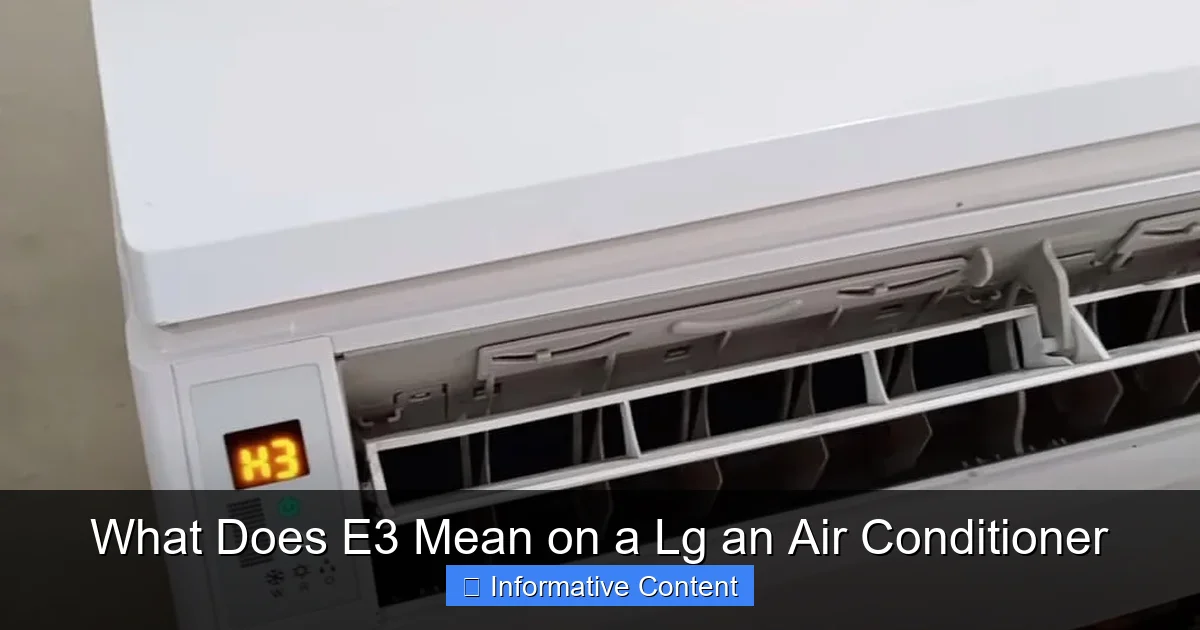
Diagram showing LG outdoor unit fan motor and communication wiring
Visual guide about What Does E3 Mean on a Lg an Air Conditioner
Image source: smartacsolutions.com
Let’s break it down: E3 is an error code specific to LG’s diagnostic system. Unlike generic “check engine” lights in cars, LG assigns specific meanings to each code so users and technicians can pinpoint problems faster. For most LG split-type and window-style air conditioners, E3 specifically refers to a fault in the outdoor unit’s fan motor operation or a communication error between the indoor and outdoor units.
When the outdoor fan motor fails to start, runs too slowly, or stops unexpectedly, the system detects this anomaly and halts normal operation to prevent damage. Similarly, if the data signal between the indoor and outdoor units gets disrupted—due to wiring issues, electrical noise, or component failure—the AC interprets this as a communication breakdown and displays E3.
It’s important to note that while E3 generally means the same thing across LG models (especially inverter-based units), slight variations can occur depending on the series or year of manufacture. Always refer to your owner’s manual for model-specific details. That said, the core issue remains consistent: something is preventing the outdoor unit from functioning correctly.
Common Triggers Behind the E3 Code
Several factors can trigger an E3 error. Understanding these helps you diagnose the root cause faster:
- Fan Motor Failure: The outdoor fan motor may be burnt out, seized, or receiving insufficient power.
- Faulty Capacitor: The start/run capacitor helps the motor spin. If it’s weak or dead, the fan won’t turn.
- Wiring Issues: Loose, corroded, or disconnected wires between units can break communication.
- Power Supply Problems: A tripped breaker, blown fuse, or unstable voltage can interrupt motor operation.
- Obstructions: Leaves, grass, ice, or debris blocking the fan blades can cause mechanical resistance.
- Control Board Malfunction: The main PCB (printed circuit board) that manages signals may have failed.
- Sensor Errors: Rarely, a faulty temperature or pressure sensor can send incorrect data, triggering E3.
Knowing these possibilities empowers you to methodically check each area before assuming the worst.
Safety First: Precautions Before Troubleshooting E3
Before attempting any hands-on steps, prioritize safety. Always turn off power at the breaker and the outdoor disconnect switch—never rely solely on the remote or thermostat. Capacitors can store a lethal charge even after power is removed; if you’re not trained to discharge them, avoid touching capacitor terminals. Wear insulated gloves and safety glasses when inspecting moving parts or electrical connections. If you smell burning plastic, see melted insulation, or hear unusual buzzing, stop immediately and call a licensed HVAC technician. A moment of caution prevents serious injury or further equipment damage.
Tools You Might Need for DIY E3 Troubleshooting
Having the right tools on hand makes the process smoother and safer. A basic kit includes: a non-contact voltage tester (to confirm power is off), insulated screwdrivers (Phillips and flathead), a multimeter with capacitance function (for capacitor testing), a soft brush or low-pressure hose (for coil cleaning), and a flashlight. For more advanced checks, a clamp meter can measure motor current draw. Keep your LG model number handy—usually on a sticker inside the front panel or on the outdoor unit—to pull up the correct wiring diagram from LG's official support site.
Step-by-Step Troubleshooting for E3 Errors
Before you call a repair service, try these practical steps. Most are safe for homeowners and take under 30 minutes.
Step 1: Turn Off and Reset the System
Start with the simplest fix: a full power reset. Turn off the AC using the remote or wall switch, then locate your home’s circuit breaker panel. Find the breaker labeled “AC” or “HVAC” and flip it off. Wait at least 5–10 minutes—this allows capacitors to discharge and resets the system’s electronics. After waiting, turn the breaker back on and restart the AC.
Why this works: Electronic glitches or temporary voltage spikes can confuse the control board. A hard reset clears these errors, much like restarting a frozen computer.
Step 2: Inspect the Outdoor Unit
Head outside and visually inspect the outdoor condenser unit. Is the fan spinning when the AC is on? If not, look for obvious blockages. Clear away leaves, twigs, or dirt lodged in the fan cage. Use a soft brush or hose (on low pressure) to clean the fins—but never high-pressure spray, which can bend delicate aluminum fins.
Also, gently try to spin the fan blade by hand (with power off!). If it’s stiff, gritty, or won’t turn freely, the motor bearings may be worn or debris is jamming it.
Step 3: Check Power and Wiring Connections
Ensure the outdoor unit is receiving power. Check that the disconnect switch near the unit (usually a pull-out fuse box or toggle switch) is in the “ON” position. If it’s off, turn it on and test again.
Next, inspect the wiring between the indoor and outdoor units. Look for frayed insulation, loose terminal screws, or signs of rodent damage. Tighten any loose connections—but only if you’re comfortable working with electrical components. If unsure, skip this step and call a pro. For deeper guidance on condenser wiring, see condenser troubleshooting steps.
Step 4: Test the Capacitor
The capacitor is a small cylindrical component near the fan motor. It stores energy to help the motor start and run smoothly. A swollen, leaking, or burnt capacitor is a clear sign of failure.
You can test it with a multimeter if you have one, but for most homeowners, visual inspection is enough. If the capacitor looks damaged, replacement is usually inexpensive ($10–$30) and straightforward—but again, only attempt this if you’re electrically savvy. Otherwise, leave it to a technician. Important: Before handling the capacitor, discharge it safely using a 20kΩ resistor across the terminals (never a screwdriver) to avoid a dangerous shock.
Step 5: Monitor for Recurrence
After completing these steps, run your AC for 15–20 minutes. If the E3 code returns immediately or frequently, the issue is likely mechanical or electrical—not a temporary glitch. At this point, professional diagnosis is recommended.
When to Call a Professional
While DIY fixes solve many E3 errors, some situations require expert help. Don’t risk injury or further damage if:
- You’re uncomfortable handling electrical components.
- The fan motor makes grinding or burning noises.
- The capacitor tests fine, but the motor still won’t spin.
- Wiring appears melted or severely corroded.
- The error persists after multiple resets and cleaning.
Certified HVAC technicians have specialized tools to test motor windings, measure refrigerant levels, and diagnose control board failures. They can also safely replace faulty parts under warranty (if applicable). Remember: tampering with sealed refrigerant systems without certification is illegal in many regions and can void your warranty.
Cost Considerations
Repair costs vary widely:
- Capacitor replacement: $100–$200 (parts + labor)
- Fan motor replacement: $200–$400
- Control board repair/replacement: $300–$600+
Always get a written estimate before authorizing work. If your unit is over 10 years old, weigh repair costs against investing in a new, energy-efficient model. For help comparing options, see our guide on selecting a new air conditioner.
Preventing Future E3 Errors
An ounce of prevention is worth a pound of cure—especially with AC systems. Follow these maintenance tips to reduce the risk of E3 and other errors:
- Clean the outdoor unit monthly during peak season. Remove debris and trim vegetation at least 2 feet away for airflow.
- Replace air filters every 1–3 months. Clogged filters strain the system and can indirectly affect outdoor performance.
- Schedule annual professional maintenance. A technician will clean coils, check refrigerant, tighten connections, and test capacitors.
- Protect the unit from weather extremes. Use a cover in winter (but only when the unit is off and dry) to prevent ice buildup.
- Ensure proper installation. Poorly installed units often suffer from wiring issues or inadequate drainage, leading to long-term problems. Review proper split AC installation practices to avoid common pitfalls.
Seasonal Tip: Winter Prep
Before winter, turn off the AC at the breaker and gently clean the outdoor unit. Cover it with a breathable fabric cover—not plastic, which traps moisture. This prevents ice accumulation and debris buildup that could trigger E3 when you restart the system in spring. For a complete checklist, see our seasonal maintenance checklist.
Model-Specific Notes and Exceptions
While E3 generally means the same thing across LG’s inverter AC lineup (like the DualCool, ArtCool, and Standard Series), always verify your model’s error codes. Some older or commercial models may use slightly different definitions.
For example:
- On certain LG window units, E3 might indicate a drain pan overflow (though this is less common).
- In multi-split systems (one outdoor unit serving multiple indoor units), E3 could point to a specific zone’s communication failure.
Download your user manual from LG’s official support site using your model number (usually found on a sticker inside the front panel or on the outdoor unit). The manual will list all error codes and recommended actions.
Comparison of E3 with Other Common LG Error Codes
Understanding how E3 differs from other codes helps you avoid misdiagnosis. Here’s a quick reference:
| Code | Typical Meaning | Primary Area |
|---|---|---|
| E3 | Outdoor fan motor fault / communication error | Outdoor unit fan & wiring |
| CH | Refrigerant pressure / charge issue | Refrigerant circuit |
| LL | Low refrigerant / leak detection | Refrigerant circuit |
| E1 | Indoor/outdoor communication failure (general) | Control wiring / PCB |
| E5 | Indoor fan motor fault | Indoor unit fan |
| F0 | Refrigerant leak (some models) | Refrigerant circuit |
Note: Definitions can vary by model series—always confirm with your manual.
LG Warranty and Support Options for E3 Errors
If your LG air conditioner is still under warranty (typically 5–10 years on parts, 1 year labor), an E3-related repair may be covered. Contact LG customer service with your model and serial number ready; they can verify coverage and direct you to an authorized servicer. Keep records of all maintenance—receipts for filter changes, coil cleanings, and professional tune-ups—as LG may request proof of proper upkeep. For units outside warranty, ask the technician about extended service plans or energy-efficient AC settings that reduce strain on components.
Real-Life Example: Solving an E3 Error at Home
Sarah, a homeowner in Arizona, noticed her LG DualCool AC showing E3 during a heatwave. She turned off the unit, checked the breaker (it was fine), and inspected the outdoor fan—it wasn’t spinning. She cleared some dried palm fronds stuck in the blades and gently spun the fan. It moved freely.
Next, she turned the system back on. The fan started, but E3 returned after 10 minutes. Suspecting a capacitor issue, she called a local HVAC tech. He confirmed the capacitor was weak and replaced it for $150. Her AC ran perfectly for the rest of the summer.
Sarah’s story shows that even if you can’t fix it yourself, early detection saves money and discomfort.
When to Consider Replacing Your LG AC Instead of Repairing
If your system is over 12 years old, requires frequent repairs, or uses R-22 refrigerant (phased out since 2020), replacement often makes more financial sense. New inverter-driven models can cut cooling costs by 20–40% compared to older units. Factor in rebates, tax credits, and the latest AC technology when deciding. A reputable contractor will perform a load calculation (Manual J) to size the new system correctly—oversizing leads to short cycling and humidity issues.
Conclusion
The E3 error on your LG air conditioner isn’t something to ignore—but it’s also not a reason to panic. In most cases, it’s a solvable issue rooted in fan motor problems, communication faults, or simple maintenance oversights. By understanding what E3 means, following safe troubleshooting steps, and knowing when to call a pro, you can restore cool comfort quickly and confidently.
Regular upkeep is your best defense. Keep filters clean, clear debris, and schedule annual checkups. And if E3 does appear, approach it methodically: reset, inspect, test, and act. With a little effort, you’ll keep your LG AC running smoothly for years to come. Need a certified technician? Start with our guide on diagnosing condenser problems to find a qualified pro near you.
Frequently Asked Questions
How do I reset my LG air conditioner after an E3 error?
Turn off the AC, flip the circuit breaker off for 5–10 minutes, then turn it back on. This resets the system’s electronics and may clear temporary glitches.
Can a dirty air filter cause an E3 error?
Not directly, but a clogged filter strains the system, potentially leading to overheating or reduced airflow that indirectly affects outdoor unit performance.
Should I cover my LG outdoor unit in winter?
Yes, but use a breathable fabric cover—not plastic. Covering prevents ice and debris buildup, which can trigger E3 when you restart the AC in spring.
What if the E3 code keeps coming back?
Recurring E3 errors suggest a persistent mechanical or electrical fault, such as a failing motor or damaged control board. Contact a certified technician for diagnosis.
Can low refrigerant cause an E3 error?
Rarely. E3 is primarily related to fan or communication issues. Low refrigerant usually triggers different codes like CH or LL, but severe imbalances can affect overall system operation.
Is it safe to run my AC with an E3 error?
No. Running the AC with an E3 error can overheat components, damage the compressor, or cause complete system failure. Turn it off and troubleshoot immediately.

