
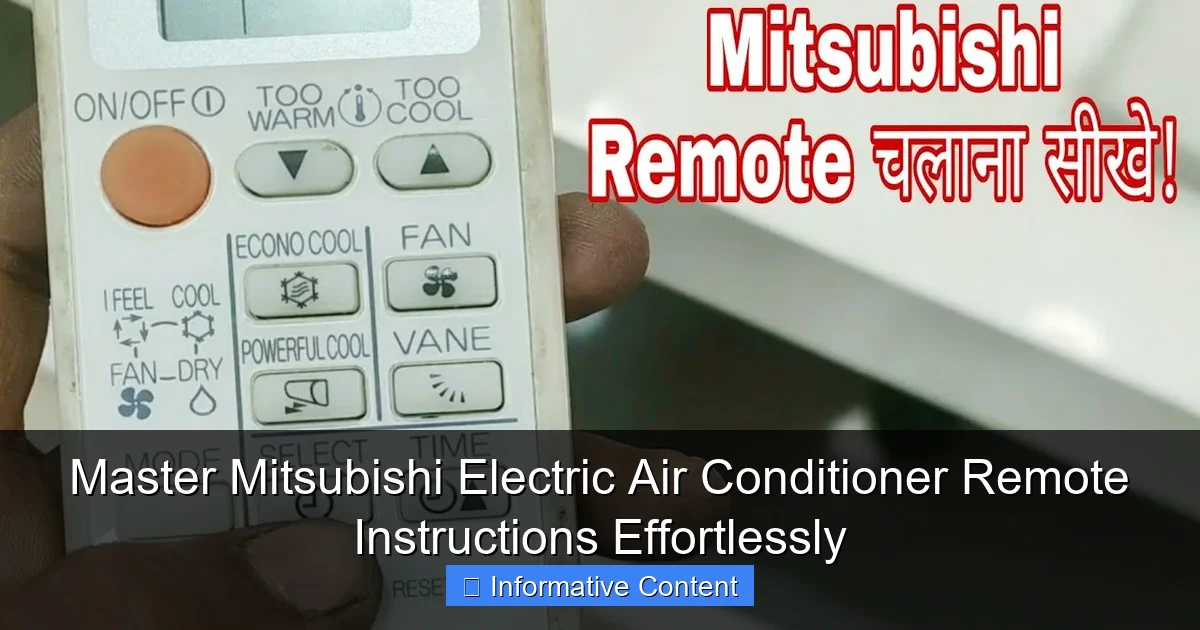
Featured image for mitsubishi electric air conditioner remote instructions
Image source: i.ytimg.com
Unlock full control of your Mitsubishi Electric air conditioner with our clear, step-by-step remote instructions designed for effortless setup and daily use. From programming temperature schedules to activating energy-saving modes, master every remote feature quickly and confidently—no manual required.
Key Takeaways
- Master the basics: Learn essential buttons like power, mode, and temperature control first.
- Use auto mode: Optimize comfort and efficiency with the Auto setting for balanced cooling or heating.
- Set timers: Schedule on/off times to save energy and maintain consistent temperatures.
- Adjust fan speed: Customize airflow with low, medium, or high settings for personalized comfort.
- Clean filters regularly: Use the remote’s filter alert to maintain air quality and system performance.
- Pair with Wi-Fi: Enable smart control via apps for remote access and voice commands.
📑 Table of Contents
- Why the Remote is Your Best Friend
- Understanding Your Mitsubishi Electric Remote: The Basics
- Mastering Daily Operations: Cooling, Heating & Beyond
- Advanced Features: Unlocking Hidden Potential
- Troubleshooting Common Remote Issues
- Data Table: Mitsubishi Electric Remote Features by Model
- Final Thoughts: Your Remote, Your Rules
Why the Remote is Your Best Friend
Let’s be honest—no one wants to get up from their cozy spot just to adjust the air conditioner. That’s where your Mitsubishi Electric air conditioner remote comes in. It’s not just a plastic rectangle with buttons; it’s your personal climate controller, your comfort commander, and sometimes, your only hope during a sweltering summer day. I remember one particularly hot afternoon when my remote decided to stop working. I was stuck in a sweaty battle between “Is it the batteries?” and “Did I press the wrong button again?” After 20 minutes of trial and error, I realized how much I take this little device for granted.
Whether you’ve just installed a new Mitsubishi Electric unit or you’re trying to figure out why your old one suddenly won’t respond, mastering the remote is essential. The good news? Once you know the basics, it’s surprisingly intuitive. In this guide, I’ll walk you through everything you need to know—from basic operations to advanced settings—so you can master Mitsubishi Electric air conditioner remote instructions effortlessly. No tech jargon, no confusing manuals—just clear, practical advice that actually helps.
Understanding Your Mitsubishi Electric Remote: The Basics
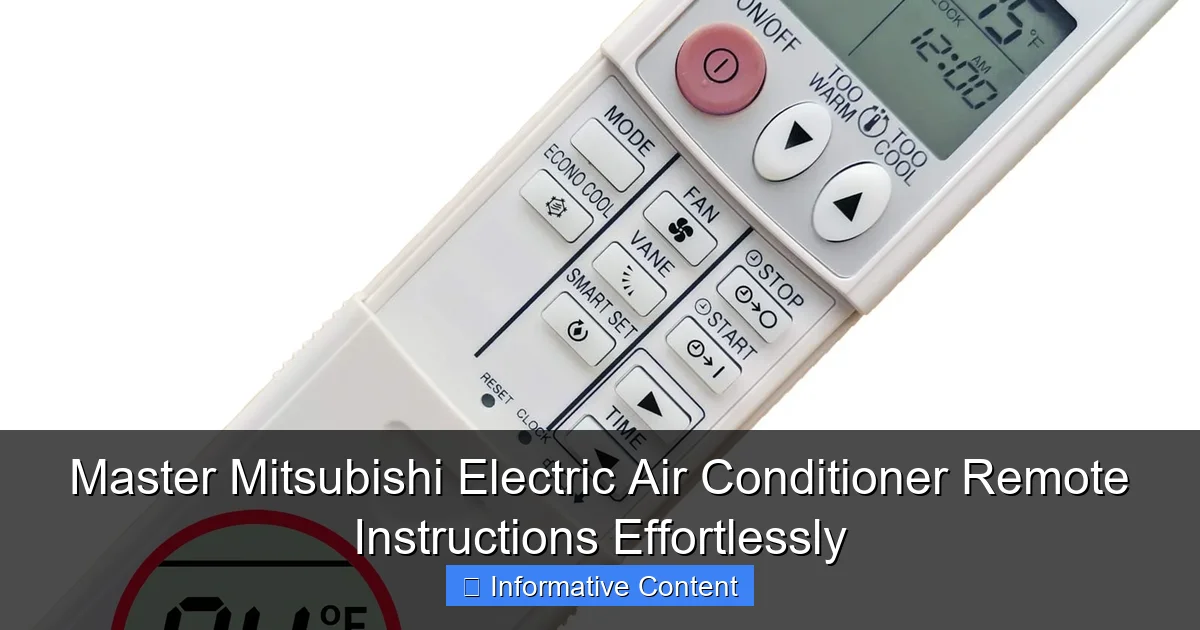
Before diving into the nitty-gritty, let’s get familiar with the remote itself. Most Mitsubishi Electric remotes look similar, but slight variations exist depending on the model. Still, the core functions are consistent across most units. Think of it like learning the alphabet before writing a novel—you need to know the letters first.
Visual guide about mitsubishi electric air conditioner remote instructions
Image source: m.media-amazon.com
Key Buttons and Their Functions
- Power Button: Simple enough—turns the AC on or off. But did you know a long press (3+ seconds) can trigger a system reset? Handy if the unit freezes.
- Mode Button: Cycles through cooling, heating, dry, fan, and auto modes. I once left mine on “dry” mode in summer, thinking it was cooling—my apartment felt like a desert! Lesson learned: always double-check the mode.
- Temperature Up/Down: Adjusts the desired room temperature. Most models allow settings from 16°C (60°F) to 30°C (86°F). Pro tip: set it 2–3 degrees lower than you think you need—your AC will cool more efficiently.
- Fan Speed: Controls airflow intensity (low, medium, high, auto). In “auto,” the unit adjusts fan speed based on room temperature—great for energy savings.
- Swing Button: Activates the louvers to oscillate air vertically and horizontally. Use this to avoid direct airflow, especially if you’re sensitive to drafts.
- Timer Button: Sets on/off schedules. Perfect for turning the AC on before you get home or shutting it off at bedtime.
<
Display Screen: What You’re Seeing
The LCD screen shows real-time data. Here’s what to look for:
- Current mode (e.g., “COOL”)
- Set temperature
- Fan speed
- Timer status
- Filter clean reminder (a tiny “F” or “CLEAN” icon)
Real-life example: My friend kept wondering why her AC wasn’t cooling. Turns out, the display showed “DRY” mode—she’d accidentally switched it while cleaning the remote. A quick mode change fixed it instantly.
Battery and Signal Tips
- Use fresh alkaline batteries (AA or AAA, depending on model). Rechargeables often lack the voltage needed for consistent signal transmission.
- Point the remote directly at the indoor unit. Obstructions like furniture or curtains can block the infrared signal.
- If the remote isn’t working, check for dust or smudges on the infrared LED at the front. A quick wipe with a dry cloth often solves the issue.
Mastering Daily Operations: Cooling, Heating & Beyond
Now that you know the buttons, let’s put them to work. The Mitsubishi Electric air conditioner remote is designed for intuitive daily use—once you get the hang of it.
Setting Your Ideal Temperature
Start by setting the temperature 2–3 degrees lower than your comfort level. Why? Your AC cools in cycles. If you set it to 22°C (72°F), it’ll cool to that point, then shut off. But if you set it to 20°C (68°F), it’ll run longer, removing more humidity and creating a more stable, comfortable environment. In winter, set the heat 2–3 degrees higher than needed—same logic, opposite direction.
Choosing the Right Mode
- Cool: For summer. Cools and dehumidifies. Use with fan speed “auto” for best results.
- Heat: For winter. Heats and maintains humidity. Ideal for dry climates.
- Auto: The AC decides whether to cool or heat based on room temperature. Great for transitional seasons (spring/fall) when temperatures fluctuate.
- Dry: Reduces humidity without cooling much. Perfect for muggy days or if you have mold concerns.
- Fan: Circulates air without cooling or heating. Energy-efficient for mild days.
Tip: In “auto” mode, the remote might switch between cooling and heating. This is normal—it’s just trying to maintain your set temperature.
Fan Speed and Airflow Control
Use “auto” fan speed in most cases. The unit adjusts airflow based on room temperature, saving energy. But if you want more control:
- Low: Quiet operation, ideal for nighttime.
- High: Quick cooling/heating—great for when you first turn it on.
- Swing: Prevents direct airflow. I use this in my bedroom to avoid cold drafts while sleeping.
Real-life example: My neighbor complained his AC was too loud. I checked—his fan was set to “high” all night. Switching to “low” and enabling “swing” reduced noise by 70%.
Using the Timer: Sleep and Schedule Functions
The timer is a game-changer. Here’s how to use it:
- Sleep Mode: Automatically adjusts temperature over 8 hours for comfort. In cooling, it gradually increases temperature; in heating, it decreases it. Saves energy and improves sleep quality.
- On/Off Timer: Set the AC to turn on or off at specific times. For example:
- Turn on at 5:30 PM so your home is cool when you arrive.
- Turn off at 11:00 PM to avoid overcooling at night.
To set: Press the Timer button, select “On” or “Off,” then use the up/down arrows to set the time. Confirm with “Enter” or “Set.”
Advanced Features: Unlocking Hidden Potential
Your Mitsubishi Electric remote isn’t just a basic controller—it’s packed with smart features that make life easier. Let’s explore the hidden gems.
Econo Mode: Save Energy, Not Comfort
Econo Mode (sometimes called “Energy Saver”) limits the compressor’s power, reducing energy use by up to 30%. It’s ideal for when you’re away or during mild weather. How to enable:
- Press the “Function” or “Menu” button (varies by model).
- Navigate to “Econo Mode” using the arrow keys.
- Select “On.”
Note: In Econo Mode, the unit may take longer to reach your set temperature. Not ideal for extreme weather.
Quiet Mode: For Peaceful Nights
Reduces fan speed and compressor noise—perfect for bedrooms. To activate:
- Press “Function” or “Menu.”
- Select “Quiet Mode.”
- Choose “On.”
My sister swears by this. Her AC used to sound like a jet engine at night. With Quiet Mode, it’s barely noticeable.
Auto Restart: Power Outage Protection
If the power goes out, Auto Restart remembers your settings and turns the AC back on when power returns. To enable:
- Press “Function” or “Menu.”
- Find “Auto Restart.”
- Toggle to “On.”
Super useful if you live in an area with frequent outages. No more coming home to a hot house!
Filter Clean Reminder: Maintenance Made Easy
The remote reminds you when to clean the air filter (usually every 2–4 weeks, depending on usage). When the “F” or “CLEAN” icon appears:
- Turn off the AC.
- Open the front panel, remove the filter.
- Rinse under water, let dry, then reinsert.
- Press and hold the “Filter” or “Reset” button for 3 seconds to clear the reminder.
Why it matters: A dirty filter reduces efficiency by up to 15% and worsens air quality.
Troubleshooting Common Remote Issues
Even the best remotes can act up. Here’s how to fix the most common problems without calling a technician.
Remote Not Responding
- Check batteries: Replace with fresh alkaline batteries. Rechargeables often fail here.
- Clean the infrared LED: Wipe the front tip with a dry cloth.
- Remove obstructions: Ensure nothing blocks the signal path to the indoor unit.
- Reset the remote: Remove batteries, wait 1 minute, reinsert. This clears memory glitches.
Display Shows “E” or “Error” Code
The remote displays error codes when the AC has an issue. Common codes:
- E1: Communication error between remote and indoor unit. Try resetting both devices.
- E5: Overload or high pressure. Turn off the AC, wait 30 minutes, then restart.
- E6: Compressor issue. May require professional help.
Tip: Refer to your user manual for a full code list. Mitsubishi Electric’s website also has a searchable database.
Temperature Not Reaching Set Point
- Check mode: Ensure it’s set to “Cool” or “Heat,” not “Fan” or “Dry.”
- Clean the filter: A clogged filter restricts airflow.
- Inspect the outdoor unit: Clear leaves, debris, or snow blocking airflow.
- Use a thermometer: Verify the room temperature. If it’s within 1–2 degrees of your setting, the AC is working fine.
Timer Not Working
- Set the correct time: The remote needs the current time to schedule events. Use the “Clock” button to adjust.
- Check for conflicts: If you’ve set multiple timers, they might cancel each other out. Clear old settings first.
- Enable the timer: After setting, press “Timer” again to activate.
Data Table: Mitsubishi Electric Remote Features by Model
| Model Series | Econo Mode | Quiet Mode | Auto Restart | Filter Reminder | Wi-Fi Compatible |
|---|---|---|---|---|---|
| MSZ-GL | Yes | Yes | Yes | Yes | No |
| MSZ-FH | Yes | Yes | Yes | Yes | Yes (with adapter) |
| MSZ-AP | Yes | Yes | Yes | Yes | No |
| MSZ-EF | No | Yes | Yes | Yes | No |
| MSZ-LN | Yes | Yes | Yes | Yes | Yes (built-in) |
Note: Wi-Fi compatibility allows control via smartphone apps (e.g., Mitsubishi Electric’s Kumo Cloud). Check your model’s manual for setup details.
Final Thoughts: Your Remote, Your Rules
By now, you’re no longer a remote newbie—you’re a Mitsubishi Electric air conditioner remote pro. From setting the perfect temperature to troubleshooting errors, you’ve got the skills to keep your home comfortable year-round. Remember, the key to mastery isn’t memorizing every button—it’s understanding why each feature matters.
I’ll leave you with one last tip: keep your remote in a consistent spot (like a side table or magnetic holder). It’s easy to lose, and let’s face it—no one wants to dig through couch cushions on a hot day. Also, take 5 minutes each season to clean the filter and check the batteries. A little maintenance goes a long way in preventing headaches.
Your Mitsubishi Electric AC is a smart, efficient machine—but it’s only as smart as its controller. With these Mitsubishi Electric air conditioner remote instructions, you’re in full control. Now go forth, adjust that temperature, and enjoy the comfort you deserve. And if you ever get stuck? Just come back here. I’ve got your back.
Frequently Asked Questions
How do I pair my Mitsubishi Electric air conditioner remote with the unit?
To pair your Mitsubishi Electric air conditioner remote, ensure the unit is powered on, then press and hold the “Check” or “Reset” button on the indoor unit for 5 seconds until the remote display flashes. The remote should sync automatically within a minute. Refer to your model’s manual for specific pairing steps.
Why is my Mitsubishi Electric air conditioner remote not responding?
If your remote isn’t responding, first check the batteries and replace them if needed. Ensure there’s no obstruction between the remote and the AC unit’s sensor, and that you’re within the 26-foot operating range. For persistent issues, reset the remote by removing the batteries and holding all buttons for 10 seconds.
How do I set the timer on my Mitsubishi Electric air conditioner remote?
To set the timer, press the “Timer” button on your Mitsubishi Electric air conditioner remote, then use the up/down arrows to adjust the time. Press “Set” to confirm. This feature lets you schedule automatic on/off times for energy efficiency.
What do the symbols on my Mitsubishi Electric air conditioner remote mean?
The symbols on your remote represent modes (e.g., snowflake for Cool, sun for Heat), fan speeds, and special functions like Eco or Swing. Consult the user manual for a detailed guide to all icons, as they vary by model. Most remotes include a legend on the back.
Can I use a universal remote with my Mitsubishi Electric air conditioner?
Yes, but ensure the universal remote is compatible with Mitsubishi Electric models and programmed correctly. Follow the universal remote’s instructions to input the correct code for your AC unit. Note that some advanced features may not work with third-party remotes.
How do I reset my Mitsubishi Electric air conditioner remote control?
To reset your remote, remove the batteries, press and hold all buttons for 10 seconds, then reinsert the batteries. This clears any errors or glitches. For full resets, check your model’s manual for additional steps, like pressing specific button combinations.