
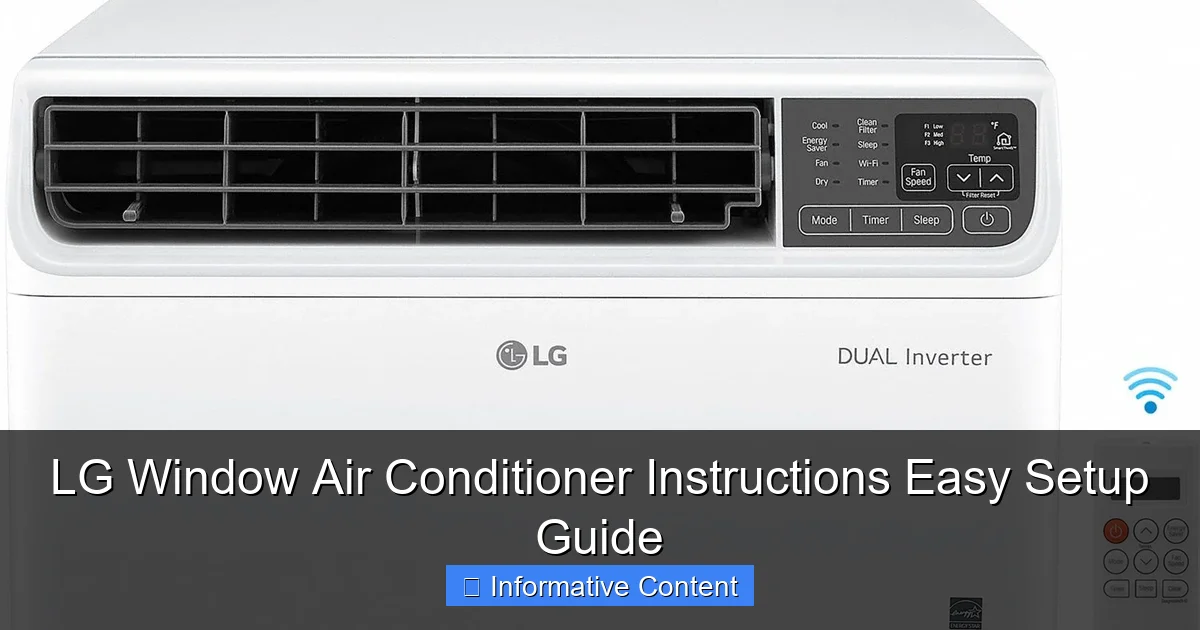
Featured image for lg window air conditioner instructions
Image source: static.grainger.com
Installing your LG window air conditioner is quick and hassle-free with the step-by-step instructions in this easy setup guide. From securing the unit safely in your window to connecting power and configuring settings, every detail is covered for efficient, reliable cooling. Follow these clear, expert-tested directions to get your AC running perfectly in minutes.
Key Takeaways
- Read the manual first: Always review LG’s instructions before installation to avoid errors.
- Secure the unit properly: Use side panels and brackets to prevent window AC from falling.
- Seal gaps tightly: Weather stripping reduces energy waste and improves cooling efficiency.
- Check electrical safety: Plug directly into an outlet; avoid extension cords for optimal performance.
- Clean filters monthly: Maintain airflow and efficiency by washing reusable filters regularly.
- Use smart features: Connect to LG ThinQ app for remote control and scheduling convenience.
📑 Table of Contents
- LG Window Air Conditioner Instructions: Easy Setup Guide
- Why Choose an LG Window Air Conditioner?
- What’s in the Box? Unboxing Your LG Window AC
- Step-by-Step Installation Guide
- Connecting Power and First-Time Setup
- Maintenance Tips to Keep Your LG AC Running Smoothly
- Common Issues and Troubleshooting Tips
- Energy Efficiency and Cost Savings
- Final Thoughts: Enjoy Cool Comfort All Summer Long
LG Window Air Conditioner Instructions: Easy Setup Guide
So, it’s that time of year again—the kind where stepping outside feels like walking into a sauna. You’ve finally decided to upgrade your summer survival kit with an LG window air conditioner. Great choice! LG is known for reliable, energy-efficient cooling, and their window units are no exception. But now you’re staring at the box, surrounded by parts, screws, and a manual that might as well be written in ancient hieroglyphics. Sound familiar?
Don’t worry—you’re not alone. Setting up a window AC for the first time can feel overwhelming, especially if you’ve never done it before. But here’s the good news: with the right instructions, a few basic tools, and a little patience, you can have your LG window air conditioner installed and cooling your space in under an hour. This guide is designed to walk you through every step of the process—from unboxing to first use—in plain, easy-to-follow language. Whether you’re a DIY newbie or just need a refresher, we’ve got you covered.
Why Choose an LG Window Air Conditioner?
Before we dive into the setup, let’s take a moment to appreciate why LG window air conditioners are such a popular choice. These units are built with smart features, energy efficiency, and user-friendly design in mind. Many models come with Wi-Fi connectivity, allowing you to control the temperature from your smartphone. Others include programmable timers, remote controls, and even voice assistant compatibility with Google Assistant or Alexa.
Visual guide about lg window air conditioner instructions
Image source: images.ctfassets.net
LG also focuses on quiet operation—something that’s a big deal if you’re trying to sleep or work while the AC is running. Their units often feature dual inverter compressors, which not only reduce noise but also improve energy efficiency. That means lower electricity bills and a smaller carbon footprint. Plus, LG’s sleek, modern designs blend well with most home aesthetics, so you don’t have to sacrifice style for comfort.
Key Features to Look For
- Energy Star Certification: Many LG models are Energy Star rated, meaning they meet strict energy efficiency guidelines set by the EPA.
- Smart Controls: Use the LG ThinQ app to adjust settings, set schedules, or check energy usage from anywhere.
- Multiple Cooling Speeds: Choose from low, medium, or high fan speeds depending on your comfort needs.
- Easy-Clean Filters: Washable filters make maintenance simple and help improve air quality.
- Auto Swing Louvers: Distribute cool air evenly across the room with adjustable airflow direction.
One real-life example: My neighbor Sarah installed an LG 10,000 BTU window unit last summer. She loves how quiet it is—she barely notices it’s running—and she’s saved nearly 20% on her cooling costs compared to her old unit. “It’s like having a personal climate butler,” she joked. And honestly? She wasn’t far off.
What’s in the Box? Unboxing Your LG Window AC
Before you even think about installing your LG window air conditioner, take a moment to unpack everything carefully. Rushing this step can lead to missing parts or damaged components. Most LG window units come with a standard set of items, but it’s always good to double-check against the included parts list.
Standard Components Included
- The air conditioner unit itself
- Window mounting brackets or support brackets
- Foam insulation panels (side and top)
- Screws, bolts, and washers
- Remote control (with batteries)
- User manual and installation guide
- Drain hose (on some models)
Pro tip: Lay out all the parts on a clean, flat surface—like a table or the floor—before you begin. This helps you keep track of everything and ensures nothing gets lost. I once spent 20 minutes looking for a tiny screw that had rolled under the couch. Lesson learned!
Tools You’ll Need
You don’t need a full toolbox, but having these basics on hand will make the process smoother:
- Phillips-head screwdriver
- Measuring tape
- Level (to ensure the unit is properly aligned)
- Pencil (for marking drill points)
- Drill (optional, depending on your window type)
- Safety gloves and goggles
If you’re installing in a double-hung window (the most common type), you likely won’t need a drill. But if you’re working with a sliding window or need to secure the unit to a wall, a drill may be necessary. Always prioritize safety—wear gloves to protect your hands and goggles to shield your eyes from dust or debris.
Step-by-Step Installation Guide
Now for the main event: installing your LG window air conditioner. Follow these steps carefully, and you’ll have cool, refreshing air in no time. Remember, every model is slightly different, so always refer to your specific user manual for model-specific instructions. But the general process remains consistent across most LG window units.
Step 1: Choose the Right Location
Not all windows are created equal. For optimal performance, choose a window that:
- Gets good airflow (not blocked by trees or buildings)
- Is easily accessible for maintenance
- Can support the weight of the unit (check your window frame’s strength)
- Is close to an electrical outlet (extension cords are not recommended)
Avoid placing the unit in direct sunlight if possible—this can make the AC work harder and reduce efficiency. Also, make sure there’s at least 12–18 inches of clearance on all sides for proper airflow.
Step 2: Prepare the Window
Open your window and remove the screen. Measure the width of the opening to ensure your AC unit will fit. Most LG window units are designed for standard window widths between 23 and 36 inches. If your window is too narrow, you may need to trim the included side panels or use additional insulation.
Next, lower the window sash until it rests on top of the AC unit. The unit should sit level and snugly in the opening. Use a level to check—this is important for proper drainage and operation.
Step 3: Install the Support Brackets
Many LG models come with support brackets that help hold the unit in place and prevent it from tipping. Attach these to the bottom of the window sill using the provided screws. Make sure they’re secure and level. If your model doesn’t include brackets, you can purchase aftermarket supports or use wooden blocks for added stability.
One thing to note: Never rely solely on the window sash to hold the unit. The weight of the AC can cause the window to sag or even fall, especially over time. Support brackets are a must for safety.
Step 4: Place the Unit in the Window
With a helper (this is a two-person job!), carefully lift the AC unit and slide it into the window opening. The front of the unit should be slightly tilted downward (about 1/4 inch) to allow condensation to drain properly. This is where the level comes in handy.
Once the unit is in place, lower the window sash onto the top of the AC. Make sure it’s snug but not so tight that it damages the unit or prevents the window from closing fully.
Step 5: Secure the Side Panels
Attach the foam or accordion-style side panels to the sides of the unit. These fill the gaps between the AC and the window frame, preventing hot air from sneaking in and cool air from escaping. Slide the panels into place and secure them with the included screws or clips.
If your window is wider than the unit, you may need to cut the panels to size. Use a sharp utility knife and measure twice before cutting. A clean, tight fit is key to energy efficiency.
Step 6: Seal the Top and Bottom
Use the included foam weather stripping or insulation tape to seal any gaps at the top and bottom of the unit. This helps keep insects out and improves cooling performance. Don’t skip this step—even small gaps can reduce efficiency by up to 10%.
Pro tip: For extra insulation, consider using a window AC cover on the outside during the winter months. This prevents drafts and protects the unit from weather damage.
Connecting Power and First-Time Setup
Once your LG window air conditioner is securely installed, it’s time to plug it in and get it running. But before you hit the power button, there are a few important steps to follow.
Electrical Safety First
Always plug your AC unit directly into a dedicated electrical outlet. Avoid using extension cords or power strips, as these can overheat and pose a fire hazard. The outlet should be on a circuit that can handle the unit’s power requirements—usually 115V or 230V, depending on the model.
Check the label on your AC unit for the correct voltage and amperage. If you’re unsure, consult an electrician. It’s better to be safe than sorry.
Initial Setup and Remote Control
Turn on the unit using the power button on the front panel or the remote control. Most LG models will default to “Cool” mode with a temperature setting of 72°F. Use the remote to adjust the temperature, fan speed, and mode (Cool, Fan, Dry, or Energy Saver).
If your model includes Wi-Fi, download the LG ThinQ app and follow the on-screen instructions to connect the unit to your home network. This allows you to control the AC from your phone, set schedules, and monitor energy usage.
Setting the Timer and Sleep Mode
One of the handiest features of LG window ACs is the programmable timer. Use it to turn the unit on or off at specific times—perfect for cooling your room before you get home from work. The sleep mode gradually adjusts the temperature overnight to save energy while keeping you comfortable.
For example, set the timer to turn on 30 minutes before bedtime, and let the sleep mode take over. You’ll wake up refreshed without wasting electricity.
Maintenance Tips to Keep Your LG AC Running Smoothly
Even the best air conditioners need a little TLC to perform at their best. Regular maintenance not only extends the life of your unit but also keeps your energy bills low and your air clean.
Clean the Air Filter Monthly
The air filter traps dust, pollen, and other particles. Over time, it gets clogged and restricts airflow, making the AC work harder. Most LG models have a washable filter that’s easy to remove and clean.
Simply pull out the filter, rinse it under warm water, and let it air dry completely before reinserting. Aim to clean it once a month during heavy use, or every two months otherwise.
Check the Drainage System
Condensation builds up inside the unit as it cools the air. Most window ACs drain this water outside automatically, but it’s good to check the drain hole periodically to make sure it’s not clogged. If water starts pooling inside the unit, it could indicate a blockage or improper tilt.
Inspect the Exterior and Vents
Every few months, take a look at the outside of the unit. Remove any leaves, dirt, or debris that may have accumulated around the vents. Blocked vents reduce efficiency and can cause the unit to overheat.
If you live in a dusty area, consider covering the unit during the off-season to protect it from the elements.
Schedule Professional Servicing
Once a year, consider having a professional technician inspect your AC unit. They can check refrigerant levels, clean internal components, and ensure everything is working properly. This is especially important if you notice reduced cooling, strange noises, or higher-than-normal energy bills.
Common Issues and Troubleshooting Tips
Even with proper installation and maintenance, issues can arise. Here are some common problems and how to fix them using your LG window air conditioner instructions as a guide.
Unit Won’t Turn On
- Check the power cord and outlet. Try plugging in another device to confirm the outlet is working.
- Make sure the remote control has fresh batteries.
- Verify the circuit breaker hasn’t tripped.
Not Cooling Enough
- Clean or replace the air filter.
- Ensure the unit is the right size for the room (too small = inadequate cooling).
- Check that windows and doors are closed to prevent warm air from entering.
- Verify the temperature setting is lower than the room temperature.
Water Leaking Inside
- Make sure the unit is tilted slightly downward to allow drainage.
- Check the drain hole for blockages.
- Inspect the window seal—gaps can allow humid air to condense inside.
Strange Noises
- Rattling: Loose screws or panels. Tighten all fasteners.
- Banging: Debris in the fan. Turn off the unit and inspect the interior.
- Hissing: Possible refrigerant leak. Contact a technician immediately.
Energy Efficiency and Cost Savings
One of the biggest advantages of LG window air conditioners is their energy efficiency. But how much can you really save? Let’s break it down with some real numbers.
| Model | BTU Rating | Energy Efficiency Ratio (EER) | Estimated Monthly Cost (8 hrs/day) |
|---|---|---|---|
| LG LW8016ER | 8,000 | 12.1 | $12–$15 |
| LG LW1016ER | 10,000 | 12.0 | $15–$18 |
| LG LW1216ER | 12,000 | 12.0 | $18–$22 |
| LG LW1516ER | 15,000 | 11.8 | $22–$26 |
These estimates are based on an average electricity rate of $0.13 per kWh. Actual costs may vary depending on your location, usage, and local energy prices. But as you can see, even the higher BTU models are relatively affordable to operate—especially when compared to central air systems.
To maximize savings, use the “Energy Saver” mode, which cycles the compressor on and off to maintain temperature without constant running. Also, keep your thermostat set to 78°F when you’re home and higher when you’re away. Every degree counts!
Final Thoughts: Enjoy Cool Comfort All Summer Long
Installing an LG window air conditioner might seem like a daunting task at first, but with the right guidance, it’s totally doable—even for beginners. From unboxing and mounting to setup and maintenance, every step is designed to be user-friendly and straightforward. And once it’s up and running, you’ll wonder how you ever lived without it.
Remember, the key to a successful installation is preparation, patience, and attention to detail. Follow the LG window air conditioner instructions carefully, use the right tools, and don’t hesitate to ask for help if you need it. And once you’re enjoying that crisp, cool air on a sweltering afternoon, you’ll know it was all worth it.
So go ahead—beat the heat, save on energy, and sleep better at night. Your LG window air conditioner is more than just an appliance; it’s your personal oasis in the summer storm. Stay cool, stay comfortable, and enjoy every breeze.
Frequently Asked Questions
How do I install an LG window air conditioner for the first time?
To install your LG window air conditioner, first ensure the window is properly supported and the unit fits securely. Follow the step-by-step instructions in the manual, including securing the window bracket, attaching side panels, and connecting the exhaust hose if required.
Where can I find the official LG window air conditioner instructions?
You can download the official LG window air conditioner instructions from the LG Support website by entering your model number. The manual includes setup, operation, and troubleshooting guidance tailored to your specific unit.
What tools do I need to set up my LG window AC unit?
Most LG window air conditioners require basic tools like a screwdriver, measuring tape, and level for proper installation. Some models may also need foam insulation strips or brackets, which are usually included in the packaging.
How do I clean and maintain my LG window air conditioner?
Turn off and unplug the unit before removing and cleaning the filter monthly with mild soap and water. Wipe down the exterior and ensure the vents are unobstructed to maintain efficiency and air quality.
Why is my LG window air conditioner not cooling properly?
Check if the filter is dirty, the temperature is set correctly, and the unit is sized properly for the room. Also, ensure there are no obstructions blocking airflow and that the window seal is tight to prevent warm air from entering.
Can I use a remote control with my LG window air conditioner?
Yes, many LG window air conditioner models come with a remote control for convenient operation. Refer to your LG window air conditioner instructions to pair the remote and adjust settings like temperature, fan speed, and mode.