
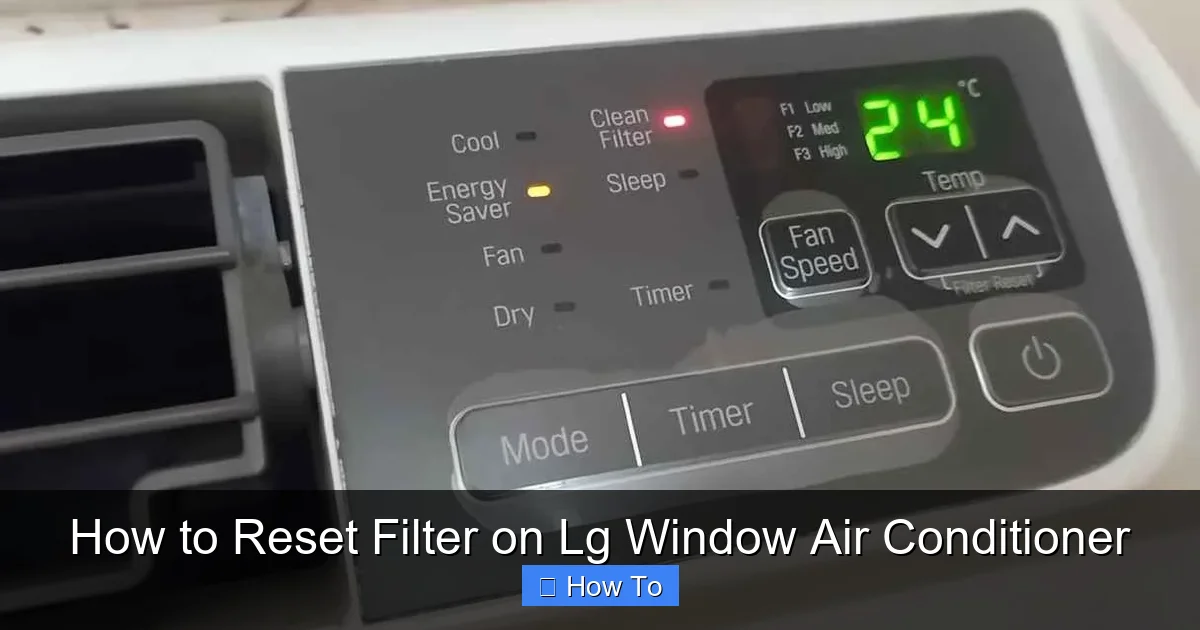
Resetting the filter on your LG window air conditioner is simple and essential for optimal performance. This guide walks you through the process, explains why it matters, and offers tips to maintain your unit in 2026 and beyond.
Key Takeaways
- Regular filter resets improve air quality: Resetting the filter indicator ensures you’re alerted when cleaning is needed, helping maintain clean, healthy indoor air.
- It extends your AC’s lifespan: A clean filter reduces strain on the motor and internal components, preventing overheating and costly repairs.
- Energy efficiency increases: A properly maintained filter allows better airflow, lowering energy consumption and reducing your electricity bill.
- The reset process is quick and easy: Most LG window AC models allow you to reset the filter light in under a minute using the remote or control panel.
- Know your model type: Whether you have a basic, smart, or inverter model, the reset method may vary slightly—always check your user manual.
- Clean the filter before resetting: Always remove, clean, and dry the filter before pressing the reset button to avoid false alerts.
- Schedule regular maintenance: Set a monthly reminder to check and clean your filter for consistent performance throughout the cooling season.
How to Reset Filter on LG Window Air Conditioner: A Complete 2026 Guide
Keeping your LG window air conditioner running smoothly isn’t just about comfort—it’s about efficiency, air quality, and longevity. One of the most overlooked yet crucial maintenance tasks is resetting the filter indicator after cleaning. If you’ve noticed the “Filter” light blinking on your LG window AC, or you’ve just cleaned the filter and want to clear the alert, you’re in the right place.
In this comprehensive guide, updated for 2026, we’ll walk you through exactly how to reset the filter on your LG window air conditioner. Whether you’re using a basic model, a smart Wi-Fi-enabled unit, or an inverter-powered system, we’ve got you covered. You’ll learn why this simple step matters, how to do it correctly, and how to avoid common mistakes. Plus, we’ll share expert tips to keep your AC performing at its best all summer long.
By the end of this guide, you’ll be able to confidently maintain your LG window AC, save on energy costs, and breathe easier knowing your indoor air is clean and fresh.
Why Resetting the Filter Matters
Before diving into the step-by-step process, it’s important to understand why resetting the filter is so essential. Your LG window air conditioner is equipped with a filter that traps dust, pollen, pet dander, and other airborne particles. Over time, this filter gets clogged, reducing airflow and forcing the unit to work harder.
When the filter becomes dirty, your AC’s performance drops. It may struggle to cool your room, use more electricity, and even overheat. To help you stay on top of maintenance, LG includes a filter indicator light that turns on after a set number of operating hours—usually around 250 hours, depending on the model.
Once you clean the filter, the system still “remembers” that the filter was dirty. That’s where the reset function comes in. Resetting the filter indicator tells the AC that the filter is clean and resets the timer. Without this step, the light will keep blinking, and you might forget when the next cleaning is due.
In 2026, with rising energy costs and increased focus on indoor air quality, maintaining your AC isn’t just a chore—it’s a smart investment. A clean filter and properly reset system mean better cooling, lower bills, and fewer service calls.
What You’ll Need
Resetting the filter on your LG window air conditioner is a breeze, but having the right tools and information ready makes it even easier. Here’s what you’ll need:
- Your LG window AC unit: Make sure it’s powered on and functioning.
- Remote control: Most models use the remote to reset the filter light. If you’ve lost it, check if your model supports app control or manual buttons.
- Clean, dry filter: You should clean the filter before resetting. We’ll cover how to do that shortly.
- User manual (optional but helpful): If you’re unsure about your model, the manual will confirm the exact reset steps.
- Smartphone (for Wi-Fi models): If your AC connects to the LG ThinQ app, you can reset the filter remotely.
Most of these items are likely already nearby. The key is ensuring the filter is clean and dry before resetting—otherwise, you’re just clearing the alert without solving the problem.
Step-by-Step: How to Reset the Filter on LG Window Air Conditioner
Now, let’s get into the main event: resetting the filter. The process varies slightly depending on your model, but the core steps are similar across most LG window AC units. We’ll cover the most common methods, including remote control, manual buttons, and app-based resets.
Method 1: Using the Remote Control (Most Common)
This is the standard method for the majority of LG window air conditioners. If your unit came with a remote, this is likely the way to go.
Step 1: Turn on the Air Conditioner
Make sure your LG window AC is plugged in and powered on. The unit should be in cooling, fan, or any active mode. You don’t need to adjust the temperature—just ensure it’s running.
Step 2: Locate the “Filter” or “Reset Filter” Button on the Remote
Look for a button labeled “Filter,” “Reset Filter,” or sometimes “Clean” on your remote. On many 2026 LG models, this button is located near the bottom of the remote, often with a small filter icon.
Step 3: Press and Hold the Filter Button
Press and hold the “Filter” or “Reset Filter” button for about 3 to 5 seconds. You should see the filter light on the AC unit blink or turn off. On some models, the light will flash three times to confirm the reset.
Step 4: Confirm the Reset
Check the display panel on your AC unit. The filter indicator light should be off or return to its normal state. If it’s still on, try repeating the process. Make sure you’re holding the button long enough—some users press it too briefly.
Step 5: Test the System
Run your AC for a few minutes to ensure everything is working properly. Listen for normal operation and feel the airflow. If the unit is cooling well and the light stays off, you’ve successfully reset the filter.
Method 2: Using the Control Panel (No Remote)
If you’ve misplaced your remote or your model doesn’t include one, you can still reset the filter using the buttons on the AC unit itself.
Step 1: Access the Control Panel
Locate the control panel on the front of your LG window air conditioner. This is usually a small digital display with buttons for power, mode, temperature, and fan speed.
Step 2: Find the “Filter” or “Reset” Button
Some LG models have a dedicated “Filter” button on the panel. If you don’t see one, look for a combination of buttons. On certain units, you may need to press and hold the “Mode” and “Fan” buttons simultaneously for 3 seconds.
Step 3: Press and Hold the Correct Button(s)
Hold the designated button or button combination until the filter light blinks or turns off. This usually takes 3 to 5 seconds. Refer to your user manual if you’re unsure which buttons to use.
Step 4: Verify the Reset
Check the display to confirm the filter light is off. If it’s still on, try the process again. Make sure the unit is powered on and not in sleep or timer mode.
Method 3: Using the LG ThinQ App (Smart Models)
For LG window air conditioners with Wi-Fi connectivity and smart features, you can reset the filter remotely using the LG ThinQ app—perfect for 2026’s connected homes.
Step 1: Open the LG ThinQ App
Download and install the LG ThinQ app from the App Store or Google Play if you haven’t already. Log in with your LG account and ensure your AC is connected to your home Wi-Fi network.
Step 2: Select Your Air Conditioner
From the home screen, tap on your LG window air conditioner. Make sure it’s online and responding to commands.
Step 3: Navigate to Maintenance or Settings
Look for a section labeled “Maintenance,” “Filter,” or “Device Care.” This is where you’ll find the filter reset option.
Step 4: Tap “Reset Filter”
Tap the “Reset Filter” button. The app will send a signal to your AC, and you should see a confirmation message. The filter light on the unit should turn off within a few seconds.
Step 5: Confirm on the Unit
Check the physical display on your AC to ensure the filter light is off. If it’s still on, try refreshing the app or repeating the process.
This method is especially convenient if you’re away from home and want to reset the filter after a cleaning service or family member has maintained the unit.
How to Clean the Filter Before Resetting
Resetting the filter only makes sense if the filter is actually clean. A dirty filter won’t improve performance, no matter how many times you reset the indicator. Here’s how to clean your LG window AC filter properly.
Step 1: Turn Off and Unplug the Unit
Safety first. Always turn off the air conditioner and unplug it from the wall outlet before removing the filter. This prevents accidental startup and protects you from electrical hazards.
Step 2: Locate the Filter
Open the front panel of your LG window AC. The filter is usually behind a grille or cover on the inside. On most models, you’ll need to lift the panel slightly and pull it forward. Some filters slide out, while others are attached with clips.
Step 3: Remove the Filter
Gently pull the filter out of its slot. Be careful not to bend or damage the mesh. If it’s heavily clogged, you may need to wiggle it slightly to free it.
Step 4: Clean the Filter
Use a soft brush or vacuum cleaner with a brush attachment to remove loose dust and debris. For a deeper clean, rinse the filter under lukewarm water. Avoid using hot water, as it can warp the filter material.
Do not use soap or detergent unless specified in your manual. Most LG filters are designed to be rinsed with water only. If your filter is washable (most are), let it air dry completely before reinstalling. Never put a wet filter back into the unit—this can cause mold or damage the motor.
Step 5: Reinstall the Filter
Once the filter is dry, slide it back into place. Make sure it’s seated properly and the front panel closes securely. A loose filter can reduce efficiency and cause noise.
Step 6: Plug In and Reset
Plug the unit back in, turn it on, and follow the reset steps outlined earlier. Now your AC is clean, reset, and ready to perform at its best.
Troubleshooting Common Issues
Even with clear instructions, you might run into a few hiccups. Here are some common problems and how to fix them.
The Filter Light Won’t Turn Off
If the filter light stays on after resetting, try these solutions:
- Repeat the reset process: Sometimes the signal doesn’t register. Press and hold the button again for a full 5 seconds.
- Check the filter installation: A misaligned or improperly seated filter can trigger the sensor. Remove and reinsert it carefully.
- Power cycle the unit: Turn off the AC, unplug it for 1–2 minutes, then plug it back in and try resetting.
- Update the firmware (smart models): Use the LG ThinQ app to check for firmware updates. Outdated software can cause glitches.
The Remote Isn’t Working
If your remote isn’t responding:
- Replace the batteries: Weak batteries are the most common cause. Use fresh AA or AAA batteries.
- Check the line of sight: Make sure there’s no obstruction between the remote and the AC’s sensor.
- Reset the remote: Some LG remotes have a reset button or require re-pairing. Consult your manual.
- Use the control panel: As a backup, use the buttons on the unit itself to reset the filter.
The Filter Is Damaged or Missing
If your filter is torn, warped, or missing:
- Order a replacement: Visit the LG website or contact customer support to find the correct filter model. Using the wrong filter can reduce efficiency.
- Don’t run the AC without a filter: This allows dust and debris to enter the unit, damaging internal components.
- Consider upgrading: In 2026, LG offers advanced filters with antimicrobial coatings or HEPA-like performance. Upgrading can improve air quality significantly.
Tips for Maintaining Your LG Window AC in 2026
Resetting the filter is just one part of AC maintenance. To keep your unit running efficiently all season, follow these expert tips:
- Clean the filter monthly: Even if the light hasn’t come on, dust builds up quickly. Set a calendar reminder for the first of every month.
- Check the coils and fins: Every few months, inspect the evaporator and condenser coils for dirt. Use a soft brush or coil cleaner to remove buildup.
- Keep the area around the unit clear: Ensure there’s at least 2 feet of space around the AC for proper airflow. Don’t block vents with furniture or curtains.
- Use a programmable thermostat or timer: This helps reduce runtime and saves energy. Many 2026 LG models include smart scheduling features.
- Schedule professional maintenance annually: A technician can check refrigerant levels, inspect electrical connections, and perform deep cleaning.
- Monitor energy usage: Use the LG ThinQ app to track your AC’s energy consumption. Sudden spikes may indicate a problem.
Conclusion
Resetting the filter on your LG window air conditioner is a simple but vital task that ensures your unit runs efficiently, saves energy, and delivers clean, cool air. Whether you’re using the remote, the control panel, or the LG ThinQ app, the process takes just a few seconds—but the benefits last all season.
In 2026, with smarter technology and higher energy costs, maintaining your AC isn’t optional—it’s essential. By cleaning the filter regularly and resetting the indicator, you’re not just following instructions; you’re taking control of your comfort, your health, and your budget.
So the next time you see that filter light blink, don’t ignore it. Grab your remote, clean the filter, and reset the system. Your LG window air conditioner—and your wallet—will thank you.