
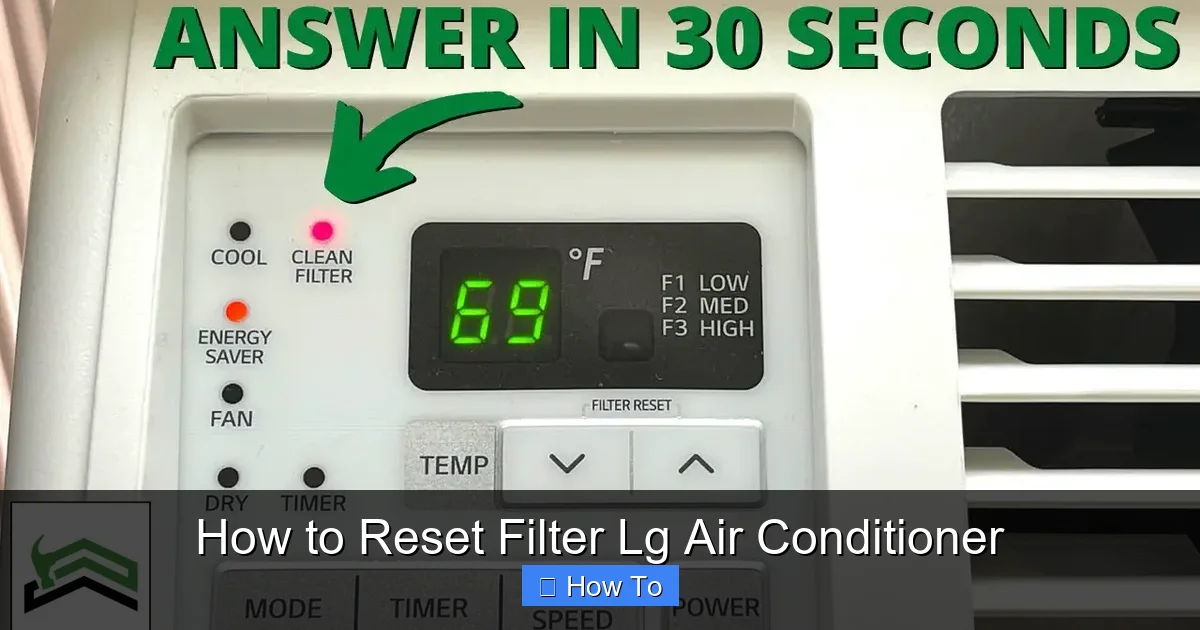
Resetting the filter on your LG air conditioner is essential for maintaining performance and air quality. This guide walks you through the process clearly, whether you have a window, split, or smart model. Follow these simple steps to keep your AC in top shape.
Key Takeaways
- Regular filter resets improve air quality: Resetting the filter indicator ensures you’re alerted when it’s time to clean or replace the filter, helping maintain clean, healthy air in your home.
- Most LG models use a filter reset button: The majority of LG air conditioners feature a dedicated “Filter” or “Reset Filter” button on the remote or control panel.
- Smart models can auto-remind you: LG’s 2026 smart ACs with Wi-Fi connectivity can send filter maintenance alerts directly to your smartphone via the LG ThinQ app.
- Manual reset may be needed after cleaning: Even after cleaning the filter, you must manually reset the indicator to stop the warning light and reset the timer.
- Incorrect reset can cause false alerts: Failing to reset properly may lead to repeated filter warnings, even when the filter is clean.
- Always power off before cleaning: For safety, turn off the unit and unplug it before removing or cleaning the air filter.
- Check your user manual for model-specific steps: While most LG ACs follow a similar process, some newer 2026 models may have unique reset procedures.
How to Reset Filter LG Air Conditioner: A Complete 2026 Guide
Keeping your LG air conditioner running smoothly isn’t just about cooling your space—it’s about maintaining efficiency, reducing energy bills, and ensuring the air you breathe is clean and healthy. One of the most overlooked yet crucial maintenance tasks is resetting the filter indicator after cleaning or replacing the air filter. In 2026, LG continues to lead the HVAC industry with smart, energy-efficient air conditioners that rely on accurate filter monitoring to deliver optimal performance.
If you’ve recently cleaned your LG AC’s filter and the filter warning light is still on, or if you’re unsure how to reset the filter indicator, you’re in the right place. This comprehensive guide will walk you through the process step by step, covering various LG air conditioner models—from traditional window units to advanced split systems and Wi-Fi-enabled smart ACs. Whether you’re a first-time user or a long-time LG owner, this guide will help you reset your filter with confidence.
By the end of this article, you’ll know exactly how to reset the filter on your LG air conditioner, understand why it’s important, and learn tips to keep your unit running efficiently all year long. Let’s get started!
Why Resetting the Filter Matters
Visual guide about How to Reset Filter Lg Air Conditioner
Image source: guideabouthvac.com
Before diving into the how-to steps, it’s important to understand why resetting the filter is such a big deal. Your LG air conditioner’s filter plays a vital role in trapping dust, pollen, pet dander, and other airborne particles. Over time, this filter gets clogged, reducing airflow and forcing your AC to work harder. This not only increases energy consumption but can also lead to overheating, reduced cooling performance, and even system damage.
LG air conditioners are equipped with a filter monitoring system that tracks how long the filter has been in use. Once the system detects that the filter needs attention—usually after 250 hours of operation—it triggers a warning light on the control panel or remote. This is your cue to clean or replace the filter.
However, simply cleaning the filter isn’t enough. If you don’t reset the filter indicator, the warning light will remain on, and the system will continue to count usage hours from the last reset. This can lead to confusion, unnecessary maintenance alerts, and even reduced efficiency if the system thinks the filter is still dirty.
Resetting the filter tells your LG AC that the filter has been serviced and resets the internal timer. This ensures accurate monitoring and helps maintain peak performance. In 2026, with more homes relying on smart climate control, keeping your filter reset is more important than ever.
What You’ll Need
Before you begin, gather a few basic items to make the process smooth and safe:
- Your LG air conditioner remote control: Most filter resets are done using the remote.
- A clean, dry cloth: For wiping down the filter and control panel.
- A vacuum cleaner or soft brush: For cleaning the filter (if needed).
- Access to the user manual: Especially helpful for model-specific instructions.
- A smartphone (for smart models): If your AC is connected to the LG ThinQ app.
Having these items ready will help you complete the reset quickly and avoid any interruptions.
Step-by-Step Guide to Resetting the Filter on LG Air Conditioners
The exact steps to reset the filter may vary slightly depending on your LG air conditioner model. However, the general process is consistent across most units. Below, we’ll cover the most common methods used in 2026 LG models, including window units, split systems, and smart ACs.
Step 1: Turn Off the Air Conditioner
Safety first! Before you do anything, make sure your air conditioner is turned off. Use the remote or the power button on the unit to shut it down completely. For added safety, unplug the unit from the power outlet. This prevents any accidental startup while you’re handling the filter or control panel.
Even if you’re only resetting the indicator and not cleaning the filter, it’s a good habit to power down the unit. This reduces the risk of electrical shock and protects the internal components.
Step 2: Locate the Filter Reset Button
Most LG air conditioners have a dedicated “Filter” or “Reset Filter” button on the remote control. This button is usually labeled clearly and may have a small filter icon next to it. On some models, the button is located on the unit’s control panel itself, especially in window ACs.
If you can’t find the button, check your user manual. In 2026, LG has standardized the design across many models, but older units or regional variants may have slight differences.
Step 3: Press and Hold the Filter Reset Button
Once you’ve located the filter reset button, press and hold it for about 3 to 5 seconds. You should see the filter indicator light on the display panel blink or turn off completely. This confirms that the reset has been successful.
On some models, you may need to press the button twice—once to enter the menu and again to confirm the reset. If your remote has a display screen, look for a confirmation message like “Filter Reset” or “Clean Filter.”
Step 4: Check the Display Panel
After resetting, check the control panel on your air conditioner. The filter warning light should be off. If it’s still on, try repeating the reset process. Sometimes, the button needs to be held longer, or the system may require a power cycle.
To do a power cycle, unplug the unit for 30 seconds, then plug it back in and try the reset again. This can help reset the internal electronics and ensure the command is registered.
Step 5: Clean or Replace the Filter (If Needed)
While resetting the indicator is important, it’s equally crucial to actually clean or replace the filter. A reset without cleaning defeats the purpose.
To clean the filter:
- Open the front panel of your AC unit.
- Gently remove the filter. Most LG filters slide out easily.
- Use a vacuum cleaner or soft brush to remove dust and debris.
- Rinse the filter under lukewarm water if it’s washable. Let it dry completely before reinserting.
- Reinstall the filter and close the front panel.
If your filter is damaged or hasn’t been replaced in over 6 months, consider getting a new one. LG recommends replacing filters every 3 to 6 months, depending on usage and air quality.
Step 6: Turn the AC Back On
Once the filter is clean and the reset is complete, plug the unit back in and turn it on. The filter indicator should remain off, and your AC should operate normally. If the light comes back on immediately, double-check that the filter is properly installed and the reset was successful.
Resetting the Filter on LG Smart Air Conditioners (2026 Models)
In 2026, LG has expanded its lineup of smart air conditioners with advanced features like Wi-Fi connectivity, voice control, and AI-powered climate management. These models often use the LG ThinQ app for remote control and maintenance alerts.
Using the LG ThinQ App
If your LG AC is connected to the LG ThinQ app, you can reset the filter indicator directly from your smartphone:
- Open the LG ThinQ app on your phone.
- Select your air conditioner from the device list.
- Tap on “Maintenance” or “Filter Status.”
- Look for an option like “Reset Filter” or “Mark as Clean.”
- Tap to confirm the reset.
The app will send a signal to your AC, and the filter indicator should turn off. This method is especially convenient if you’ve cleaned the filter while away from home.
Voice Assistant Integration
Some 2026 LG smart ACs support voice commands via Google Assistant or Amazon Alexa. You can say, “Hey Google, reset the filter on my LG air conditioner,” and the system will attempt to perform the reset. However, this feature may not be available on all models, and manual confirmation via the app or remote is often required.
Automatic Reminders
One of the best features of LG’s 2026 smart ACs is the automatic filter reminder system. The unit tracks usage and sends a notification to your phone when it’s time to clean the filter. After cleaning, the app will prompt you to reset the indicator, ensuring you never miss a maintenance task.
Model-Specific Reset Instructions
While the general process is similar, some LG models have unique reset procedures. Here are a few examples:
LG Window Air Conditioners (e.g., LW8016ER, LW1216ER)
For most LG window units:
- Press and hold the “Filter” button on the remote for 3 seconds.
- The filter light on the unit will blink and then turn off.
- If no remote is available, some models have a reset button on the control panel.
LG Split System Air Conditioners (e.g., LS120HSV5, LS180HSV5)
Split systems often use the same remote-based reset:
- Press and hold the “Filter” button on the remote.
- Wait for the indicator to turn off.
- Some models may require you to press “Menu” first, then select “Filter Reset.”
LG Dual Inverter Window ACs (e.g., LW1019IVSM)
These energy-efficient models follow the standard reset process but may have a longer hold time:
- Press and hold the “Filter” button for 5 seconds.
- The display will show “CL” (Clean) briefly, then return to normal.
Always refer to your user manual for the most accurate instructions. LG’s 2026 models often include QR codes in the manual that link to video tutorials.
Troubleshooting Common Issues
Even with clear instructions, you might run into problems. Here are some common issues and how to fix them:
Filter Light Won’t Turn Off
If the filter indicator remains on after resetting:
- Ensure the filter is properly installed. A loose or misaligned filter can trigger the sensor.
- Try a power cycle: Unplug the unit for 1 minute, then plug it back in and reset.
- Check for firmware updates if you have a smart model. Outdated software can cause glitches.
No Filter Reset Button on Remote
Some older or basic models may not have a dedicated filter button. In this case:
- Look for a “Reset” or “Menu” button.
- Navigate to the maintenance section using the arrow keys.
- Select “Filter Reset” from the menu.
If your remote is missing or broken, you may need to use the buttons on the unit itself or contact LG support for a replacement.
App Reset Not Working
If the LG ThinQ app won’t reset the filter:
- Make sure your AC is connected to Wi-Fi.
- Restart the app and your phone.
- Reconnect the AC to the app if necessary.
- Try resetting manually using the remote as a backup.
Filter Sensor Malfunction
In rare cases, the filter sensor itself may be faulty. Signs include:
- The light stays on even with a new, clean filter.
- The light turns on immediately after reset.
If you suspect a sensor issue, contact LG customer support or a certified technician. Attempting to repair internal components yourself can void your warranty.
Tips for Maintaining Your LG Air Conditioner
Resetting the filter is just one part of AC maintenance. Here are some additional tips to keep your LG unit running efficiently in 2026:
- Clean the filter every 2–4 weeks: Especially during peak usage seasons.
- Check the outdoor unit: Keep it free of leaves, dirt, and debris.
- Schedule professional maintenance annually: A technician can inspect coils, refrigerant levels, and electrical connections.
- Use a programmable thermostat: Helps reduce runtime and save energy.
- Keep vents unobstructed: Ensure furniture or curtains aren’t blocking airflow.
Regular maintenance not only extends the life of your AC but also improves indoor air quality and lowers your energy bills.
Conclusion
Resetting the filter on your LG air conditioner is a simple yet essential task that ensures your unit operates efficiently and delivers clean, cool air. Whether you’re using a traditional window unit or a cutting-edge smart AC, the process is straightforward and takes just a few minutes.
By following the steps in this guide—turning off the unit, locating the reset button, holding it for a few seconds, and confirming the light is off—you can keep your filter indicator accurate and avoid unnecessary alerts. For 2026 smart models, the LG ThinQ app makes maintenance even easier with remote resets and automatic reminders.
Remember, resetting the filter is only effective if you also clean or replace the filter regularly. Combine this practice with other maintenance habits, and your LG air conditioner will serve you well for years to come.
Don’t let a simple reset task become a hassle. Take control of your AC’s performance today and enjoy a cooler, healthier home all year long.