
Is your LG air conditioner’s clean filter light stuck on, even after cleaning? This guide walks you through simple, effective steps to reset the filter indicator light in 2026 models. Follow along to restore optimal performance and energy efficiency.
Key Takeaways
- Regular filter maintenance prevents the clean filter light from staying on: Cleaning or replacing your air filter every 1–3 months helps avoid false alerts and ensures proper airflow.
- Most LG AC units allow manual reset of the filter light: Use the remote control or unit buttons to reset the indicator after maintenance.
- Different LG models may have slightly different reset procedures: Always check your user manual or model number for specific instructions.
- Resetting the light doesn’t clean the filter—it only clears the alert: You must physically clean or replace the filter first for the reset to be effective.
- Persistent filter light issues may indicate a sensor or electrical problem: If the light won’t reset after following steps, contact LG support or a certified technician.
- Using genuine LG filters improves performance and longevity: Third-party filters may not fit properly or trigger sensor errors.
- Smart LG AC models can send filter alerts via the LG ThinQ app: Use the app to monitor filter status and receive maintenance reminders.
How to Reset Clean Filter Light LG Air Conditioner: A Complete 2026 Guide
If you’ve recently cleaned or replaced the air filter in your LG air conditioner but the “Clean Filter” light is still blinking or staying on, you’re not alone. This common issue can be frustrating—especially when your AC is working fine, but the persistent reminder light makes it seem like something’s wrong. The good news? Resetting the clean filter light on most LG air conditioners is quick, easy, and doesn’t require special tools or technical know-how.
In this comprehensive guide, updated for 2026 models, we’ll walk you through everything you need to know about resetting the clean filter light on your LG air conditioner. Whether you have a window unit, split system, or a smart inverter model, we’ve got you covered. You’ll learn why the light comes on, how to properly clean your filter, step-by-step reset instructions for various LG models, troubleshooting tips, and how to prevent future issues. By the end, your AC will be running smoothly—and that annoying light will be gone for good.
Why Does the Clean Filter Light Come On?
The “Clean Filter” light on your LG air conditioner is designed to remind you when it’s time to clean or replace the air filter. Over time, dust, pet dander, pollen, and other airborne particles accumulate on the filter, reducing airflow and making your AC work harder. This not only lowers efficiency but can also increase energy bills and strain the system.
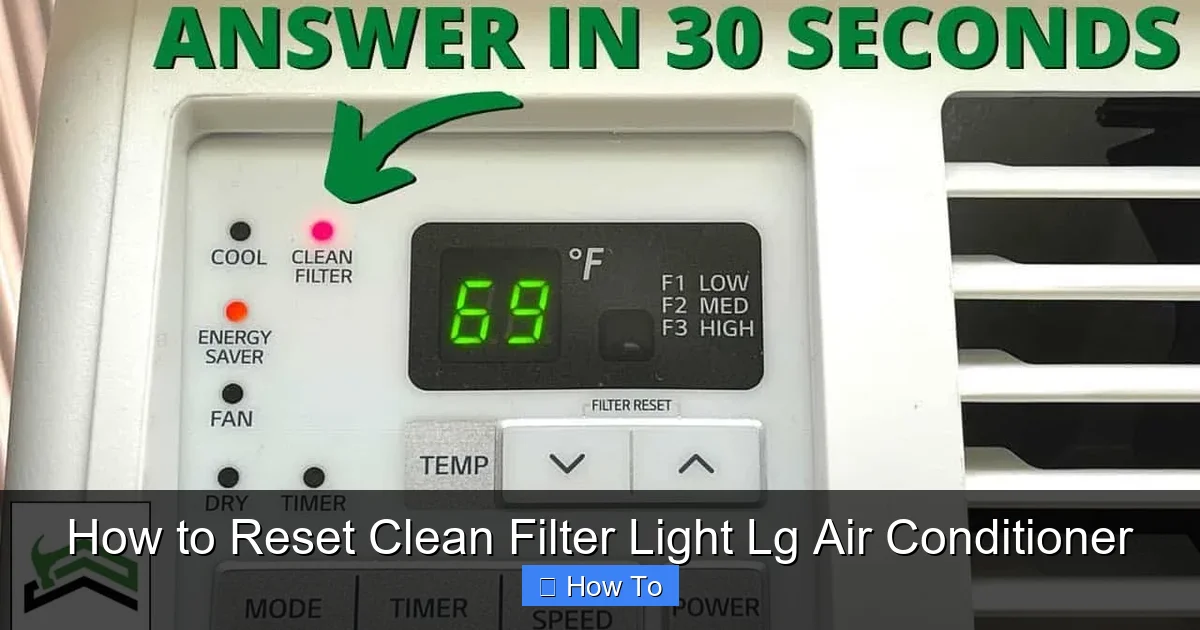
Visual guide about How to Reset Clean Filter Light Lg Air Conditioner
Image source: cleanestor.com
LG air conditioners use a timer-based system to track filter usage. Most models are programmed to trigger the clean filter light after approximately 2,500 hours of operation—roughly every 2–3 months with normal use. Once the timer reaches this threshold, the light turns on as a maintenance reminder. However, the light doesn’t automatically turn off when you clean the filter. That’s where the reset function comes in.
It’s important to note that the light is not a malfunction indicator. It’s a proactive maintenance feature. Ignoring it can lead to reduced cooling performance, higher electricity consumption, and even potential damage to internal components over time. So, while resetting the light is simple, the real benefit comes from regular filter care.
When Should You Reset the Clean Filter Light?
You should reset the clean filter light only after you’ve physically cleaned or replaced the air filter. Resetting the light without addressing the filter itself defeats the purpose of the reminder system and may lead to poor air quality and system inefficiency.
Here are the key scenarios when a reset is needed:
- You’ve cleaned a reusable filter with water and let it dry completely.
- You’ve replaced a disposable filter with a new, compatible LG filter.
- The filter light came on during routine maintenance, even if the filter still looks clean (timers don’t assess filter condition—they just count usage hours).
- You’ve performed a deep clean of the indoor unit and want to restart the filter timer.
Resetting the light resets the internal timer, giving you another 2,500 hours (or roughly 2–3 months) before the next reminder. This ensures you stay on top of maintenance without constant manual checks.
Tools and Preparation
Before you begin, gather the following items to make the process smooth and safe:
- Your LG air conditioner remote control (most common method)
- A clean, dry cloth (for wiping the filter and unit)
- A replacement filter (if needed—check your model number for compatibility)
- Access to the indoor unit (for split systems or window units with removable panels)
- User manual (optional, but helpful for model-specific guidance)
Safety Tip: Always turn off the air conditioner at the remote or wall switch before cleaning the filter or performing any maintenance. For added safety, unplug window units or turn off the circuit breaker for split systems.
Step-by-Step Guide: How to Reset the Clean Filter Light
The exact method to reset the clean filter light depends on your LG air conditioner model. Below, we’ve broken down the most common reset procedures for popular LG AC types in 2026. Follow the steps that match your unit.
Method 1: Reset Using the Remote Control (Most Common)
This method works for the majority of LG split-type and window air conditioners with remote controls, including inverter and non-inverter models.
Step 1: Turn On the Air Conditioner
Press the Power button on your remote to turn on the unit. Make sure it’s in cooling, fan, or auto mode—not off.
Step 2: Locate the “Filter” or “Clean” Button
Look for a button labeled Filter, Clean, or Reset Filter on your remote. On some models, this may be a dedicated button; on others, it’s part of a multi-function key.
Step 3: Press and Hold the Filter Button
Press and hold the Filter button for 3 to 5 seconds. You should see the “Clean Filter” light on the indoor unit blink or turn off. On some models, a beep or confirmation message may appear on the remote display.
Step 4: Confirm the Reset
Release the button and check the indoor unit. The “Clean Filter” light should now be off. If it’s still on, repeat the process or try the alternative method below.
Example: On the LG Dual Inverter Window AC (model LW1822IVSM), press and hold the “Filter” button on the remote for 5 seconds until the light turns off.
Method 2: Reset Using the Indoor Unit Buttons
If you don’t have a remote or it’s not working, you can reset the filter light using the control panel on the indoor unit itself.
Step 1: Access the Control Panel
Open the front panel of your indoor unit. On most LG split systems, gently pull the bottom edge of the panel downward to reveal the control buttons.
Step 2: Locate the “Filter” or “Reset” Button
Look for a small button labeled Filter, Reset, or Clean. It’s usually located near the power or mode buttons.
Step 3: Press and Hold the Button
Press and hold the button for 3 to 5 seconds. The “Clean Filter” light should blink and then turn off.
Step 4: Close the Panel
Once the light is off, gently close the front panel until it clicks into place.
Tip: If your unit doesn’t have a physical filter button, try pressing and holding the Power and Mode buttons simultaneously for 5 seconds. This works on some LG models as an alternative reset method.
Method 3: Reset via LG ThinQ App (Smart Models)
If you have a 2026 LG smart air conditioner connected to Wi-Fi and the LG ThinQ app, you can reset the filter light remotely—no remote or physical buttons needed.
Step 1: Open the LG ThinQ App
Launch the app on your smartphone or tablet. Make sure your AC is connected and online.
Step 2: Select Your Air Conditioner
Tap on your AC unit from the home screen to access its controls.
Step 3: Navigate to Maintenance Settings
Look for a section labeled Maintenance, Filter, or Settings. This may be under a gear icon or “More” menu.
Step 4: Reset the Filter Timer
Tap Reset Filter or Clear Filter Alert. The app will confirm the action, and the light on your unit should turn off within a few seconds.
Bonus Feature: The LG ThinQ app can also send push notifications when it’s time to clean the filter, helping you stay ahead of maintenance.
Method 4: Manual Timer Reset (For Older or Non-Smart Models)
Some older LG models don’t have a dedicated filter reset button. In these cases, you can manually reset the timer by turning the unit off and on in a specific sequence.
Step 1: Turn Off the AC
Press the Power button to turn off the unit completely.
Step 2: Wait 10 Seconds
Allow the system to fully power down. This ensures the internal timer resets.
Step 3: Turn the AC Back On
Press the Power button again to restart the unit. On some models, this action resets the filter timer automatically.
Step 4: Check the Light
If the “Clean Filter” light is off, the reset was successful. If not, try unplugging the unit for 1–2 minutes before plugging it back in.
Note: This method isn’t guaranteed for all models. Check your user manual or LG’s support site for confirmation.
How to Clean Your LG Air Conditioner Filter
Before resetting the light, make sure your filter is actually clean. A dirty filter won’t improve performance—even if the light is off.
Step 1: Turn Off and Unplug the Unit
Safety first! Always disconnect power before handling the filter.
Step 2: Remove the Front Panel
Gently pull the bottom of the front panel to access the filter. On some models, you may need to lift the panel slightly to release it.
Step 3: Take Out the Filter
Slide the filter out of its slot. Most LG filters are rectangular and made of washable mesh.
Step 4: Clean the Filter
Rinse the filter under lukewarm water. Use a soft brush or cloth to remove stubborn dust. Avoid hot water or harsh chemicals, which can damage the mesh.
Step 5: Dry Completely
Let the filter air dry for at least 1–2 hours. Never reinstall a wet filter—it can promote mold growth and reduce efficiency.
Step 6: Reinstall the Filter
Slide the dry filter back into place, ensuring it fits snugly. Close the front panel securely.
Pro Tip: Clean your filter every 4–6 weeks during peak usage seasons (summer and winter) to maintain optimal airflow and indoor air quality.
Troubleshooting: What If the Light Won’t Reset?
If you’ve followed the steps above and the “Clean Filter” light still won’t turn off, don’t panic. Here are common causes and solutions.
Issue 1: Remote Control Not Working
Solution: Replace the remote batteries or try resetting using the indoor unit buttons. If the remote is damaged, order a replacement from LG or use the ThinQ app (if compatible).
Issue 2: Filter Not Properly Reinstalled
Solution: Double-check that the filter is fully inserted and the front panel is closed. A misaligned filter can trigger sensor errors.
Issue 3: Faulty Filter Sensor
Solution: Some LG models have a physical sensor that detects filter presence. If it’s dirty or damaged, the unit may think the filter is missing. Clean the sensor area with a dry cloth or contact LG support.
Issue 4: Software Glitch
Solution: Perform a full power cycle: unplug the unit for 5 minutes, then plug it back in. This resets the internal electronics and often clears false alerts.
Issue 5: Model-Specific Quirks
Solution: Not all LG models follow the same reset procedure. Visit the LG Support website, enter your model number, and download the latest user manual for accurate instructions.
Preventing Future Filter Light Issues
Resetting the light is only half the battle. To avoid constant reminders, adopt these best practices:
- Set a calendar reminder: Schedule filter checks every 6–8 weeks.
- Use high-quality filters: Genuine LG filters fit better and last longer than generic alternatives.
- Keep the area clean: Reduce dust buildup by vacuuming nearby surfaces and keeping windows closed during high-pollen days.
- Upgrade to a smart model: 2026 LG smart ACs offer real-time filter monitoring and app-based alerts.
- Schedule professional maintenance: Have a technician inspect your unit annually to ensure sensors and timers are functioning correctly.
Conclusion
Resetting the clean filter light on your LG air conditioner is a simple but essential task that keeps your unit running efficiently and your indoor air clean. Whether you use the remote, indoor buttons, or the LG ThinQ app, the process takes less than a minute—but the benefits last for months. By following the steps in this 2026 guide, you’ll not only silence that persistent reminder light but also extend the life of your AC and reduce energy costs.
Remember: the light is there to help you, not annoy you. Treat it as a friendly nudge to maintain your system. Clean the filter, reset the timer, and enjoy cool, fresh air all season long. And if you ever run into issues, don’t hesitate to reach out to LG customer support or a certified technician. Your comfort is worth it.