
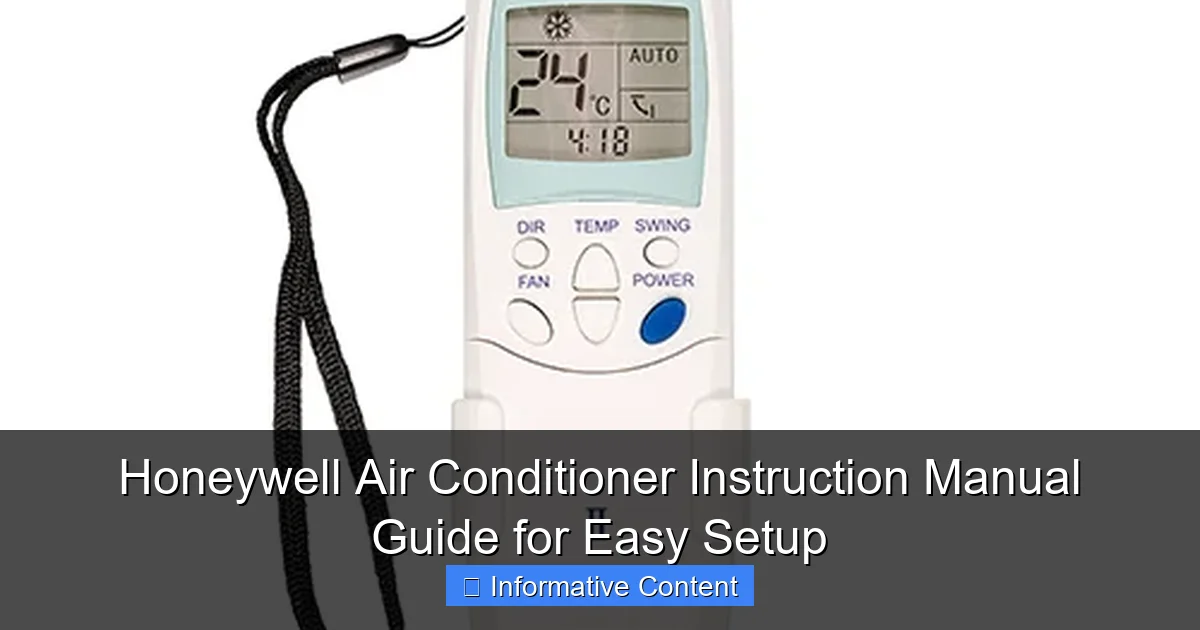
Featured image for honeywell air conditioner instruction manual
Image source: thermocontrols.com.au
The Honeywell air conditioner instruction manual is your essential guide to fast, frustration-free setup and optimal performance. Packed with clear diagrams, step-by-step instructions, and troubleshooting tips, it ensures even first-time users can install and operate their unit with confidence. Maximize efficiency and extend your AC’s lifespan by following the manual’s expert-recommended maintenance guidelines.
Key Takeaways
- Read the manual first: Always start with the Honeywell AC manual for safe, correct setup.
- Check voltage requirements: Match your outlet voltage to the AC’s specs to avoid damage.
- Secure window installation: Use included brackets to prevent unit slippage or air leaks.
- Clean filters monthly: Maintain airflow and efficiency by washing reusable filters regularly.
- Use eco mode: Save energy by activating this setting when cooling isn’t urgent.
- Store properly off-season: Drain water, clean, and cover the unit to extend its lifespan.
📑 Table of Contents
- Why the Honeywell Air Conditioner Instruction Manual Matters
- Getting Started: Unboxing and Initial Setup
- Mastering the Control Panel and Remote
- Daily Operation and Energy-Saving Tips
- Maintenance and Cleaning: Keep Your AC Running Smoothly
- Troubleshooting and When to Call a Pro
- Putting It All Together: A Sample Usage Schedule
- Final Thoughts: Your AC, Your Way
Why the Honeywell Air Conditioner Instruction Manual Matters
Let me paint a picture for you: it’s a sweltering summer afternoon, and you’ve just unboxed your brand-new Honeywell air conditioner. You’re eager to cool down, but the remote feels like a puzzle, and the control panel might as well be written in hieroglyphics. Sound familiar? We’ve all been there. That’s exactly why the Honeywell air conditioner instruction manual isn’t just a booklet—it’s your lifeline to comfort, efficiency, and peace of mind.
Whether you’ve got the sleek TP50WK portable unit, the compact TP30WK, or one of Honeywell’s window-mounted models, the manual is your go-to guide for setup, operation, and troubleshooting. Think of it like a trusted friend who’s already mastered the unit and is patiently walking you through every step. In this guide, I’ll break down everything you need to know about using the Honeywell air conditioner instruction manual to get your AC up and running—fast, safely, and with zero stress. From unboxing to daily use and maintenance, we’ll cover it all with real-world tips and a dash of empathy for those “why isn’t this working?” moments.
Getting Started: Unboxing and Initial Setup
What’s in the Box?
Before you even think about plugging in your Honeywell air conditioner, take a moment to inventory what’s inside. Most models come with:
Visual guide about honeywell air conditioner instruction manual
Image source: byterom.weebly.com
- The air conditioner unit
- A window installation kit (for window units) or exhaust hose and window bracket (for portable units)
- Remote control with batteries
- The Honeywell air conditioner instruction manual
- Drain hose (for dehumidifying models)
- Optional accessories like air filters or extension kits
I remember unboxing my first Honeywell portable AC—the TP50WK—and almost missing the small plastic window slider in the corner of the box. It was only after reading the manual’s “Parts Checklist” section that I realized what I’d overlooked. That’s why I always recommend checking the manual’s first few pages before assembly. It saves time and frustration later.
Choosing the Right Location
Location is everything. The manual usually includes a “Placement Guidelines” section, and here’s what it typically recommends:
- Window units: Install in a secure, shaded window with at least 12 inches of clearance on all sides. Avoid direct sunlight to improve efficiency.
- Portable units: Place on a flat, stable surface near a window for the exhaust hose. Keep at least 18–24 inches of space around the unit for proper airflow.
- Never place the unit near curtains, furniture, or electronics that could block airflow or get damaged.
<
Pro tip: If you’re using a portable AC, measure your window before buying. The manual lists compatible window sizes (e.g., 20–46 inches for the TP50WK). I once bought a unit without checking—my window was 48 inches, and the included kit didn’t fit. Lesson learned!
Assembling the Installation Kit
This is where the Honeywell air conditioner instruction manual really shines. It includes step-by-step diagrams and clear instructions for assembling the window kit or exhaust setup. For example:
- Window units: Attach the side panels to the main frame, then insert the unit into the window. Use the included screws or brackets to secure it. The manual warns against overtightening—this can warp the frame.
- Portable units: Connect the exhaust hose to the back of the AC, then attach the other end to the window bracket. Slide the bracket into the window gap and close the window snugly.
I’ve helped friends set up their Honeywell ACs, and the most common mistake? Forgetting to seal the gaps around the window kit. The manual usually suggests using foam tape or weather stripping. It’s a small step, but it makes a huge difference in cooling efficiency.
Mastering the Control Panel and Remote
Understanding the Buttons and Display
The control panel on your Honeywell AC might look intimidating at first, but the manual breaks it down beautifully. Here’s a typical layout (based on models like the TP50WK and TP30WK):
- Power: Turns the unit on/off. Some models have a soft-touch button; others use a physical switch.
- Mode: Cycles between Cool, Fan, Dry (dehumidify), and Auto modes. The manual explains what each mode does—e.g., “Dry mode reduces humidity without overcooling.”
- Fan Speed: Choose from Low, Medium, High, or Auto. The manual notes that higher speeds cool faster but use more energy.
- Temperature: Adjust from 61°F to 89°F (16°C to 32°C). The display shows the current room temperature or your set point.
- Timer: Set the AC to turn on/off after 1–24 hours. Great for pre-cooling before bedtime.
One thing the manual doesn’t always emphasize: the “Auto” mode. It’s not just a set-and-forget option—it uses sensors to adjust fan speed and cooling based on room conditions. I used to think it was less effective, but the manual clarified that it’s actually more energy-efficient for long-term use.
Using the Remote Control
The remote is your secret weapon. The Honeywell air conditioner instruction manual includes a dedicated section for remote functions, often with a labeled diagram. Key features include:
- Sleep Mode: Gradually increases temperature overnight to save energy while keeping you comfortable. The manual recommends this for bedrooms.
- Turbo Mode: Boosts cooling for 20–30 minutes. Perfect for those “I need to cool down NOW” moments.
- Follow Me: Uses the remote’s temperature sensor to cool where you are, not just near the unit. The manual warns to keep the remote within 20 feet for best results.
- Child Lock: Disables the control panel to prevent kids (or pets) from changing settings.
Real-world example: My neighbor’s toddler kept pressing the “Power” button on her Honeywell AC. After she read the manual’s “Child Lock” section, she activated it via the remote—problem solved!
Troubleshooting Common Remote Issues
Sometimes the remote acts up. The manual’s troubleshooting section is a goldmine here. Common fixes:
- No response? Replace the batteries (usually CR2025). The manual shows how to open the battery compartment.
- Weak signal? Point the remote directly at the AC’s sensor (usually on the front panel). Avoid obstacles.
- Display dim? Clean the remote’s lens with a soft cloth. The manual warns against using liquids.
One thing I wish the manual included: a “Remote Range Test.” You can do this yourself by walking 20–30 feet away and pressing a button. If it works, you’re good to go.
Daily Operation and Energy-Saving Tips
Setting the Right Temperature
The manual’s “Operation” section often includes temperature recommendations, but here’s the real-world take:
- Daytime: Set to 72–75°F (22–24°C) for comfort and efficiency.
- Nighttime: Use Sleep Mode or set to 75–78°F (24–26°C). The manual notes that every degree lower increases energy use by 6–8%.
- Vacation mode: Some models have a “Vacation” setting (e.g., 85°F/29°C) to prevent mold while you’re away.
I learned this the hard way. I once set my AC to 68°F and cranked it up to “High.” It cooled the room fast, but my electricity bill doubled. The manual’s “Energy Efficiency Tips” section saved me—now I use “Auto” mode and a ceiling fan for better air circulation.
Optimizing Fan Speeds and Modes
Here’s where the Honeywell air conditioner instruction manual gets tactical. For example:
- Cool Mode: Best for hot, humid days. The manual explains that the compressor runs continuously.
- Fan Mode: Circulates air without cooling. Use this when it’s mild or to save energy.
- Dry Mode: Reduces humidity in damp climates (e.g., basements). The manual warns that it’s less effective in very hot weather.
- Auto Mode: Balances cooling and energy use. The manual recommends this for most situations.
Pro tip: Pair your AC with a ceiling or floor fan. The manual doesn’t say this, but it’s a game-changer. A fan helps distribute cool air, so you can set the AC 2–3 degrees higher without sacrificing comfort.
Using Timers and Schedules
The timer function is underused. The manual shows how to:
- Set the AC to turn on 30 minutes before you get home (no more walking into a sauna).
- Turn off the AC automatically after bedtime (great for forgetful folks).
I use the “On” timer to pre-cool my home every weekday. It’s programmed for 4:30 PM, so by 5:00 PM, it’s a refreshing 72°F. The manual even includes a sample schedule table (see below).
Maintenance and Cleaning: Keep Your AC Running Smoothly
Filter Care: The #1 Priority
The manual’s “Maintenance” section starts with the air filter—and for good reason. A dirty filter reduces efficiency by up to 50%. Here’s the routine:
- Frequency: Clean every 2 weeks in heavy use, monthly otherwise.
- Method: Remove the filter, rinse with lukewarm water, and air-dry completely. The manual warns against using hot water or soap.
- Replacement: Replace annually or if it’s torn. The manual lists compatible filter models (e.g., Honeywell TP-FILTER).
I once ignored a clogged filter for a month. The AC struggled to cool, and my energy bill spiked. After cleaning the filter (per the manual), the difference was night and day.
Draining the Water Tank
Portable ACs collect condensation. The manual explains how to drain it:
- Manual drain: Remove the plug at the back and pour out water. The manual suggests doing this when the “Tank Full” light flashes.
- Continuous drain: Attach a hose to the drain port for automatic drainage. The manual notes this requires a floor drain or bucket.
Real-world tip: If you’re using continuous drain, check the hose weekly. Algae can grow inside, causing clogs. The manual doesn’t mention this, but a quick vinegar rinse every few months prevents it.
Cleaning the Unit and Exhaust Hose
The manual covers exterior cleaning:
- Wipe the unit with a damp cloth. Avoid abrasive cleaners.
- Clean the exhaust hose monthly with a brush or vacuum.
- Check the window kit for debris (e.g., leaves, dust).
One thing the manual doesn’t say: unplug the unit before cleaning. Safety first!
Troubleshooting and When to Call a Pro
Common Issues and DIY Fixes
The manual’s troubleshooting table is invaluable. Here are the top fixes:
- AC not cooling? Check the filter, temperature setting, and room size. The manual warns that oversized rooms (e.g., 500+ sq ft) may require a larger unit.
- Leaking water? Ensure the unit is level. The manual explains how to adjust the tilt.
- Loud noises? Check for loose parts or debris. The manual suggests tightening screws and cleaning the fan.
- Remote not working? See the earlier section.
Example: My AC started making a rattling noise. The manual said to check the fan—turns out a loose screw was vibrating. Fixed in 2 minutes.
When to Seek Professional Help
The manual draws a clear line: DIY for simple fixes, pro help for complex issues. Call a technician if:
- The AC doesn’t power on (could be an electrical issue).
- It’s leaking refrigerant (a hissing sound or oily residue).
- The compressor isn’t starting (listen for a clicking sound).
The manual also lists Honeywell’s customer support number and warranty details. Keep this info handy!
Warranty and Support Resources
Honeywell typically offers a 1-year limited warranty. The manual includes:
- Warranty terms (what’s covered and what’s not).
- How to register your product online.
- Contact info for technical support.
Pro tip: Register your AC within 30 days. The manual makes it clear—this extends your coverage and speeds up support requests.
Putting It All Together: A Sample Usage Schedule
Here’s a data table based on the Honeywell air conditioner instruction manual recommendations, tailored for a typical home:
| Time of Day | Recommended Mode | Temperature Setting | Fan Speed | Notes |
|---|---|---|---|---|
| 7:00 AM – 9:00 AM | Fan | Off | Medium | Circulate morning air; save energy. |
| 9:00 AM – 5:00 PM | Cool | 75°F (24°C) | Auto | Pre-cool for evening; use timer. |
| 5:00 PM – 10:00 PM | Cool | 72°F (22°C) | High | Peak cooling; pair with ceiling fan. |
| 10:00 PM – 7:00 AM | Sleep | 75°F (24°C) | Low | Energy-saving; auto-adjusts. |
Remember, this is just a starting point. Adjust based on your climate, room size, and comfort preferences. The manual’s flexibility is its strength!
Final Thoughts: Your AC, Your Way
At the end of the day, the Honeywell air conditioner instruction manual is more than just a set of instructions—it’s a toolkit for comfort, efficiency, and peace of mind. Whether you’re a first-time AC owner or a seasoned pro, taking the time to read it thoroughly (yes, even the small print!) pays off in spades. You’ll avoid costly mistakes, extend your unit’s lifespan, and maybe even lower your energy bills.
From the unboxing checklist to the troubleshooting table, every page is designed to make your life easier. And while no manual is perfect (I wish it had a “Quick Start” cheat sheet on the back cover!), Honeywell’s attention to detail and user-friendly language sets it apart. So next time you’re sweating over a confusing setting or a mysterious error light, grab that manual. Your future cool, calm self will thank you.
Frequently Asked Questions
How do I set up my Honeywell air conditioner for the first time using the instruction manual?
The Honeywell air conditioner instruction manual provides step-by-step setup guidance, including window mounting, power connection, and initial settings. Always ensure the unit is on a stable surface and the exhaust hose is properly sealed to maximize efficiency.
Where can I download a digital copy of the Honeywell air conditioner instruction manual?
You can download the latest Honeywell air conditioner instruction manual from the official Honeywell support website by entering your model number. This ensures you get the correct guide tailored to your specific unit.
What should I do if my Honeywell AC isn’t cooling properly, according to the manual?
The manual recommends checking the air filter for clogs, ensuring the exhaust hose is vented correctly, and verifying that the temperature settings are appropriate. If issues persist, consult the troubleshooting section for error codes or contact customer support.
How often should I clean the air filter, as mentioned in the Honeywell air conditioner manual?
The manual advises cleaning the air filter every two weeks for optimal performance and air quality. Regular cleaning prevents dust buildup and maintains efficient airflow, especially in high-humidity environments.
Can I use my Honeywell portable AC in a room without windows, per the manual?
The Honeywell air conditioner requires venting through a window, sliding door, or wall opening, as specified in the manual. Without proper exhaust, the unit will overheat and fail to cool effectively.
What do the error codes on my Honeywell AC mean, and how does the manual help?
The manual includes a dedicated section listing common error codes (e.g., “E1” for sensor issues) and their solutions. Refer to this table to quickly diagnose and resolve problems without professional help.