
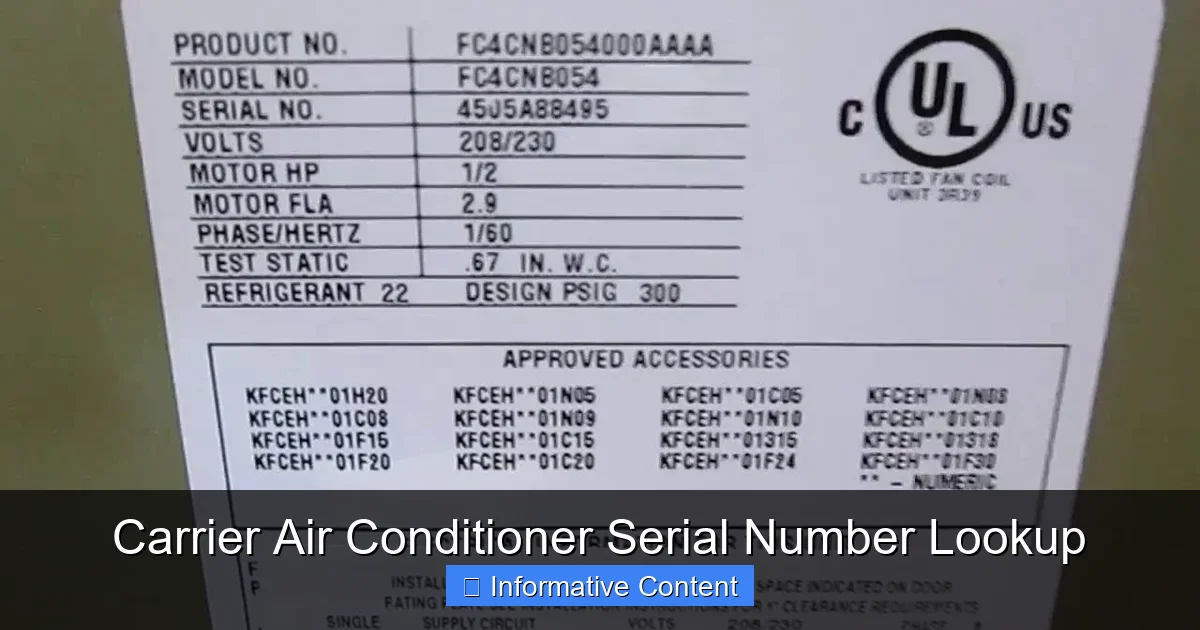
Knowing how to perform a Carrier air conditioner serial number lookup is essential for checking warranty status, identifying your model, and getting the right parts or service. This guide walks you through locating, decoding, and using your AC’s serial number—no technical expertise required.
Key Takeaways
- Locate the serial number quickly: It’s usually found on a metal plate on the outdoor unit or indoor air handler.
- Decode the serial number: Carrier uses a specific format where letters and numbers reveal manufacturing date and plant location.
- Check warranty status: Use the serial number on Carrier’s official website or contact customer service to verify coverage.
- Order correct replacement parts: The serial number ensures you get compatible components for repairs or upgrades.
- Schedule accurate service: Technicians use the serial number to access your unit’s specs and service history.
- Avoid scams and counterfeit parts: Verifying your serial number helps confirm authenticity and protects your investment.
- Prepare for resale or insurance claims: Having your serial number on file simplifies documentation for property transactions or damage claims.
📑 Table of Contents
- Why Your Carrier Air Conditioner Serial Number Matters
- Where to Find Your Carrier Air Conditioner Serial Number
- How to Decode Your Carrier Serial Number
- Using Your Serial Number for Warranty and Service
- Avoiding Scams and Counterfeit Parts
- Preparing for Resale, Insurance, or Emergencies
- Tips for Keeping Your Serial Number Accessible
- Conclusion
Why Your Carrier Air Conditioner Serial Number Matters
You’ve probably seen that little metal tag on your air conditioner with a string of letters and numbers. It might look like random code, but that’s your Carrier air conditioner’s serial number—and it’s more important than you think. Whether you’re trying to file a warranty claim, order a replacement filter, or schedule a repair, this number is your unit’s unique ID. Think of it like a fingerprint: no two are exactly alike, and it holds key information about your system.
Many homeowners overlook the serial number until something goes wrong. But knowing how to find and use it can save you time, money, and frustration. For example, if your AC stops cooling in the middle of summer, a technician will likely ask for the serial number before they even show up. That’s because it tells them everything from the model type to the manufacturing date—details that help them diagnose issues faster and bring the right tools and parts.
Where to Find Your Carrier Air Conditioner Serial Number
The first step in any Carrier air conditioner serial number lookup is knowing where to look. The serial number is typically printed on a metal or plastic data plate attached to your unit. But depending on whether you have a split system, packaged unit, or ductless mini-split, the location can vary.
Visual guide about Carrier Air Conditioner Serial Number Lookup
Image source: thedailythrive.org
Outdoor Unit (Condenser)
For most central air conditioning systems, the outdoor condenser unit houses the serial number. Look for a rectangular plate on the side or top of the metal casing. It’s often near the refrigerant lines or electrical connections. The plate will list the model number, serial number, voltage, refrigerant type, and other technical details. The serial number is usually labeled “S/N” or “Serial No.”
Indoor Air Handler
If you can’t find the serial number outside, check the indoor air handler—the unit inside your attic, basement, or utility closet. It’s usually a metal box connected to your ductwork. Open the access panel (if there is one) and look for the data plate on the side or front. In some cases, especially with older models, the serial number may only be listed here.
Packaged Units
Packaged air conditioners combine the condenser and air handler in one outdoor unit, often installed on rooftops or beside the house. The serial number is typically on the side of the unit, near the control panel. Because these units are exposed to the elements, the label may fade over time. If it’s hard to read, use a flashlight or take a photo and zoom in.
Ductless Mini-Splits
For ductless systems, the serial number is usually on the outdoor compressor unit. Some models also include it on the indoor wall-mounted unit, often behind the front panel or near the air intake. Check the user manual if you’re unsure—Carrier often includes a diagram showing label locations.
User Manual and Documentation
If you still can’t locate the serial number, check your original installation paperwork or user manual. These documents usually list the model and serial number. You might also find it on the warranty card you filled out when the unit was installed. If you’ve misplaced everything, don’t panic—your HVAC contractor may have a record on file.
How to Decode Your Carrier Serial Number
Once you’ve found your Carrier air conditioner serial number, the next step is understanding what it means. Carrier uses a standardized format that encodes the manufacturing date and plant location. While the exact layout can vary slightly by model and year, most serial numbers follow a similar pattern.
Understanding the Format
A typical Carrier serial number looks something like “1234567890” or “R456789012.” The first digit or letter often indicates the manufacturing plant. For example, “R” usually means the unit was made in Charlotte, North Carolina. The next few digits represent the week and year of production.
Decoding the Date
Let’s say your serial number starts with “18.” The “18” means your unit was manufactured in the 18th week of the year. To find the year, look at the next digit. If it’s “9,” your AC was made in 2019. So “189” would mean 18th week of 2019—around late April or early May. This is crucial for warranty claims, as most Carrier units come with a 5- to 10-year parts warranty from the manufacture date, not the installation date.
Example Breakdown
Take the serial number “R456789012.” Here’s how to decode it:
- R: Manufactured in Charlotte, NC
- 45: 45th week of the year (mid-November)
- 6: Year 2016
So this unit was made in November 2016. If you bought it in 2017, your warranty still started in 2016. That’s why the serial number matters more than your purchase date.
Online Decoding Tools
Carrier doesn’t offer a public online decoder, but several third-party websites and HVAC forums provide guides and tools to help interpret serial numbers. Always double-check with Carrier’s customer service if you’re unsure. They can verify the manufacture date and confirm warranty eligibility over the phone or via email.
Using Your Serial Number for Warranty and Service
One of the most common reasons people perform a Carrier air conditioner serial number lookup is to check warranty status. But it’s also vital for service, repairs, and parts replacement.
Checking Warranty Coverage
Carrier offers different warranty plans depending on the model and whether it was registered. Standard warranties typically cover parts for 5 to 10 years, while registered units may qualify for extended coverage. To check your warranty:
- Visit Carrier’s official warranty lookup page.
- Enter your model and serial number.
- Review the coverage details, including start and end dates.
If your unit isn’t registered, you may still be covered, but you’ll need to provide proof of purchase and the serial number. Keep in mind that labor costs are usually not covered under manufacturer warranties—only parts.
Ordering Replacement Parts
When your AC needs a new capacitor, fan motor, or compressor, the serial number ensures you get the exact match. Even small differences in model years can affect compatibility. For example, a 2015 Carrier unit might use a different coil design than a 2018 version. Using the wrong part can lead to poor performance, system damage, or voided warranties.
Always provide the full model and serial number when ordering parts online or calling a supplier. Many HVAC retailers, like Grainger or SupplyHouse, allow you to search by serial number to find compatible components.
Scheduling Professional Service
When you call a technician, have your serial number ready. It helps them prepare for the job by knowing the system’s age, configuration, and common issues. Some companies even keep service histories linked to serial numbers, so they can see past repairs or recurring problems.
For example, if your unit has a history of refrigerant leaks, the technician might bring extra gauges or seals. Without the serial number, they’d have to inspect the unit on-site first, wasting time and potentially requiring a second visit.
Avoiding Scams and Counterfeit Parts
The HVAC industry isn’t immune to scams, and counterfeit parts are a growing concern. Fake capacitors, motors, and compressors may look similar to genuine Carrier parts but are often made with inferior materials. They can fail prematurely, damage your system, or even pose safety risks.
How Serial Numbers Help
By verifying your serial number, you can confirm that replacement parts are authentic and compatible. Reputable suppliers cross-check serial numbers against Carrier’s database to ensure accuracy. If a seller can’t or won’t verify compatibility, consider it a red flag.
Buying from Authorized Dealers
Always purchase parts from Carrier-authorized dealers or certified HVAC suppliers. These businesses have direct access to OEM (original equipment manufacturer) parts and are trained to match them correctly. Avoid eBay, Amazon third-party sellers, or unknown online stores unless they provide serial number verification.
Red Flags to Watch For
- Prices that seem too good to be true
- No option to enter or verify serial numbers
- Vague product descriptions or stock photos
- No return policy or warranty on parts
If you suspect you’ve received a counterfeit part, contact Carrier immediately. They may offer support or replacement under warranty.
Preparing for Resale, Insurance, or Emergencies
Your Carrier air conditioner serial number isn’t just for repairs—it’s also useful for documentation and planning.
Home Resale and Inspections
When selling your home, buyers and inspectors will want to know the age and condition of major systems like your HVAC. Providing the serial number allows them to verify the manufacture date and check for recalls or known issues. It adds transparency and can speed up the sale process.
Insurance Claims
In case of storm damage, fire, or theft, your insurance company may require proof of ownership and system details. The serial number helps identify your unit and supports your claim. Keep a photo of the data plate in a safe place, like a cloud storage account or home inventory app.
Emergency Preparedness
During power outages or extreme weather, knowing your system’s specs can help you make informed decisions. For example, if you’re considering a backup generator, the serial number helps determine the correct size and compatibility. It’s also useful if you need to shut off the system quickly for safety reasons.
Tips for Keeping Your Serial Number Accessible
Now that you know how important your Carrier air conditioner serial number is, here are some practical tips to keep it handy:
Take a Photo
Use your smartphone to take a clear photo of the data plate. Store it in a folder labeled “Home Systems” or “HVAC.” Add it to your cloud backup so you can access it from anywhere.
Create a Home Maintenance Binder
Keep a physical or digital binder with all your home systems’ information—serial numbers, manuals, warranties, and service records. Update it after every repair or maintenance visit.
Label the Unit
If the data plate is hard to reach or faded, consider attaching a waterproof label with the serial number in a more accessible spot. Just make sure it’s secure and won’t interfere with operation.
Register Your Unit
If you haven’t already, register your Carrier air conditioner online. This activates your warranty and makes it easier to look up information later. Registration usually takes just a few minutes and requires the model and serial number.
Conclusion
Your Carrier air conditioner serial number is more than just a string of characters—it’s a powerful tool for maintenance, repairs, and peace of mind. From decoding the manufacture date to verifying warranty coverage, this small detail can make a big difference in how you care for your home’s cooling system.
By learning how to perform a Carrier air conditioner serial number lookup, you’re taking a proactive step toward smarter homeownership. Whether you’re scheduling service, ordering parts, or preparing for a sale, having this information ready saves time and prevents costly mistakes. So next time you’re near your AC unit, take a moment to locate that serial number. Snap a photo, jot it down, and store it safely. Your future self will thank you.
Frequently Asked Questions
Where is the serial number on a Carrier air conditioner?
The serial number is usually found on a metal data plate on the outdoor condenser unit or indoor air handler. Look for labels marked “S/N” or “Serial No.” near the refrigerant lines or electrical connections.
How do I decode my Carrier serial number?
Carrier serial numbers typically include a plant code, week of manufacture, and year. For example, “R456” means made in Charlotte (R), 45th week, in 2016. Use this to determine your unit’s age for warranty purposes.
Can I check my Carrier warranty with just the serial number?
Yes, you can use your serial number on Carrier’s official website or by calling customer service to verify warranty status. You may also need the model number for full details.
What if my serial number is faded or missing?
If the label is damaged, check your user manual, installation paperwork, or contact your HVAC installer. Carrier may also help identify your unit using the model number and installation date.
Does the serial number change if I replace part of my AC?
No, the serial number is tied to the original unit and doesn’t change with repairs or part replacements. Only the main chassis or compressor retains the original serial number.
Why do technicians ask for the serial number?
Technicians use the serial number to confirm your system’s model, age, and specifications. This helps them diagnose issues faster and bring the correct tools and parts for service.