
Keeping your server room cool isn’t just about comfort; it’s absolutely critical for the health and longevity of your valuable IT equipment. Overheating can lead to costly downtime, data loss, and permanent hardware damage. That’s why choosing the best air conditioner for a server room is a decision you can’t afford to get wrong.
Whether you’re managing a small network closet, a dedicated server room, or just a hot rack in a larger data center, investing in the right cooling solution is a no-brainer. But with so many options out there, how do you pick the perfect one? Don’t sweat it – we’ve got you covered!
We’ve scoured the market to bring you our top 5 picks for the best air conditioner for a server room, reviewing each one to help you make an informed decision. Let’s dive in and keep your servers chill!
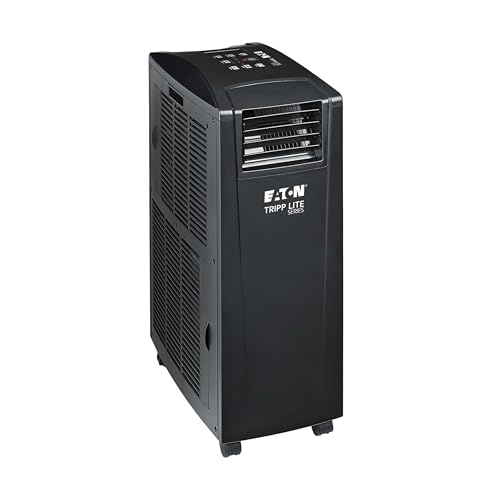
1. Eaton Tripp Lite SRCOOL12KE Spot Cooler Air Conditioner

The Eaton Tripp Lite SRCOOL12KE is designed with the unique demands of IT environments in mind. This compact, self-contained spot cooler is a lifesaver for network closets, small server rooms, or simply those notoriously hot racks within a larger data center. What really makes it stand out is its focused cooling power delivered right where your equipment needs it most, along with impressive self-evaporating capabilities, meaning less hassle for you.
-
Key Features
- Compact, self-contained spot cooler with caster wheels for portability.
- Delivers 13,000 BTU (3.8kW) of air conditioning capacity.
- Uses low GWP R32 refrigerant.
- Includes a 71-inch flexible hose for targeted cooling.
- Built-in evaporator means no manual water collection tanks to empty.
- Also functions as a dehumidifier and air filter.
- 100% duty cycle for continuous operation.
- Optional SRCOOLNETLXE network card (sold separately) for remote monitoring and control.
-
Pros
- Specifically designed for IT environments like server rooms and network closets.
- Portable and easy to reposition for spot cooling.
- No drainage required thanks to the built-in evaporator.
- Dehumidifies and filters air, contributing to better equipment health.
- Remote management option is excellent for critical infrastructure.
- Backed by a 2-Year Limited Manufacturer’s Warranty.
-
Cons
- Remote management card is an additional purchase.
- May not be sufficient for very large server rooms.
User Impressions: IT professionals frequently praise this unit for its reliability and its ability to handle “hot spots” that larger HVAC systems often miss. The no-drainage feature is a huge plus, saving time and preventing potential spills, making it a strong contender for the best air conditioner for a server room.
2. Dreo Portable Air Conditioners, 12,000 BTU AC Unit

When you need robust cooling with smart features and a surprisingly quiet operation, the Dreo Portable Air Conditioner steps up to the plate. While it’s marketed for general room use, its powerful 12,000 BTU cooling capacity and intelligent controls make it a viable option for smaller server rooms or home labs where ambient noise is a concern. Plus, being able to control it with your voice or an app adds a layer of convenience often desired in modern setups.
-
Key Features
- Massive 12,000 BTU ASHRAE cooling capacity, reaching up to 16 ft.
- 3-in-1 mode: cooling, dehumidifying, and fan.
- New noise isolation system reduces sound down to a minimum of 46dB.
- Drainage-free system that reduces drainage needs by 90% (below 85% humidity).
- Smart cooling with compatibility for Amazon Alexa, Google Home, and the Dreo App.
- Temperature range from 65°F to 86°F.
-
Pros
- High cooling power suitable for many small to medium server rooms.
- Versatile 3-in-1 functionality (AC, fan, dehumidifier).
- Extremely quiet operation, ideal for shared office spaces or home labs.
- Smart home integration for convenient control.
- Mostly drainage-free, simplifying maintenance.
-
Cons
- A drain hose is required in environments with humidity above 85%, which can happen in server rooms.
- Lacks specialized server room features like SNMP for advanced network monitoring.
User Impressions: Users love the Dreo’s powerful cooling and quiet performance, often noting how quickly it can bring down room temperatures. The smart controls are a definite hit, making it easy to manage remotely, even if not through traditional IT management protocols.
3. Eaton Tripp Lite SRCOOL12KWTE Spot Cooler Air Conditioner

Another powerhouse from Eaton Tripp Lite, the SRCOOL12KWTE builds upon the strengths of its sibling (SRCOOL12KE) by adding an important feature for highly sensitive environments: an ionizer. Beyond just cooling and dehumidifying, this unit actively cleans the air, making it an excellent choice for server rooms, lab equipment, or other critical areas where dust and air purity can impact delicate electronics. It’s truly a robust climate control solution.
-
Key Features
- Compact, self-contained spot cooler with caster wheels for portability.
- 13,000 BTU (3.8kW) of air conditioning capacity using low GWP R32 refrigerant.
- Includes a 71-inch flexible hose for targeted cooling.
- Built-in ionizer for air purification, along with an evaporator, dehumidifier, and air filter.
- No extra plumbing or water tank emptying due to the evaporator.
- 100% duty cycle for continuous operation.
- Optional SRCOOLNETLXE network card (sold separately) for remote management.
-
Pros
- Superior air quality with a built-in ionizer and air filter, crucial for sensitive IT gear.
- Specialized for demanding IT environments and lab equipment.
- Excellent portability and focused spot cooling capability.
- Maintenance-free evaporation system (no draining needed).
- Optional remote monitoring and control via various protocols.
- Robust 2-Year Limited Manufacturer’s Warranty and support.
-
Cons
- The optional network management card is an additional investment.
- Its focused spot cooling might require multiple units for larger server rooms.
User Impressions: This unit receives high marks from those who value not just temperature control but also air purity. Users appreciate the peace of mind knowing their sensitive equipment is protected from both heat and airborne contaminants, solidifying its place as a top choice for a specialized best air conditioner for a server room need.
4. Midea 8,000 BTU Smart Inverter Air Conditioner Window Unit

For server rooms with direct access to a window, the Midea Smart Inverter Window Unit offers an incredibly energy-efficient and quiet cooling solution. What sets it apart is its inverter technology, which allows it to modulate compressor speed, leading to significant energy savings and ultra-low noise levels. It even provides supplemental heating, making it a multi-season workhorse. If you’re looking for a quiet, efficient option for a smaller, dedicated server space, this could be your champion.
-
Key Features
- 8,000 BTU cooling with multi-season comfort (cooling, dehumidification, and supplemental heat).
- Energy Star certified with variable-speed inverter technology for up to 35% energy savings.
- Operates at an ultra-low noise level, as low as 45 dBA.
- SmartHome App and voice control (Alexa, Google Assistant) enabled.
- 5 Modes (Heat, Auto, Cool, Dry, Fan), 3 speed settings, and a 24-hr timer.
- Designed for double-hung windows (24 to 38.5 inches wide).
- Washable filter for easy maintenance.
-
Pros
- Exceptional energy efficiency thanks to inverter technology.
- Remarkably quiet operation, great for server rooms near workspaces.
- Offers supplemental heating, useful for cooler months or specific environmental needs.
- Smart controls provide convenient remote management.
- Cost-effective to run over time.
-
Cons
- Requires a window for installation, which isn’t always feasible or secure for server rooms.
- 8,000 BTU might be insufficient for larger or very high-density server rooms.
- Heat pump function is limited by outside temperatures.
User Impressions: Customers rave about the Midea’s quiet operation and impressive energy savings. For small server closets or home labs where a window installation is viable, this unit offers a powerful yet subtle presence, keeping equipment cool without drawing much attention to itself.
5. BLACK+DECKER Portable Air Conditioner, 8,000 BTU

The BLACK+DECKER Portable Air Conditioner is a straightforward, reliable option for general cooling needs, particularly useful for small server rooms, network closets, or as an emergency backup. Its main appeal lies in its ease of mobility and simple setup, making it an accessible choice for those needing a quick and effective solution. While not as specialized as some other units, it offers solid 3-in-1 functionality at an accessible price point.
-
Key Features
- Three-in-One unit: 8,000 BTU (3,950 BTU SACC) air conditioner, dehumidifier, and fan.
- Full function remote control with a “FOLLOW ME” feature, acting as a thermostat for precise temperature control.
- Portable design with casters and side handles for easy movement.
- Includes an easy-to-install window kit.
- Top-mounted control panel with LED display.
- Recommended for rooms up to 400 sq. ft.
-
Pros
- Highly portable, allowing you to move it between different hot spots.
- Easy to set up with the included window kit.
- “FOLLOW ME” remote ensures accurate temperature sensing at your desired location.
- Combines AC, dehumidifier, and fan in one unit.
- Budget-friendly option for effective cooling.
-
Cons
- Lower BTU output (8,000 BTU ASHRAE) might struggle with very hot or larger server rooms.
- More consumer-oriented, lacking advanced IT-specific features like SNMP monitoring.
- Requires manual drainage of condensate water in high humidity (though most portable ACs have some self-evaporation, full drainage is often eventually needed).
User Impressions: Users find the BLACK+DECKER to be a dependable and convenient portable AC. It’s often praised for its ability to quickly cool down smaller spaces and its easy mobility, making it a good choice for smaller setups or as a supplementary cooling source.
FAQ: Keeping Your Server Room Cool
Q1: How many BTUs do I need for a server room?
A: Calculating BTU requirements for a server room is crucial and more complex than for a regular room. It depends on the heat generated by your equipment (servers, switches, UPS, etc.), the room size, insulation, and ambient temperature. A rough estimate is 1 BTU for every 3.41 watts of equipment power consumption. However, it’s best to perform a heat load calculation by summing the total wattage of all equipment and then dividing by 3.41. For small closets, 8,000-12,000 BTUs might suffice, but larger server rooms or those with dense racks could easily require 20,000+ BTUs or multiple units.
Q2: What’s the ideal temperature for a server room?
A: While older guidelines suggested colder temperatures, modern recommendations from organizations like ASHRAE (American Society of Heating, Refrigerating and Air-Conditioning Engineers) suggest a broader range. Generally, maintaining a temperature between 64°F and 80°F (18°C and 27°C) at the server intake is considered safe and energy-efficient. Consistency is key; avoid rapid temperature fluctuations.
Q3: Should I get a portable or a window AC for my server room?
A: Both have pros and cons.
* Portable AC units offer flexibility. They can be moved to different “hot spots,” don’t require permanent installation (beyond a window exhaust kit), and can be a quick solution. However, they can be less efficient and may require more frequent drainage in humid conditions.
* Window AC units are typically more energy-efficient and quieter for their BTU rating. They offer a permanent cooling solution but require a window opening, which might pose security or installation challenges for some server rooms. They are generally not designed for the specific needs of server environments.
Q4: What about humidity in a server room?
A: Humidity control is almost as important as temperature. Too low (below 40% RH) can lead to static electricity buildup, which can damage sensitive electronics. Too high (above 60% RH) can cause condensation and corrosion, leading to hardware failure. The ideal relative humidity for a server room is typically between 45% and 55% RH. Many server room AC units, or dedicated dehumidifiers, can help maintain this balance.
Q5: Can a regular home AC unit work for a server room?
A: While a regular home AC unit can provide cooling, it’s generally not ideal for server rooms. Home ACs are designed for human comfort, which involves different temperature set points and run cycles. They might not offer the continuous 24/7 operation, precise temperature control, or specialized features (like remote monitoring, low-humidity operation, or air filtration) found in units designed for IT environments. Using a residential unit can also void warranties or lead to inefficient cooling and higher energy bills in a server room context.
Q6: What’s the difference between a spot cooler and a portable AC?
A: A “spot cooler” (like the Tripp Lite units reviewed) is a type of portable AC unit specifically designed to deliver concentrated cooling to a targeted area or equipment. They often have flexible hoses to direct airflow precisely where heat is highest (e.g., a specific server rack). While all spot coolers are portable ACs, not all portable ACs are true spot coolers. Many portable ACs are designed for general room cooling, distributing air more broadly. Spot coolers often include more robust components and features tailored for continuous operation in demanding IT environments.
Q7: Why is remote monitoring important for server room AC?
A: Remote monitoring is crucial for server room AC because it allows IT administrators to keep an eye on temperature, humidity, and AC status from anywhere, at any time. This capability means you can receive instant alerts about potential issues (like rising temperatures or unit failures), allowing for proactive intervention before equipment overheats. It minimizes downtime, protects valuable hardware, and reduces the need for constant physical checks of the server room.
Conclusion
Choosing the best air conditioner for a server room is a critical investment that protects your IT infrastructure and ensures continuous operation. From specialized spot coolers like the Eaton Tripp Lite units designed with IT environments in mind, to versatile portable ACs like the Dreo and Black+Decker, and even energy-efficient window units like the Midea, there’s a solution for every need and budget.
Consider your specific requirements: room size, heat load, budget, need for portability, and desired level of remote management. By carefully evaluating these factors against the features and benefits of our top picks, you’ll be well-equipped to select an air conditioner that keeps your servers cool, secure, and performing optimally. Don’t let your valuable tech burn out – invest in smart cooling today!